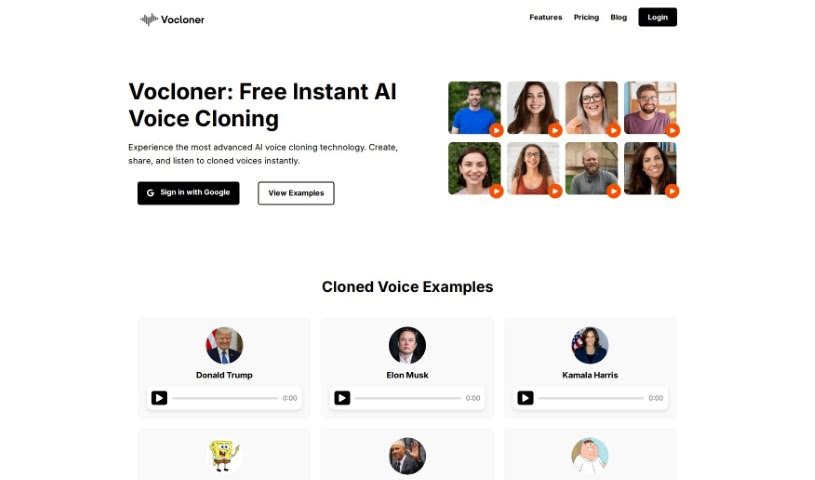
Screenshot of Vocloner

Vocloner

Discover what Vocloner is and how to use it effectively in 2025. We'll explore its features and see how it stacks up against other voice cloning tools.

Screenshot

What Exactly is Vocloner?

Vocloner is a handy online tool that uses AI to clone voices. It is a digital mimic for sound. You give it an audio sample of a voice you want to copy, along with the text you want that voice to say, and it creates a new audio file. It’s pretty versatile, supporting many languages and built on powerful open-source tech like Coqui AI’s XTTS. Before you dive in, you’ll need to agree to their licenses, which is standard practice. The best part? It’s free to use, and they even offer an embeddable demo so you can try it out right on your own website before committing to anything bigger.

Who’s Behind Vocloner?

Coqui AI is the team that brought Vocloner to life, using their own open-source XTTS tool as the engine. They launched it back on March 2, 2023. What’s great about Vocloner is how easy it is to use, how quickly it processes things, and its support for multiple languages. You get your cloned voice back fast! The tool runs on LiteSpeed Web Server, and yes, you’ll need to accept the associated licenses before you start cloning. It’s a free tool available in two versions: the classic one and a more recent one that uses XTTS for a wider range of voice replication.

What Can You Actually Do with Vocloner?

Vocloner is fantastic for a variety of tasks:

  • Language Support: It handles multiple languages, making it super flexible.
  • Voice Recreation: You can recreate virtually any voice from a simple audio sample.
  • Voice Cloning: It’s designed for voice cloning across many different languages.
  • User-Friendly: The interface is really easy to navigate.
  • Efficient Processing: It handles voice processing quickly.
  • Try Before You Buy (Sort Of): An embeddable demo lets you test it out easily.
  • XTTS Synthesis: It uses XTTS for its voice cloning capabilities.
  • Simple Input: All you need is an audio file and the text you want spoken.
  • Speed: Voices can be cloned in just seconds.
  • Free to Use: It’s a completely free tool for voice cloning.
  • Text-to-Speech: You can clone voices using text you provide.
  • Multi-Language Cloning: It supports cloning voices in many languages.
  • Quick Cloning: Get your cloned voices in a matter of seconds.
  • Quality Matters: For the best results, use clear, high-quality audio files.
  • English & Beyond: You can use Vocloner for both English and non-English languages.
  • Easy Workflow: Just upload an audio file and type the text for cloning.
  • License Agreement: Remember to agree to the licenses before you start.
  • Demo Access: The ‘embeddable demo’ is a great way to get a feel for it.
  • Open Source Power: It’s a free tool powered by open-source technology.
  • Voice Replication: Recreate voices from audio samples.
  • Text Synthesis: Synthesize text you input into a cloned voice.
  • Coqui AI’s XTTS: It uses XTTS by Coqui AI for its cloning.
  • Legal & Privacy: You can find the privacy policy and user agreements on their official website.
  • Demo Availability: The embeddable demo is available for trying out.
  • Cost-Free: It’s a free tool you can use for voice cloning.
  • Global Language Support: Clone voices in both English and other languages.

Who Should Use Vocloner?

Vocloner is a great tool for:

  • Voice Actors
  • Language Learners
  • Podcasters
  • Audiobook narrators
  • Content creators

How Do I Use Vocloner?

Using Vocloner is pretty straightforward. Here’s a simple guide to get you started:

  1. Get to Vocloner: First, head over to the Vocloner website or open the application on your device.
  2. Log In or Sign Up: If you’ve used it before, just log in. If not, signing up is quick – you’ll just need to provide some basic info.
  3. Add Your Content: Upload the text or document you want to work with. This is what Vocloner will process.
  4. Pick Your Cloning Options: Vocloner offers different ways to clone or modify text. Choose the options that best fit what you need, like paraphrasing or summarizing.
  5. Adjust Settings: You can customize things like how closely it checks for plagiarism, the writing style, or the desired word count.
  6. Start Cloning: Hit the button to begin the cloning process. Let Vocloner do its thing!
  • Review and Tweak: Once it’s done, take a good look at the generated text. Make sure it’s accurate and flows well. Edit anything that needs adjusting.
  • Save or Export: You can save your work directly within Vocloner or export it to your computer in a format you prefer.
  • Share Your Thoughts: Giving feedback helps Vocloner get even better. Let them know what you think!
  • Explore More: Check out the advanced features Vocloner offers. They can really boost your cloning experience, like AI-powered rewriting tools.

Following these steps should help you make the most of Vocloner for all your cloning, rewriting, and text generation needs.

Related AI Tools

Discover more tools in similar categories that might interest you

Stay Updated with AI Tools

Get weekly updates on the latest AI tools, trends, and insights delivered to your inbox

Join 25,000+ AI enthusiasts. No spam, unsubscribe anytime.