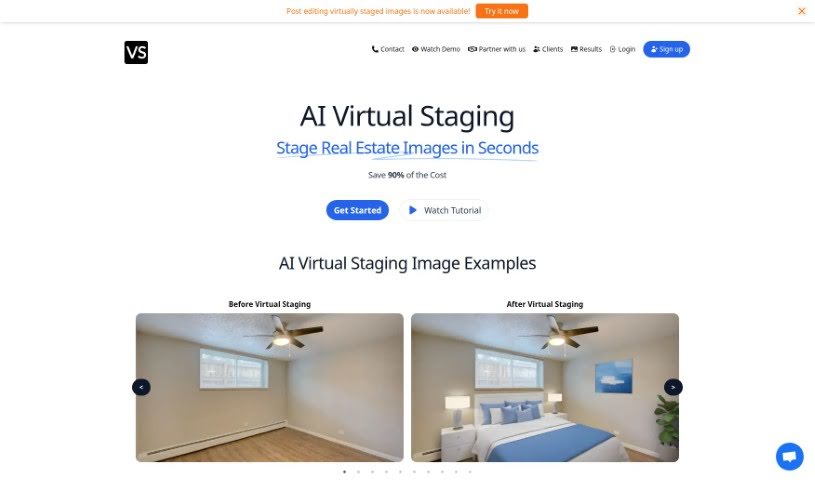
Screenshot of Virtual Staging Art

Virtual Staging Art

Discover Virtual Staging Art in 2025! Learn what it is, how to use it effectively, explore its features, and see how it stacks up against other photo editors.

Screenshot

What Exactly is Virtual Staging Art?

Virtual Staging Art is a really smart tool that lets you quickly stage real estate photos. You just upload high-quality pictures of empty rooms, pick out the furniture styles you like, and the AI does the rest. It’s pretty amazing how fast it generates these staged images – it can save you up to 90% of the cost you’d normally spend on physical staging or having someone manually edit photos in programs like Photoshop. You can easily send in your images and then tweak the staging as many times as you need until it looks just right. Real estate pros trust Virtual Staging Art because it’s a budget-friendly and time-saving way to make properties look their absolute best for potential buyers.

Here are some of the standout features of Virtual Staging Art:

  1. Super Quick Staging: You can get your real estate images staged in mere seconds, which really cuts down on the time and effort involved.
  2. Lots of Furniture Choices: You’re not limited to just one look; there’s a wide variety of furniture styles available, so you can match the property’s vibe perfectly.
  3. Big Cost Savings: This option is much more affordable, helping you save around 90% compared to what you’d typically pay for staging.
  4. Great Quality Images: The AI software is designed to produce high-quality staged photos, ensuring your presentations look professional and appealing.
  5. Redo for Perfection: If you’re not quite happy with the first try, you can regenerate the images multiple times. This gives you the freedom to fine-tune everything until it’s exactly how you want it.

We’ve heard from professionals who use Virtual Staging Art, and they consistently talk about how effective it is and the real financial benefits they’ve seen. Photographers, real estate brokers, and property managers have all noticed big improvements in how they stage properties since using VirtualStaging.art. They often mention how fast it is, how much money it saves, and the flexibility it offers. People really appreciate how easy it is to use and the time-saving aspects, making it a truly valuable tool in their respective fields.

Who’s Behind Virtual Staging Art?

AI Virtual Staging was developed by the same team that runs VirtualStaging.art. They’ve created a really innovative way to stage real estate photos in just seconds. The platform gives you a huge selection of furniture styles to choose from, and you can customize and regenerate images as much as you like, which helps you save up to 90% on costs compared to traditional staging. Real estate professionals rely on this AI-powered tool because it’s so efficient and cost-effective for showing off properties.

What Can You Do with Virtual Staging Art?

  • Stage real estate photos in just seconds.
  • Pick from all sorts of furniture styles to furnish empty rooms.
  • Save about 90% of the cost you’d normally spend on physical staging or manual virtual staging.
  • Quickly and efficiently create high-quality staged images.
  • Regenerate images multiple times to get them just perfect.
  • It’s a budget-friendly way to make properties look great and attract buyers.
  • Real estate agents use it a lot for marketing properties.
  • You get a wide range of furniture styles to match different tastes.
  • It helps you visualize properties better with modern, traditional, and minimalist looks.
  • It’s a fast, accurate, and affordable solution for your real estate listings.

Who Should Use Virtual Staging Art?

  • Real estate brokers
  • Photographers
  • Property managers
  • Asset managers

How Do You Use Virtual Staging Art?

AI Virtual Staging is designed to be super user-friendly, making it easy to stage your real estate images in seconds. Here’s a simple, step-by-step guide to get you started:

  1. Upload Your Image: First, upload a high-quality photo of an empty room. It should be in JPG, JPEG, or PNG format.
  2. Pick a Style: Choose the furniture style you like best from the options provided to stage the room.
  3. Submit It: Just click the “Submit” button to start the staging process. The AI software will then take about 30 seconds to generate the staged images for you.
  4. Regenerate if Needed: If you want to make further adjustments, you can regenerate the images multiple times until you achieve exactly the look you’re going for. This feature is great for fine-tuning the staging to perfection.

By following these easy steps, you can effortlessly create professionally staged images that look fantastic and are much more affordable than traditional staging methods. This guide offers a quick and efficient way to really make your properties shine, attract potential buyers, and boost your real estate marketing efforts with the help of AI Virtual Staging technology.

Related AI Tools

Discover more tools in similar categories that might interest you

123RF AI Image Generator

Creative Image Generation
Learn More

Stay Updated with AI Tools

Get weekly updates on the latest AI tools, trends, and insights delivered to your inbox

Join 25,000+ AI enthusiasts. No spam, unsubscribe anytime.