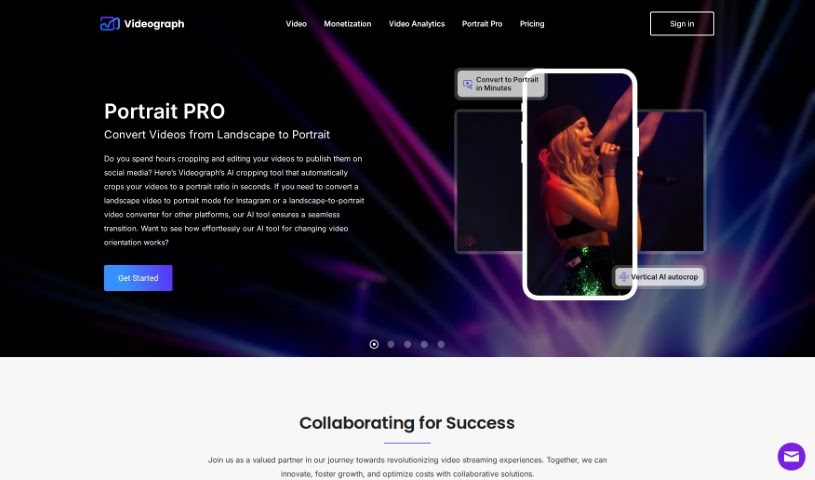
What is Videograph?
Videograph is a digital asset management platform that offers a really dynamic solution for all your video streaming needs. It’s packed with features like high-quality live streaming that has very little delay, SSAI for smoothly inserting ads into Free-Ad-Supported TV channels, and the ability to create video clips in real-time. Plus, it gives you video analytics to help you make the most money from your content. Videograph also makes processing video files super fast thanks to its transcoding engine, letting you publish live and on-demand videos in just minutes. You can easily integrate videos into your apps using its APIs, which means you can publish them instantly across all sorts of platforms and screens. You’ll be able to track how your videos are performing and how people are engaging with them without needing any extra integrations. You can keep an eye on your content live, and get detailed viewership data no matter the device or platform. Videograph also offers a really user-friendly platform for managing your videos, complete with fast video encoding and worldwide edge delivery.
Who created Videograph?
Videograph was developed by a company that really knows its stuff when it comes to Digital Asset Management for video content. This platform comes with features like 4K transcoding, content tagging, and thorough video analytics to really boost your content strategy. It provides APIs that let you seamlessly integrate videos into your applications, with a strong focus on live streaming, video processing, and overall management. The company is all about working with partners to come up with new ideas and make video streaming experiences even better.
Unfortunately, the specific founder of Videograph isn’t mentioned in the information we have.
What is Videograph used for?
- Live Streaming: Enjoy live streams with latency as low as 4 seconds.
- SSAI for Ads: Insert ads into Free-Ad-Supported TV Channels.
- Real-time Clips: Create video clips from live streams instantly.
- Video Analytics: Get insights to better position your content and ads.
- API Integration: Seamlessly integrate videos into your applications using Videograph APIs.
- Performance Tracking: Monitor video performance without needing extra integrations.
- Easy Management: Upload, deliver, and manage videos easily with a user-friendly platform.
- AI Portrait PRO: Enhance your viewing experience by converting landscape videos to portrait using AI. This helps optimize content for different platforms.
- Content Optimization: Convert videos to suit various platforms.
- Creator Tools: Empower content creators and social media influencers with advanced AI cropping technology.
- On-Demand & Live Streams: Integrate videos into applications seamlessly using Videograph APIs for both on-demand and live content.
- Detailed Tracking: Track video performance without integrations. Monitor content in real-time, see engagement data by geo-location, find popular videos, and understand viewership across all devices, apps, players, and operating systems.
- User-Friendly Platform: Use the platform to upload, deliver, and manage videos with ease.
- Faster Encoding: Experience quicker video encoding thanks to Videograph’s advanced infrastructure.
- AI-Powered Cropping: Use AI-Based Portrait PRO to convert landscape videos to portrait format. It intelligently identifies subjects for accurate cropping.
- Digital Asset Management: Elevate your video experience with comprehensive digital asset management.
- High-Quality Streaming: Enjoy high-quality live streaming with minimal latency.
- FAST Channel Ads: Insert ads into Free-Ad-Supported TV (FAST) Channels.
- Social Media Clips: Create real-time video clips from live streams for easy sharing on social media.
- Monetization Insights: Analyze viewership patterns to optimize content and maximize revenue.
- Real-time Monitoring: Track content engagement in real-time, including geo-location data and popular videos.
- Cross-Platform Viewership: Understand viewership across devices, applications, players, and operating systems.
- Efficient Management: Upload, deliver, and manage videos effortlessly using the user-friendly platform.
- Transcoding & Streaming: Enhance your video transcoding and streaming experience.
- AI for Portrait: Use AI-Based Portrait PRO to convert landscape videos to portrait format using advanced AI technology.
- Scalable Infrastructure: Benefit from a robust and scalable infrastructure for 100X faster encoding and global delivery.
- Content & Ad Placement: Create engaging video experiences by optimizing content positioning and ad placement.
- Advanced Features: Incorporate dynamic video streaming solutions with 4K transcoding, content tagging, and Dolby Audio enhancements.
- Revenue Generation: Create new revenue streams by inserting ads into Free-Ad-Supported TV (FAST) Channels.
- Live Stream Publishing: Easily publish video clips from live streams directly to social media.
Who is Videograph for?
- Content creators
- Social media influencers
How to use Videograph?
Here’s how you can use Videograph:
- Ingest / Upload:
- Upload your video files. You can do this via a URL, direct upload, or RTMP input. It supports various formats like .mp4, .mov, .m4v, and .mpg.
- Processing:
- Your video files get processed super fast – 100X faster, actually – using the transcoding engine. This means you can publish live and on-demand videos quickly.
- Streaming:
- Stream your content instantly to multiple devices and formats, no matter where you are. You can even make the streaming experience better by adding subtitles, thumbnail previews, and more.
- Managing:
- Use Videograph APIs for both on-demand video and live streams. Publishing videos to different platforms and screens is a breeze with the provided SDKs and device clients.
- Video Analytics:
- Dive into viewership patterns to fine-tune your content and maximize your earnings. Track how users engage and which videos are most popular across various platforms, devices, applications, and even locations.
- User-Friendly Platform:
- Work with the user-friendly platform alongside the Video APIs for simple video upload, delivery, and management. You can do everything smoothly without needing extra API calls.
- Enhanced Features:
- Videograph makes video transcoding easier, improves streaming experiences, and offers scalable transcoding solutions. You’ll enjoy faster video encoding and worldwide edge delivery.
- AI-Based Portrait PRO:
- Use the AI-Based Portrait PRO tool to effortlessly convert landscape videos into a portrait ratio. This tool accurately identifies subjects, ensuring a visually appealing portrait layout without losing any essential content.
By following these steps and making the most of Videograph’s features, you can efficiently manage and optimize your video content for all sorts of platforms and audiences.