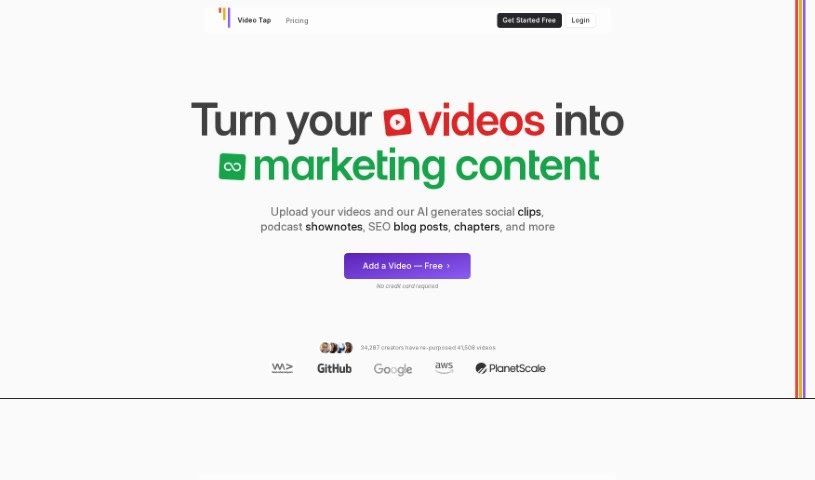
Screenshot of Video Tap

Video Tap

Discover Video Tap in 2025! Learn what this AI tool does, how to use its features for content marketing, and how it stacks up against other tools.

Screenshot

What is Video Tap?

Video Tap is a platform that uses AI to turn your existing video content into all sorts of new formats – think blog posts, short clips, summaries, and more. It’s designed to be super easy to use, whether you’re a seasoned pro or just starting out in content creation. You can even try out tools like the YouTube Chapters Generator and YouTube Summarizer for free! Because it’s powered by AI, Video Tap lets you repurpose your videos really effectively, saving you a ton of time and effort. Basically, it makes turning videos into different kinds of content much simpler. It’s a great option for digital marketers, content creators, and social media influencers who want to get the most out of their video libraries.

Who created Video Tap?

Video Tap was developed by a team that includes Kai Magaldi and Aaron Francis. Kai is a coach specializing in personal branding, and Aaron is an educator at PlanetScale. This platform, which is known for its AI-driven ability to transform videos into various content formats, has received great feedback. People appreciate how easy it is to use and its innovative features, like the YouTube Chapters Generator and YouTube Summarizer. The service is really designed to help content creators make the most of their video content, efficiently and effectively.

What is Video Tap used for?

  • Transform Videos into New Content: Use AI to turn your existing videos into blog posts, short clips, summaries, and other formats.
  • Generate Various Content Types: Easily create blog posts, short clips, summaries, and more directly from your videos.
  • User-Friendly for Everyone: It’s built with a simple interface, making it perfect for both professionals and beginners.
  • Free Tools Available: You can access helpful tools like the YouTube Chapters Generator and YouTube Summarizer at no cost.
  • Try Before You Buy: Get started with 3 free videos without needing a credit card.
  • Effortless Repurposing: Repurpose your video content easily with AI assistance.
  • Boost Your Marketing: Content is optimized for SEO and social media sharing to help your marketing efforts.
  • Diverse Content Output: Generate a wide range of content, including blog posts, short clips, descriptions, summaries, tags, chapters, and tweets.
  • Save Time & Effort: Significantly cuts down the time and effort needed to repurpose videos into written content.
  • High-Quality Blog Posts: Helps you turn your video recordings into excellent blog posts.
  • Streamline Editing: Simplifies the editing process for your video content.
  • Multiple Formats with AI: Transform existing videos into many different content formats using AI.
  • Content Variety: Create blog posts, short clips, and summaries from your videos.
  • Free Starter Tools: Access the YouTube Chapters Generator and YouTube Summarizer for free.
  • No Credit Card Needed: Start with 3 free videos without any commitment.
  • Multilingual Support: Works with many languages, including English, Spanish, French, German, Italian, Dutch, Russian, Chinese, Japanese, and Korean.
  • SEO & Social Media Ready: Generated content is optimized for search engines and social media sharing.
  • Intuitive Interface: Features a simple and easy-to-navigate UI for smooth content creation.
  • Quick Written Content: Lets creators quickly get written content by repurposing YouTube videos.
  • Less Time on Repurposing: Reduces the time you spend turning video content into blog posts.
  • Effortless Content Multiplication: Repurpose video content into multiple formats with ease.
  • Maximize Video Value: Get the most from your video content by turning it into various marketing formats.
  • Streamlined Creation: Simplifies the content creation process to help you reach a wider audience.
  • Create Blog Posts, Chapters, Tweets & More: Generate various content types from your uploaded videos.
  • Save Time on Written Content: Efficiently save time when repurposing video into written content.
  • Boost Video Marketing: Improve your marketing by repurposing existing video content.
  • AI-Powered Format Transformation: Use AI to turn existing video content into new formats like blog posts, short clips, and summaries.
  • Content Generation Variety: Generate diverse content like blog posts, short clips, summaries, and more from videos.
  • Free Videos, No Card: Get started with 3 free videos without needing a credit card.
  • Effortless Repurposing for Creators: Repurpose video content effortlessly for digital marketers, content creators, and social media influencers.
  • Reach More People: Empowers creators to reach a larger audience without needing extra time or resources for new content.
  • Speed Up Written Content: Speeds up the process of creating written content from YouTube videos.
  • Save Time on Blog Posts: Helps you save valuable time when turning video content into blog posts.
  • AI for Multiple Formats: Transform existing videos into multiple content formats like blog posts, short clips, and summaries using AI.
  • User-Friendly for All: Designed for both professionals and beginners with an easy-to-use interface.
  • Multilingual Capabilities: Supports many languages, including English, Spanish, French, German, Italian, and others.
  • Fast Content Generation: Generate content within minutes of uploading a video.
  • Monthly Processing Minutes: Plans include a set number of video processing minutes per month, with extra charges for exceeding.
  • Data Privacy Focused: Handles data privacy seriously, securely storing videos and generated content.
  • SEO & Social Media Optimization: Focuses on content creation with content optimized for SEO and social media sharing.
  • Enhance Marketing: Improves your marketing efforts.
  • Create Short Clips: Make short video clips from podcast interviews.
  • Engaging Social Clips: Generate engaging clips for social media sharing.
  • Produce Blog Content: Create content for blog posts.
  • Promote Offers: Promote upcoming courses and offers.
  • Improve SEO: Improve SEO with generated content.
  • Summarize Videos: Create summaries of videos.
  • Generate Chapters & Blogs: Generate chapters and blog posts.
  • Multiply Content Easily: Multiply your content effortlessly.

Who is Video Tap for?

  • Digital marketers
  • Content creators
  • Social media influencers

How to use Video Tap?

Here’s how to get the most out of Video Tap:

  1. Sign Up and Log In: First, register for a Video Tap account on their website and then log in to access the platform.
  2. Upload Your Video: Once you’re logged in, upload the video content you want to transform. Video Tap uses AI to turn it into new formats like blog posts, short clips, and summaries.
  3. Choose Your Content Format: Decide what kind of content you want to create from your video. You can pick from options like blog posts, short clips, or summaries.
  4. Use the Free Tools: Make sure to take advantage of the free tools available, such as the YouTube Chapters Generator and YouTube Summarizer. They can really help your content creation process.
  5. Review Your Generated Content: Before you publish anything, take a moment to preview and review the content on your dashboard. You can edit it and make any changes needed before you finalize it.
  6. Understand Your Subscription: Get familiar with how the subscription plans work. They give you a set number of video processing minutes each month. Keep in mind that you might be charged extra if you go over your included minutes.
  7. Data Privacy Matters: Video Tap takes data privacy seriously. They make sure your videos and the content they generate are stored securely and aren’t shared with anyone else.
  8. Explore Language Options: Video Tap supports content generation in many languages, including English, Spanish, French, German, Italian, and others.
  9. Get Customer Support: If you have any questions, don’t hesitate to reach out to Video Tap’s customer support. They’re known for being responsive and helpful with user questions.

By following these steps, you can really use Video Tap’s AI capabilities to repurpose your video content into different formats and make your content creation process much smoother and more effective.

Related AI Tools

Discover more tools in similar categories that might interest you

Stay Updated with AI Tools

Get weekly updates on the latest AI tools, trends, and insights delivered to your inbox

Join 25,000+ AI enthusiasts. No spam, unsubscribe anytime.