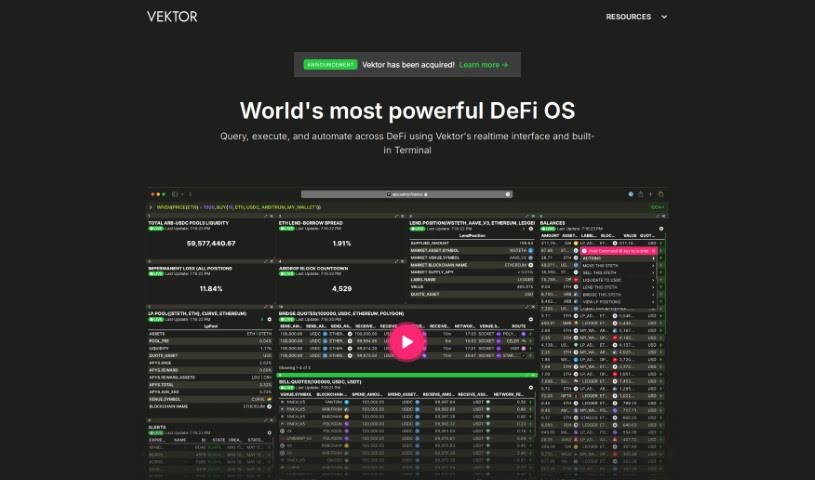
Screenshot of Vektor

Vektor

Discover what Vektor is and how to use it effectively in 2025. We'll explore its features and see how it stacks up against other investing tools.

Screenshot

What Exactly is Vektor?

Vektor is a tool built for Decentralized Finance (DeFi) that offers a really easy-to-use interface. It’s designed for professionals working in areas like hedge funds, treasuries, and service providers. The goal here is to give them powerful features without needing to learn complex coding languages like Solidity or hire a whole engineering team to build custom systems. With Vektor, people can easily manage their assets across different blockchains, compare different investment opportunities, set up alerts for important events, and safely make transactions in the DeFi world. Think of it like using a spreadsheet for familiar operations, but with much more detailed control over how you set up your workspace and keep an eye on key performance indicators (KPIs).

What’s more, Vektor really focuses on keeping your transactions non-custodial, meaning you always hold your keys. It also provides clear breakdowns of every transaction and integrates directly with hardware wallets, which adds a significant layer of security when you’re dealing with DeFi.

Who’s Behind Vektor?

Vektor was launched on June 14, 2024, by a founder who prefers to remain anonymous. The company behind Vektor is dedicated to creating DeFi tools specifically for professional users, including hedge funds and treasuries. They’ve built an interface that’s meant to be as straightforward as using Excel, yet as capable as Python. The Vektor Execution Language, or VXL™ for short, is what lets users tap into these powerful functions. It allows them to carry out complex DeFi transactions without needing deep blockchain knowledge or a dedicated engineering team.

What Can You Do with Vektor?

Vektor is incredibly versatile, helping you with a wide range of DeFi activities:

  • Data Extraction: Pulling out the information you need.
  • Liquidity Provision (LP): Contributing assets to DeFi pools.
  • Lending & Borrowing: Engaging in DeFi lending and borrowing markets.
  • Buying & Selling: Executing trades for various assets.
  • Setting Alerts: Creating custom notifications for specific conditions.
  • Managing Balances: Keeping track of your asset holdings.
  • Cross-chain Transaction Execution: Making transactions across different blockchains seamlessly.
  • Building Custom Workspaces: Tailoring your view and tools.
  • Comparing Opportunities: Evaluating different investment options side-by-side.
  • Managing Assets: Handling your digital assets effectively.
  • Creating Alerts: Setting up notifications for market movements or other events.
  • Extracting Data: Gathering specific data points for analysis.
  • Cross-chain Execution: Performing actions across multiple blockchains.
  • Professionals’ DeFi Tool: Designed specifically for those in the professional finance space.
  • Control User Permissions: Managing who can do what within your workspace.
  • Transparent Transaction Breakdown: Seeing exactly what happens in each transaction.
  • LP (Liquidity Provision): Providing liquidity to decentralized exchanges.
  • LEND & BORROW: Participating in lending and borrowing protocols.
  • BUY & SELL: Executing trades on various DeFi platforms.
  • ALERT: Setting up custom alerts.
  • BALANCES: Checking your asset holdings.
  • GET: Retrieving specific data.
  • DeFi control via functions, arguments, and options: Managing your DeFi activities with precise controls.
  • Data superpowers with cross-chain DeFi data queries: Accessing and analyzing data from across the DeFi ecosystem.
  • Vektor Execution Language (VXLâ„¢) for professionals: A specialized language for powerful DeFi operations.
  • Peace-of-mind DeFi transactions: Conducting transactions with confidence and security.
  • Cross-chain DeFi data queries: Gathering data from multiple blockchains.
  • Built for professionals - DeFi tool for hedge funds, treasuries, service providers: Tailored for institutional and professional use.
  • Transact on DeFi safely: Making secure transactions on decentralized platforms.
  • Execution of powerful composable strategies: Building and running complex, interconnected DeFi strategies.
  • Creating custom workspaces: Personalizing your interface and tools.
  • Adding or removing liquidity from pools: Managing your contributions to DeFi liquidity.
  • Borrowing and lending assets: Participating in DeFi lending markets.
  • Getting trade quotes from various platforms: Comparing prices across different exchanges.
  • Setting alerts based on conditional statements: Receiving notifications when specific criteria are met.
  • Listing assets and creating balance reports: Tracking your portfolio and holdings.
  • Extracting and processing data points: Gathering and analyzing specific pieces of information.
  • Managing fragmented assets and cross-chain addresses: Handling assets spread across different blockchains.
  • Transacting on DeFi platforms safely: Ensuring secure operations on decentralized finance platforms.

Who is Vektor Designed For?

Vektor is ideal for:

  • Hedge funds: Managing complex portfolios and strategies.
  • Treasuries: Handling digital assets and cash management.
  • Service providers: Offering DeFi solutions to clients.
  • Institutions with sophisticated needs: Any organization requiring advanced DeFi capabilities.

How Do I Use Vektor?

Getting started with Vektor is straightforward. Here’s a breakdown of the key steps:

  1. Leverage Functions: Vektor works using specific functions like LP (Liquidity Provision), LEND/BORROW, BUY/SELL, ALERT, and BALANCES. These functions are designed to help you build strategies and set up your workspace efficiently, without needing to be a coding expert.
  2. Gain DeFi Control: You can achieve advanced control over your decentralized finance activities. Use functions, arguments, and options for things like LP to provide liquidity, LEND & BORROW to check market rates, and BUY & SELL to execute trades across various supported pools and blockchains.
  3. Manage Alerts and Balances: You can write your own conditional statements with custom logic using the ALERT function. Keep an eye on your asset balances with BALANCES, and retrieve various data points using the GET function for real-time monitoring.
  4. Execute Multi-Chain Transactions: Vektor makes it easy to execute transactions across different venues and blockchains. Its standardized interface gives you aggregated data access and transaction capabilities, so you don’t have to juggle multiple browser tabs.
  5. Perform Cross-Chain Queries: Use Vektor’s data querying features to pull information from various chains and platforms. You can then compute custom metrics, monitor them on dashboards, or even set up automated actions based on the data.
  6. Utilize VXL Language: The Vektor Execution Language (VXL™) simplifies how you interact with transaction capabilities. It’s designed to be accessible, much like using Excel, but offers powerful features that rival Python for complex tasks.
  7. Ensure Safety and Privacy: Vektor prioritizes your security with a non-custodial approach, meaning you always maintain control of your private keys and assets. Features like support for institutional custodians, hardware wallet integrations, and user permission controls further enhance the safety of your DeFi transactions.

Overall, Vektor’s user-friendly interface, robust functions, multi-chain capabilities, and strong focus on user control and security make it a really valuable tool for anyone working professionally in DeFi. By following these steps, you can start using Vektor effectively to support your financial strategies.

Related AI Tools

Discover more tools in similar categories that might interest you

Stay Updated with AI Tools

Get weekly updates on the latest AI tools, trends, and insights delivered to your inbox

Join 25,000+ AI enthusiasts. No spam, unsubscribe anytime.