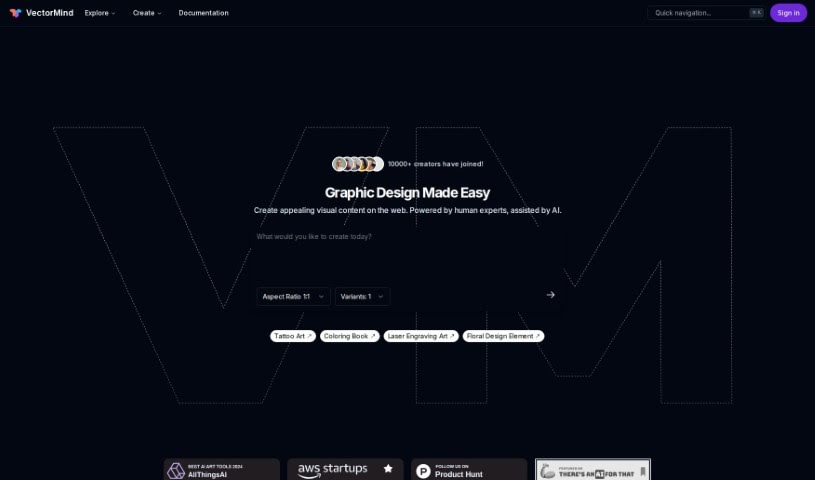
Screenshot of Vectormind

Vectormind

Discover what Vectormind is and learn how to use it effectively in 2025. We'll explore its features and see how it stacks up against other Image Generators.

Screenshot

What is Vectormind?

Vectormind is a company focused on generative AI specifically for vector graphics. They’ve developed an AI Vector Graphic Generator that lets you create high-quality vector assets really fast, just by typing in a text description. Their advanced AI engine is designed to quickly produce all sorts of art styles – think vector illustrations, abstract pieces, watercolor designs, or even simple hand-drawn doodles. Plus, they offer a handy Prompt Template Library with pre-made templates for different art styles to give your creativity a boost. You can also browse collections of vector graphics created by other users, making it easier to find the resources you need.

Who created Vectormind?

Vectormind was founded by an individual who prefers to remain anonymous. It officially launched on February 26, 2024. The company’s main focus is generative AI for vector graphics, and their tool is built to help users create high-quality vector graphic assets in a flash.

What is Vectormind used for?

  • Creating intricate and eye-catching vector graphics in mere seconds.
  • Turning your text descriptions into detailed vector images quickly and smoothly.
  • Generating a wide range of art styles, including abstract designs, doodles, and watercolor effects.
  • Discovering new graphic ideas by browsing collections shared by the community.
  • Downloading your finished assets in both PNG and SVG formats.
  • Using the generated graphics for your personal projects or for commercial purposes.
  • Ensuring your graphics work well with web development projects and are compatible with 3D printing tools.
  • Accessing a library filled with prompt templates for various art styles to inspire your creations.
  • Customizing AI models to fit specific enterprise needs.
  • Scaling up enterprise solutions with AI models that are tailored to your business.
  • It helps create complex and visually appealing vector graphics in seconds.
  • It transforms text descriptions into rich vector images quickly and efficiently.
  • The tool generates vector graphics swiftly.
  • It automates many graphic design processes.
  • It supports web development tools.
  • It supports graphic design tools.
  • It supports 3D printing tools.
  • It provides personalized AI design solutions for enterprises.
  • It offers a vast library of prompt templates for various art styles.
  • You can download assets in PNG and SVG formats.
  • You can create stunning vector graphic assets in seconds.
  • You can craft your ideas into high-quality, memorable designs.
  • You can generate vector graphics directly from text descriptions.
  • You can explore diverse art styles like abstract, doodles, and watercolor.
  • You can browse community-driven vector graphic collections.
  • You can download assets in PNG and SVG formats.
  • You can use the graphics for both personal and commercial projects.
  • The graphics are compatible with web development and 3D printing tools.
  • You can customize AI models for enterprise-specific needs.
  • There’s a clear, step-by-step process for generating vector images.
  • You can use the graphics for personal and commercial projects.
  • You can create vector graphics from text descriptions.
  • You can generate diverse art styles like abstract, doodles, and watercolor.
  • You can explore community-driven graphic collections.
  • You can access preset templates.
  • There’s a straightforward, step-by-step process for creating vector images.
  • You can search for assets using keywords, prompt templates, or tags.

Who is Vectormind for?

  • Graphic Designers
  • Illustrators
  • Marketing Professionals
  • Web Developers
  • Advertising Specialists
  • Content Creators
  • Social Media Managers
  • Game Designers
  • Art Directors
  • Product Designers

How to use Vectormind?

Using Vectormind to create your vector graphics is pretty straightforward. Here’s how you do it:

  1. Start by picking a template from the library, or if you prefer, you can create your very own prompt template.
  2. Next, type in a text description that clearly explains the graphic you want to create.
  3. Just hit Enter, and the AI app will whip up a vector graphic image based on your descriptions and the prompt template you chose, all in a matter of seconds.

Vectormind comes with some great features to help you out:

  • AI Vector Graphic Generator: This is the core engine. You can use it to create virtually any vector graphic image simply by entering text descriptions.
  • Prompt Template Library: Here, you can choose from a variety of prompt templates designed for different art styles, such as vector illustration, abstract art, watercolor, or hand-drawn doodles.
  • Discoverable Graphic Collections: You can explore vector graphic collections created by the community. Just search for assets using keywords, prompt templates, or tags to find what you need.

With these easy-to-follow steps and helpful features, Vectormind offers a smooth and efficient way to generate high-quality vector graphics.

Related AI Tools

Discover more tools in similar categories that might interest you

123RF AI Image Generator

Creative Image Generation
Learn More

Stay Updated with AI Tools

Get weekly updates on the latest AI tools, trends, and insights delivered to your inbox

Join 25,000+ AI enthusiasts. No spam, unsubscribe anytime.