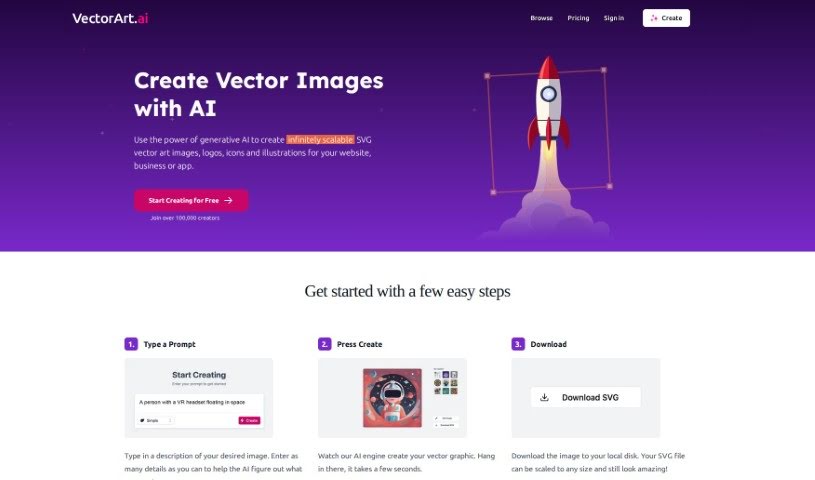
Screenshot of Vectorart

Vectorart

Discover what Vector Art is and how to use it effectively in 2025. We'll explore its features and compare it to other image generators.

Screenshot

What is Vector Art?

VectorArt.ai is a platform that uses AI to create scalable vector images, logos, and illustrations. It is a smart tool that turns your descriptions into custom SVG and PNG images. You can guide the AI using text prompts or even by uploading a sketch. It offers a variety of illustration styles, and the images you create are yours to use for commercial purposes without worrying about royalties. Plus, there’s a handy library of existing AI-generated images if you need some inspiration or want to use something ready-made.

Who Created Vector Art?

Vectorart.ai first launched on December 4, 2023. While the founders’ identities aren’t public, the company’s main focus is on using generative AI to create scalable vector images, logos, and illustrations. Essentially, you describe what you want, and the platform uses AI to generate custom SVG and PNG images based on your prompts.

What is Vector Art Used For?

VectorArt.ai is great for a variety of design needs:

  • Creating vector images that can be resized infinitely without losing quality.
  • Generating scalable graphics for any project.
  • Customizing logos and illustrations to perfectly match your brand or vision.
  • Processing detailed descriptions to bring your ideas to life.
  • Supporting popular file formats like SVG and PNG.
  • Making custom SVG images specifically for your needs.
  • Using Text-to-Image prompts to describe your vision.
  • Using Sketch-to-Image prompts to turn your drawings into polished graphics.
  • Exploring multiple illustration styles to find the perfect look.
  • Producing business graphics for marketing and presentations.
  • Crafting custom SVG images for websites or apps.
  • Generating logos and illustrations for branding.
  • Exploring a wide range of illustration styles.
  • Downloading images in SVG vector format, which is super flexible.
  • Creating royalty-free images that you can use freely.
  • Making business graphics that look professional.
  • Supporting commercial use without needing to ask for permission or give credit.
  • Accessing premium features through a subscription for more advanced options.
  • Helping with app design requirements by providing custom graphics.
  • Designing custom icons for apps.
  • Generating images for commercial use.
  • Scalable image creation for any size requirement.
  • Business graphics creation for professional use.
  • Scalable image creation for flexible design.
  • Guided image generation that makes the process easy.
  • Custom illustration creation tailored to your specific needs.

Who is Vector Art For?

This tool is a great resource for:

  • Graphic designers
  • Marketers
  • App Designers
  • Logo Designers
  • Illustrators

How to Use Vector Art?

Using VectorArt.ai is pretty straightforward. Here’s how you can get started:

  1. First, type out a detailed description of the image you’re hoping to create. The more detail you give, the better the AI can understand your vision.
  2. Hit the “Create” button. The AI engine will then work its magic to generate your vector graphic.
  3. Once your image is ready, you can download it directly to your computer. Since it’s in SVG format, you can scale it up or down without any loss in quality.
  4. Remember, VectorArt.ai offers features like creating custom SVG images, using text-to-image prompts, sketch-to-image prompts, and a variety of illustration styles.
  5. The images you create are royalty-free for commercial use, and there’s a free gallery available if you need some inspiration or want to use an existing image.
  6. If you need more advanced capabilities or higher usage limits, premium subscription plans are available.
  7. You can cancel your subscription whenever you need to.
  8. The website doesn’t specify the exact cancellation process or conditions, so it’s worth checking their terms.
  9. VectorArt.ai uses generative AI algorithms to interpret your input descriptions and sketches, turning them into customized SVG images and logos.
  10. The tool supports both SVG and PNG file formats for your downloads.
  11. You don’t need any prior knowledge of SVG creation to use VectorArt.ai; it’s designed to simplify the entire image generation process for you.
  12. The platform is highly customizable, letting you input very specific details or sketches to guide the image generation.
  13. Logo generation is also a key feature, with VectorArt.ai creating logos based on your prompts.
  14. Downloading the images you generate typically doesn’t cost extra, unless you’re using premium features that require a subscription.

Related AI Tools

Discover more tools in similar categories that might interest you

123RF AI Image Generator

Creative Image Generation
Learn More

Stay Updated with AI Tools

Get weekly updates on the latest AI tools, trends, and insights delivered to your inbox

Join 25,000+ AI enthusiasts. No spam, unsubscribe anytime.