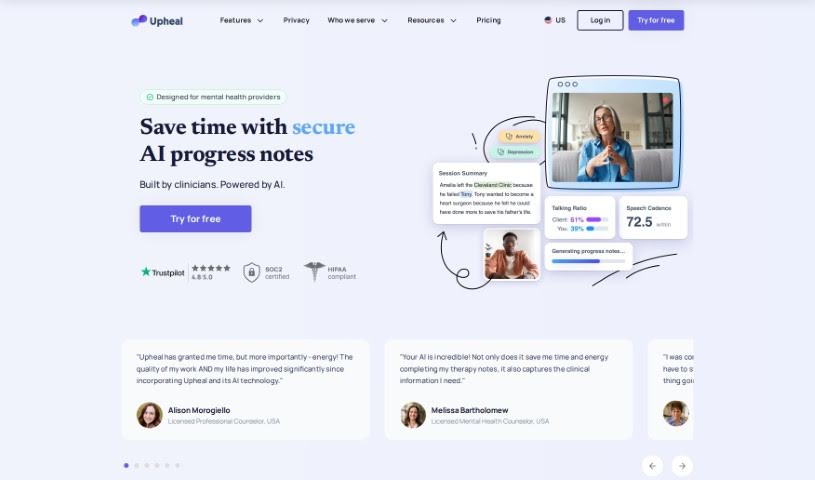
Screenshot of Upheal

Upheal

Discover what Upheal is and how to use it effectively in 2025. We'll explore its features and see how it stacks up against other Doctor's Tools.

Screenshot

What is Upheal?

Upheal is a platform built to help mental health professionals. It is a smart assistant that can generate progress notes, create treatment plans, analyze sessions, manage your schedule, connect with other tools you already use, and handle general practice management. The main idea is to make documentation easier, improve therapy sessions, and keep all your client information safe and private. Upheal’s AI technology works right alongside your therapy sessions, automatically taking notes and providing analytics. This helps make your workflow smoother and can lead to better results for your clients.

Essentially, Upheal is designed to support therapists in their daily work and help them find a better work-life balance through smart automation. It really focuses on making therapists more efficient, improving their personal time, and boosting the quality of their clinical notes. Plus, they’re serious about privacy and security, making sure client information is well-protected.

So, to sum it up, Upheal is a really useful tool for anyone running a mental health practice. It offers AI help for notes and analytics, plus ways to make your workflow run better, so you can spend more time focusing on your clients and improving how therapy works overall.

Who created Upheal?

Upheal was started by a founder with a really forward-thinking idea: to create the very first AI-assisted platform specifically for mental health professionals. This groundbreaking approach cleverly weaves automated note-taking and session analytics directly into therapy sessions. What’s great about this is that it allows therapists to stay fully present and engaged with their clients during conversations. People all over the world, especially licensed professionals, have given it positive feedback, noting how it makes their work-life balance better, improves the quality of their clinical notes, and offers genuinely useful insights into how therapy is progressing.

What is Upheal used for?

Upheal helps with a bunch of things:

  • Notes & Plans: You can create detailed progress notes for therapists and psychiatrists, and also generate treatment plans that include SMART goals.
  • Session Insights: It analyzes session data, offering insights and even a sort of ‘second opinion’ on what’s happening.
  • Scheduling: It makes scheduling sessions and sending reminders much simpler.
  • Integrations: It connects with other tools you likely already use, like Google Calendar and Zoom.
  • Practice Management: It supports managing your practice, whether you’re a solo practitioner or part of a larger group or organization.
  • Security & Privacy: It’s built to handle data securely and privately, making sure it complies with important regulations like HIPAA, PHIPA, PIPEDA, and GDPR.
  • Video Calls: It offers encrypted video calls for secure client communication.
  • Time Savings: It helps mental health professionals save time by generating notes automatically.
  • Versatile Support: It supports therapy in many different formats and languages.
  • Automated Note-Taking: This is a core feature for therapists, psychiatrists, and coaches.
  • EHR & Telehealth: It integrates with Electronic Health Records (EHRs) and telehealth platforms.
  • Various Note Formats: You can get AI therapy notes for all sorts of sessions – in-person, online, from recordings, and more.
  • Client Note Templates: It offers templates for client progress notes, including common formats like SOAP, GIRP, BIRP, DAP, EMDR, MSE, and Intake.
  • SMART Goals: It helps create treatment plans with specific, measurable, achievable, relevant, and time-bound (SMART) goals.
  • Progress Notes & Analytics: Provides comprehensive notes and analytics for therapists and psychiatrists.
  • Smart Session Analytics: Offers detailed session graphs based on things like speech cadence and talking ratio.
  • Scheduling Features: Includes private video calls and the ability to upload recordings.
  • Third-Party Connections: Integrates with tools like Google Calendar and Zoom for scheduling.
  • Group Practice Tools: Supports group practices and larger organizations with features for client management, team reporting, and training.
  • Secure Cloud: It’s a secure and private platform built on modern cloud infrastructure.
  • Compliance: It adheres to HIPAA, PHIPA, PIPEDA, and GDPR guidelines.
  • Consent Management: Handles secure consent collection and storage.

Who is Upheal for?

Upheal is a great tool for:

  • Therapists
  • Psychiatrists
  • Coaches
  • Social workers
  • Psychologists

How to use Upheal?

Here’s a simple guide to getting started with Upheal:

  1. Sign Up: First, create your account on the Upheal platform.
  2. Create Treatment Plans: You can start by creating client treatment plans with SMART goals and objectives really easily – often with just a click!
  3. Use AI Progress Notes: Take advantage of the AI progress notes feature, which comes with templates like SOAP, DAP, Intake, GIRP, BIRP, and EMDR.
  4. Analyze Sessions: Use the smart session analytics. They give you detailed graphs based on things like how fast someone speaks and their talking ratio during a session.
  5. Schedule Securely: You can schedule private video calls or upload recordings securely. The platform is HIPAA-compliant, which is important for privacy.
  6. Connect Your Tools: Make your experience even better by integrating with third-party tools like Google Calendar and Zoom for easier scheduling.
  7. Manage Your Practice: Use the tools provided to manage your practice efficiently. This includes features for client management, team reporting, training, supervision, collecting consent, and setting up privacy policies.
  8. Ensure Data Security: Upheal uses modern cloud infrastructure to keep your data safe. It also complies with important regulations like HIPAA, PHIPA, PIPEDA, GDPR, and SOC 2 Type II.
  9. Manage Your Subscription: If you need to cancel or change your subscription, just contact support through the Upheal app. You can also update your payment method by reaching out to support.
  10. For Larger Organizations: If you’re part of a larger organization or enterprise, Upheal offers API integration and customization options to fit your specific needs.

Related AI Tools

Discover more tools in similar categories that might interest you

Stay Updated with AI Tools

Get weekly updates on the latest AI tools, trends, and insights delivered to your inbox

Join 25,000+ AI enthusiasts. No spam, unsubscribe anytime.