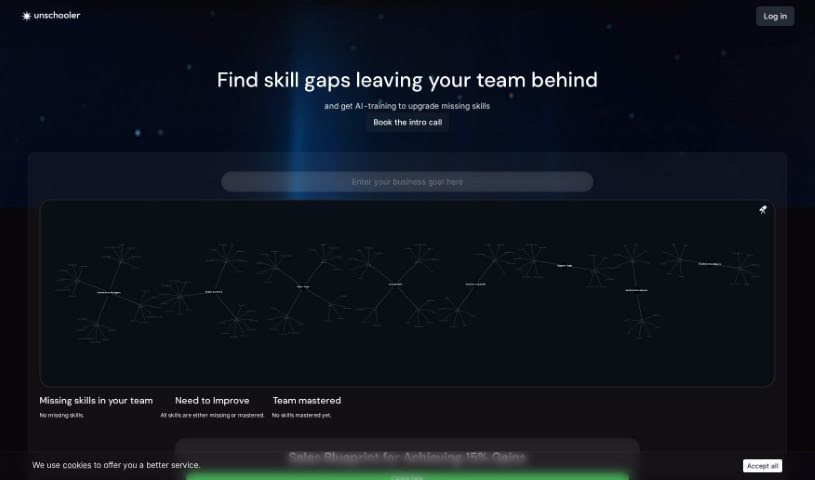
Screenshot of Unschooler

Unschooler

Discover what Unschooler is and how to use it effectively in 2025. We'll explore its features and see how it stacks up against other Teacher Tools.

Screenshot

What is Unschooler?

Unschooler is a smart platform that uses AI to help you create educational courses really fast. You can take your articles, YouTube channel, or even your website and turn them into complete courses. These courses come with quizzes, hands-on tasks, and assessments to really help students learn. Unschooler is great at organizing all sorts of learning materials – think videos, diagrams, pictures, and illustrations – into a clear, step-by-step system designed to guide students toward their learning goals. On top of that, Unschooler offers cool features like interactive quizzes, custom learning plans, strong data privacy, insights into career paths, and tools for both educators and students to work together. Basically, it’s built to save educators time, give students a more personal learning experience, and help students find careers that fit their skills and interests.

Who created Unschooler?

Lena is the founder behind Unschooler. Her company focuses on AI-powered video courses, specifically designed to help people achieve their career goals. They offer services for creating educational content to individuals, colleges, and universities all over the world. Unschooler’s platform makes it efficient to transform things like articles, YouTube channels, or websites into structured, step-by-step courses. They really emphasize personalization, keeping your data private, and matching students with careers based on how they perform, aiming to completely change how we learn.

What is Unschooler used for?

  • Create Courses Easily: You can generate courses complete with educational videos for any topic you can think of.
  • Share Your Courses: Build school environments and easily embed your courses into other platforms for your students.
  • Transform Your Content: Turn your articles, YouTube channels, or websites into detailed, step-by-step courses that include quizzes and practical tasks.
  • Personalize Learning: Define exactly what students should learn and how they’ll be assessed to create a unique, tailored curriculum.
  • AI-Powered Interaction: Let students engage directly with the courses, ask questions, and get helpful feedback from the AI.
  • Track Progress: Create interactive quizzes to test students’ skills and easily monitor their progress over time.
  • Save Time: Cut down on course creation time dramatically; the AI can generate a full course in just minutes.
  • Personalized Learning Experience: Students can communicate with the course content for a truly individualized learning journey.
  • Focus on Teaching: Let the AI handle routine tasks so you can concentrate on your students’ development.
  • Collaborate: Easily share materials with colleagues and students to foster a collaborative learning environment.
  • Teach and Learn with AI: Generate courses with educational videos for any question you have.
  • AI LMS for Institutions: Create schools, embed courses, and share them with students, or even sell them.
  • Turn Knowledge into a System: Build educational content like videos, quizzes, and tasks that guide students toward their specific goals.
  • Personalized Curriculum: Specify learning outcomes and assessments for a unique curriculum and content.
  • Interactive Quizzes and Skill Testing: Create quizzes to test students’ skills, collect results, and track their progress.
  • Career Matching: Gain insights into students’ skills and interests to help match them with potential careers.
  • Speed and Time Savings: Create courses quickly, saving time by automating course creation tasks.
  • Collaborative Learning: Share materials with colleagues and students for collaborative education.
  • Data Privacy: Your data is kept private; the AI doesn’t train on your data, sell it, or use it for ads.
  • Free Trial and Demo: Educators can try it out with a free trial and live demo.
  • Rapid Course Creation: Go from months of work to just minutes for course creation.
  • Embeddable Courses: Easily embed courses into platforms used by colleges and universities.
  • Content Conversion: Turn articles, YouTube channels, or websites into step-by-step courses.
  • Skill Testing Quizzes: Generate interactive quizzes to test students’ skills.
  • Career Insights: Reveal insights about students’ skills and interests for career matching.
  • Time Savings & Focus: Save time and focus on students’ progress instead of administrative tasks.
  • Shared Learning Space: Offer a shared space for materials for colleagues and students.
  • Private AI Training: Ensure data privacy with AI that doesn’t train on user data.
  • Career Guidance: Help students find their dream careers based on their skills and test performance.

Who is Unschooler for?

  • Educators
  • Content creators
  • Students
  • Institutions
  • Instructors
  • Training professionals
  • Academic institutions
  • College and University Institutions

How to use Unschooler?

Here’s a simple guide to using Unschooler effectively:

  1. Bring Your Content In: Start by turning your articles, YouTube channel, or website into structured courses. Just add your topic, text, link, video, or channel to get going.
  2. Set Your Goals: Clearly define what you want students to learn and how you’ll assess them. This helps create a personalized curriculum and content that really fits your educational aims.
  3. Add Quizzes: Generate interactive quizzes to test your students’ skills. You can collect their results and easily keep track of how they’re progressing.
  4. Encourage Interaction: Get students involved by letting them interact with the course. They can ask questions, request more info, and get feedback directly from the AI.
  5. Gain Insights: Unschooler offers insights into what students know and what they’re interested in. You can use this information to help match them with careers that suit them.
  6. Be Efficient: Save yourself a lot of time by creating courses in just minutes. Simply add your YouTube channel or paste your learning objectives, and the AI will build the whole course for your students.
  7. Work Together: Collaborate smoothly with colleagues and students by sharing a common space for all your course materials.
  8. Trust Your Privacy: Unschooler takes data privacy seriously. We don’t train on your data, sell it, or use it for ads. Plus, you can delete your data whenever you want.
  9. Guide Careers: Use the career matching feature to give students valuable insights based on what they’ve learned and how they performed on tests. This helps them figure out their ideal career path.

By following these steps, you can really make the most of Unschooler to create learning experiences that are both engaging and personalized for your students, all while making the course creation process much smoother.

If you’d like to see it in action, you can book a quick 15-minute demo to explore Unschooler further and start a 14-day free trial for your educational institution.

Remember, Unschooler is all about AI-powered video courses designed for individual career goals, ensuring a thorough and efficient learning experience for everyone involved.

Related AI Tools

Discover more tools in similar categories that might interest you

Academic Help Free Essay Generator

Education Academic Writing
Learn More

Stay Updated with AI Tools

Get weekly updates on the latest AI tools, trends, and insights delivered to your inbox

Join 25,000+ AI enthusiasts. No spam, unsubscribe anytime.