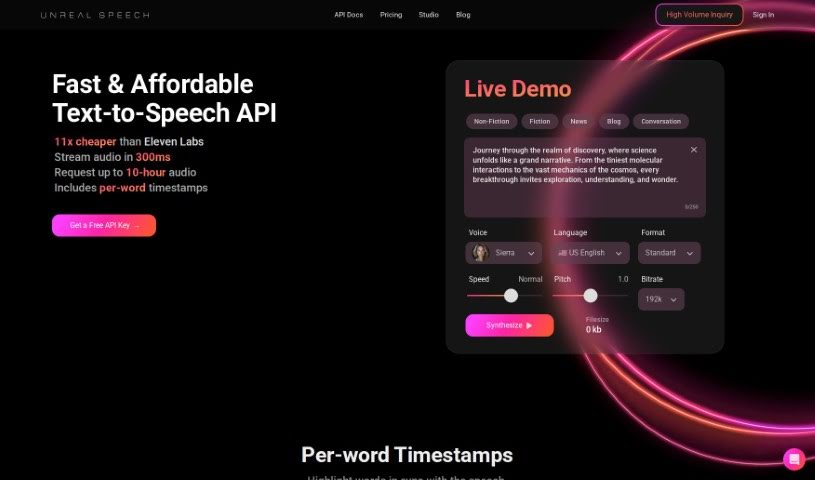
What is Unreal Speech?
Unreal Speech is a text-to-speech API solution that really stands out for being affordable. Compared to big names like Eleven Labs, Play.ht, Amazon, Microsoft, and Google, it offers a much better price point. You can convert up to 500,000 characters – that’s about 10 hours of audio – in just 15 minutes. Plus, they make it easy to manage your subscription, join their affiliate program, and use the audio you create for commercial purposes. They have different plans that adjust based on how many characters you need and how much audio you want to generate. Basically, Unreal Speech is known for delivering quality and being a budget-friendly way to get text-to-speech.
Who created Unreal Speech?
Oleg Kornienko is the entrepreneur behind Unreal Speech. His company provides a budget-friendly text-to-speech API that significantly cuts down costs when you compare it to services from Amazon, Microsoft, and Google. What really makes Unreal Speech special is its affordability – you can save up to 95%! This makes it a fantastic option if you need to process a lot of text-to-speech.
What is Unreal Speech used for?
- Creating podcasts
- Powering virtual assistants
- Building Interactive Voice Response (IVR) Systems
- Supporting language translation services
- It’s a cost-effective text-to-speech API solution.
- It helps reduce expenses by up to 95% compared to competitors.
- You get a 4x cost advantage over industry giants like Amazon, Microsoft, and Google.
- It can convert up to 500 characters in just 0.3 seconds.
- You can convert up to 500,000 characters in 15 minutes.
- You can use the audio generated with Unreal Speech commercially.
- Voice cloning is currently in development.
- Multilingual voice support is expected within the next 3-6 months.
- There’s an affiliate program offering a 15% recurring commission on all paid referrals.
- Volume discounts are available based on your usage.
- You can manage commercial audio generation.
- You can earn through affiliate program referrals.
- You can update your payment method easily.
- You can cancel subscriptions when needed.
- Additional usage charges are handled clearly.
- Voice support is currently in English, with multilingual options coming in 3-6 months.
- It offers a cheap text-to-speech cost compared to competitors.
- Audio generation is fast – think 10 hours of audio in 15 minutes.
- It’s a cost-effective API solution.
- It’s great for online customer service chatbots.
- It serves as accessibility tools for the visually impaired.
- It’s used on e-learning platforms for speech synthesis.
- It’s ideal for audiobook narration.
- It’s perfect for video game character dialogues.
- It works with voice-controlled smart home devices.
- You can use the generated audio commercially.
- It helps reduce expenses compared to competitors.
- It’s a high-quality text-to-speech solution.
- It’s a budget-friendly text-to-speech option.
- It converts up to 500,000 characters in 15 minutes.
- Multilingual voice support is in development.
- Custom voice creation is in progress.
- Volume discounts are available for additional usage.
- It handles high volumes of text-to-speech processing.
Who is Unreal Speech for?
- Developers
- Professionals working with voice technology
- API Developers
- Tech professionals
- Anyone interested in text-to-speech
- Content creators
- E-Learning professionals
- Marketers
- Game Designers
How to use Unreal Speech?
Using Unreal Speech is pretty straightforward. Here’s how you can get started:
- First, sign up for an account on the Unreal Speech website. Once you’re in, grab your free API key.
- You’ll use the
/stream API endpoint to create your text-to-speech audio. Just send a POST request with the details you need, like the ‘Text’ you want to convert, the ‘VoiceId’ you prefer, ‘Bitrate’, ‘Speed’, ‘Pitch’, and ‘Codec’.
- The response you get will be the audio. You can save it using the code snippet they provide.
- If you need to know the exact timing for words or sentences, use the
/speech or /synthesisTasks endpoint. Just set the TimestampType to either ‘word’ or ‘sentence’. This will give you a JSON file with all the word timings.
- You can then use this timestamp data for all sorts of applications.
- Need more info? Check out the FAQ section on their website. It covers voice languages, custom voices, and billing details.
- Make sure to look at the different subscription plans Unreal Speech offers. They have options based on how much you’ll use it, with character limits per month ranging from basic to enterprise levels.
- It’s also good to be aware of their policies regarding any unused characters at the end of the month and how you can use the audio commercially.
- You can easily manage your subscription, update your payment details, or cancel your subscription right from your Dashboard.
Overall, Unreal Speech offers affordable text-to-speech services with competitive pricing and efficient API use, making it a really practical choice for many different text-to-speech needs.