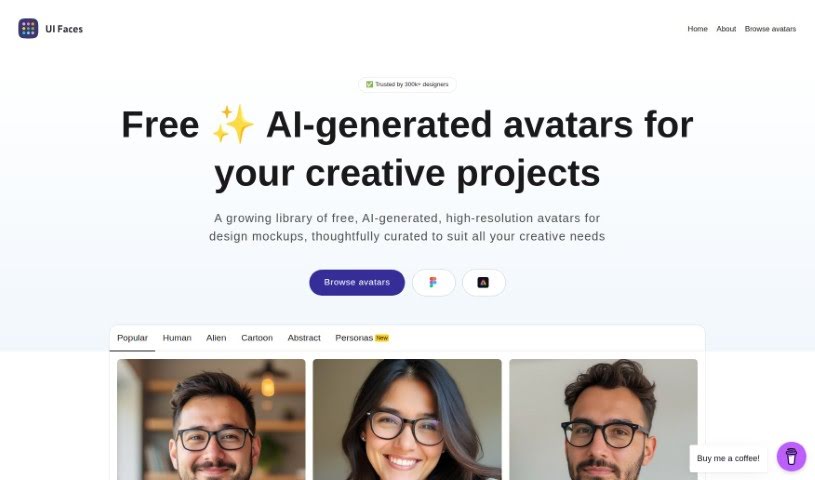
Screenshot of UI Faces

UI Faces

Discover UI Faces, a fantastic resource for free, AI-generated avatars. Learn how to use it in 2025, explore its features, and see how it stacks up against other avatar makers.

Screenshot

What is UI Faces?

UI Faces is a really useful platform that gives you a huge collection of free avatars. These aren’t just any avatars; they’re generated by AI and are designed to make your creative projects look much better. They’re high-resolution, too, and carefully chosen to represent all sorts of people. This makes them perfect for design mockups, helping you bring your ideas to life. Plus, there’s a handy Figma plugin that lets you pop these avatars right into your designs. It’s great for both professional designers and anyone working on personal stuff.

Who created UI Faces?

Mighty Alex started UI Faces back in 2017. It began as a web app that pulled images from stock photo sites. The project really took off, leading to a partnership with Adobe. Together, they created the UI Faces plugin for Adobe XD. The project kept growing, and eventually, they developed plugins for Sketch, Adobe XD, and Figma, with AI-generated avatars becoming a main feature.

What is UI Faces used for?

  • It makes designs look more realistic.
  • It adds that perfect finishing touch to creative projects.
  • You can bring concepts to life with a huge variety of faces.
  • It helps you find avatars that match any demographic you need.
  • It speeds up your work by letting you use avatars right in your design tools.
  • You get to use a library of avatars that’s been carefully put together.
  • It makes adding avatars to your designs much simpler.
  • You can easily find the right avatar for your specific project needs, no fuss.
  • It helps elevate your creative work with high-resolution avatars.
  • It’s a trusted resource for professional designers and personal projects alike.
  • It’s ideal for both professional designers and those working on personal projects.
  • It’s a versatile tool for design mockups.
  • You’ll find thoughtfully curated faces to match any demographic.
  • It’s trusted by a large community of designers.
  • You get access to a wide range of free, AI-generated avatars.
  • The avatars are premium quality and high-resolution.
  • You can easily find the perfect avatar using curated categories.
  • It streamlines your workflow by letting you use avatars directly in Figma.
  • It helps you organize avatars for specific project needs.
  • You can add variety to your design mockups.
  • It’s a versatile resource for design concepts.
  • The avatars are tailored to match any demographic.
  • It’s beneficial for professional designers.
  • It’s also beneficial for individuals working on personal projects.
  • Over 200,000 designers trust it.
  • You get access to high-resolution avatars.
  • It helps improve design mockups.
  • It simplifies adding avatars directly into designs.
  • It’s beneficial for both professional designers and personal projects.
  • You can curate faces to match any demographic.
  • You can access a wide range of free, AI-generated avatars.
  • It provides high-resolution, premium quality avatars.
  • It enhances the realism of designs.
  • It simplifies workflow with Figma plugin integration.
  • You can access a wide range of avatars for free.
  • The avatars are high-resolution, perfect for sharp projects.
  • There are curated categories for easy selection.
  • It adds a perfect touch to creative projects.
  • You can thoughtfully match faces to any demographic.
  • You benefit from a Figma plugin for incorporating avatars.
  • It’s a go-to place for elevating creative work.
  • It enhances the realism of designs.
  • You can organize avatars for specific project needs.
  • It adds a touch of creativity to designs.
  • It streamlines workflow by directly incorporating avatars into designs.
  • It’s suitable for professional designers and personal projects.

Who is UI Faces for?

  • Professional designers
  • Developers
  • Designers who use Sketch, Adobe XD, or Figma
  • Designers
  • Designers
  • Creative professionals

How to use UI Faces?

Here’s how to make the most of UI Faces:

  1. Access the UI Faces Tool: Head over to the UI Faces website. You’ll find a huge collection of free, AI-generated avatars perfect for all sorts of design projects.
  2. Explore High-Resolution Avatars: Check out the high-quality avatars. They really boost the realism in your design mockups, and there are tons of different faces to match various demographics.
  3. Find the Perfect Fit: You’ll love how organized the avatars are. It makes it super easy to find exactly what you need for your project without any hassle.
  4. Utilize Figma Plugin Integration: Want to make things even simpler? Use the Figma plugin to add avatars straight into your designs. It really streamlines your workflow.
  5. Top Features: You’ll appreciate that it’s trusted by over 200,000 designers, offers free AI-generated avatars, has high-resolution quality, curated categories for easy picking, and that great Figma plugin integration.
  6. Price: UI Faces gives you free AI-generated avatars, which is a big help for designers looking to create innovative and visually appealing projects.

By following these simple steps, you can really use UI Faces to make your creative projects shine with unique, high-quality avatars that fit your design needs perfectly.

Related AI Tools

Discover more tools in similar categories that might interest you

123RF AI Image Generator

Creative Image Generation
Learn More

Stay Updated with AI Tools

Get weekly updates on the latest AI tools, trends, and insights delivered to your inbox

Join 25,000+ AI enthusiasts. No spam, unsubscribe anytime.