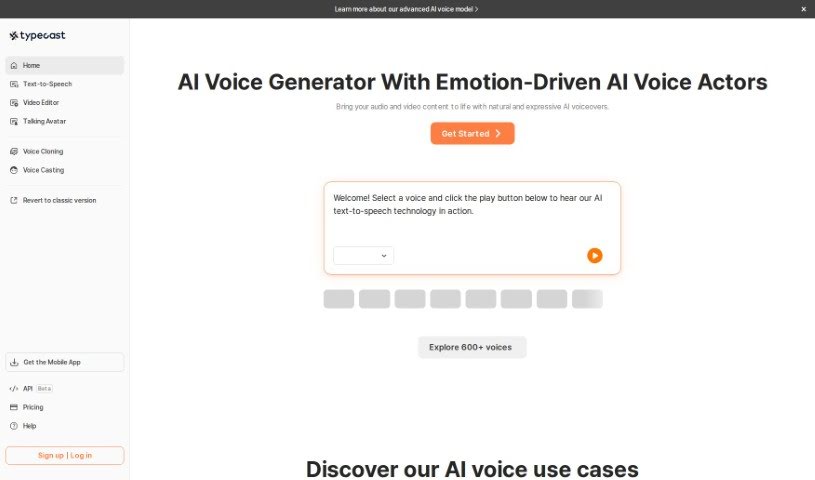
Screenshot of Typecast

Typecast

Discover what Typecast is and how to use it effectively in 2025. We'll explore its features and see how it stacks up against other Voice Generators.

Screenshot

What is Typecast?

Typecast is a really advanced AI speech technology that helps you create incredibly realistic voiceovers. It is a super-smart tool where you can type out text, and it turns it into a voice. What’s cool is you can really tweak the voices – adjust their emotions, how fast they speak, and their overall tone. This makes it perfect for all sorts of content, especially videos for places like YouTube, Instagram, and TikTok. Typecast’s AI is designed to sound exceptionally natural, full of expression, and varied, so you can get just the right feel for whatever you’re creating.

Some of the standout features of Typecast’s AI Voice Generator are:

  • Instant, High-Fidelity Voice Creation: You can generate voice content super fast, with a lot of control over how it sounds.
  • Realistic Human Speech with Emotion: It captures human speech patterns and emotions really well.
  • Effortless Content Creation: Making audio content is straightforward.

Plus, you can even clone your own voice by just recording a few seconds of audio. This lets you create multiple unique voices for different projects. You can then easily combine these custom voice clones with other Typecast tools, like their Text-to-Speech and Voiceover Video features. And if you’re working with videos in different languages, Typecast has you covered with multilingual dubbing. You can dub your videos into languages like English, Korean, Chinese, and Japanese, and get results almost instantly with easy editing options.

Who created Typecast?

Typecast is the brainchild of a company focused on powerful AI speech synthesis technology. It officially launched on October 23, 2021. The founder, Eric F., who also runs a small business, has spoken highly of Typecast, noting how it provides top-notch AI voice actors for all sorts of projects. The company offers a suite of innovative tools, including voice cloning, text-to-speech, and the ability to create voiceover videos. These tools are designed to meet a wide range of needs, whether you’re creating content, audiobooks, or producing videos.

What is Typecast used for?

Here’s a breakdown of what you can do with Typecast:

  • Personalize Your Audio: Instantly create voice content with high accuracy and fine-tuned control.
  • Engaging Text-to-Speech: Use the Text-to-Speech tool to craft captivating audio content in just minutes.
  • Professional Voiceovers: Generate polished, professional-sounding voiceovers specifically for your videos.
  • Easy Audio Creation: Effortlessly produce engaging audio for everything from storytelling and marketing to educational materials.
  • Match Tone and Style: Adjust voice speed and emotion to perfectly complement the tone and style of your video content.
  • On-Demand Regeneration: Need to make a last-minute change? You can regenerate voiceovers whenever you need to.
  • Your Own AI Voice Actor: Clone your voice to create a unique, personal AI voice actor.
  • Streamlined Video Editing: Integrate the AI voice generator directly with your video files for smoother editing.
  • Reach More Audiences: Expand your reach by dubbing your video content into multiple languages using AI voice actors.
  • Refine Content Easily: Access a wide array of multilingual dubbing options and make refinements to your video content with ease.
  • Realistic Video Voiceovers: Generate voiceovers that sound incredibly realistic for your videos.
  • Powerful Video Creation: Produce impactful video content using lifelike AI voices and even avatars.
  • Simple TTS Model: It’s an easy-to-use text-to-speech AI model that supports various tones and emotions.
  • Flexible File Support: Works with various file formats, making voice generation straightforward.
  • Cut Production Costs: Say goodbye to hiring expensive voice-over production teams.
  • Save Time and Money: Significantly reduce the time and cost involved in content creation.
  • Boost Video Content: Enhance your videos with lifelike voices and avatars.
  • Simplify Editing: Make the video content editing process much simpler.
  • High-Quality Downloads: Get high-quality audio downloads suitable for many different uses.
  • Versatile Applications: It’s great for audiobooks, education, gaming, and many other categories.
  • Create Powerful Video Content: Produce compelling video content with realistic AI voices and avatars.
  • Easy Text-to-Speech: A user-friendly text-to-speech AI model that handles different tones and emotions.
  • Broad Category Support: Works well for audiobooks, educational content, and gaming.
  • Customizable Emotions and Tones: Enjoy the ease of use that comes with being able to customize emotions and speaking styles.
  • Engaging Audio, No Actors Needed: Helpful for creating engaging audio and eliminating the need for physical actors.
  • Cost and Time Savings: Saves you time and reduces production costs by offering high-quality audio downloads.
  • Ideal for Professionals: Perfect for businesses, public entities, agencies, and multi-channel networks, offering features like emotion control.
  • Vast Voice Library: Access over 400 hyper-realistic voices with a variety of delivery styles.
  • Expressive Potential: Boost your expressive capabilities through precise control over emotions and speaking styles.
  • Realistic Voiceovers for Videos: Generate voiceovers that sound incredibly realistic for your videos.
  • Easy Text-to-Speech: Convert text to speech easily, with options for different tones and emotions.
  • Supports Many Categories: Works well for audiobooks, education, and gaming.
  • Complements Documentaries: Adds a professional touch to video documentaries.
  • Great for YouTubers and Educators: A fantastic tool for content creators on YouTube and for educational purposes.
  • Boosts Sales and Gaming: Beneficial for sales presentations and gaming content.
  • Aids Content Monetization: Useful for making money from your content.
  • Effortless Mnemonic Control: Helps with memory recall through easy control.
  • Online Story Narration: Perfect for narrating stories online.
  • For New Creators and Students: A great resource for those just starting out or for students.
  • For Professional Creators: Also ideal for experienced content creators.
  • For Businesses and Networks: Suitable for businesses, public entities, agencies, and multi-channel networks (MCNs).
  • Great for YouTubers: Especially useful for YouTube content creators.
  • Great for Gaming: Enhances gaming content with realistic voices.
  • Benefits Educators: A valuable tool for educators.
  • Professional Dialogues: Create high-quality dialogues.
  • Content for New Creators: Supports content creation for beginners and students.
  • Professional Content Creation: Offers professional content creation with features like emotion control, speed control, and flow control.
  • Business Content Creation: Tailor business content with customization options and high-quality audio downloads.
  • Reduces Production Costs: Cuts down on production costs by removing the need for screen recording and post-production editing.
  • Engaging Audio for Presentations: Create engaging audio for presentations and marketing.
  • Voiceovers for YouTube: Generate voiceovers specifically for YouTube videos and other video content.
  • Enhance Storytelling: Improve your storytelling with realistic AI voices and avatars.
  • Training Video Creation: Use text-to-voice templates for creating training videos.
  • Educational Content: Utilize it for educational materials like audiobooks and educational videos.
  • Facilitate Content Monetization: Make money from your content by tailoring emotions and tones effectively.

Who is Typecast for?

Typecast is a versatile tool that can benefit a wide range of professionals:

  • Computer Software Engineers
  • Small Business Owners
  • Civil Engineers
  • Marketers
  • Small Business Founders
  • Information Technology & Services Professionals

How to use Typecast?

Using Typecast is pretty straightforward. Just follow these simple steps:

  1. Get Started: Head over to the Typecast AI Voice Generator online platform.
  2. Add Your Text: You can type your text directly, paste it in, or even import it into the platform.
  3. Pick Your Voice: Choose a character that fits your needs and then set the voice style exactly how you want it.
  4. Generate the Audio: The tool will then process your text and create the audio file based on all your choices.
  5. Download Your Audio: Once the audio is ready, you can download it to use in your videos.
  6. Explore Customization: Dive into the emotional text-to-voice settings, browse the huge library of voice-over actors, and use the easy-to-navigate interface for smooth editing.
  7. Make Your Videos Better: Use the tool for all sorts of projects like storytelling, presentations, product marketing, training videos, and YouTube content. They even have text-to-voice templates for different categories.
  8. Save Time and Money: By using Typecast, you can skip production costs, save valuable time, and create engaging audio without needing to hire actors or book studio time.
  9. Fresh Voices Added: The library of voice-over actors is updated regularly, so you’ll always have new and diverse voices to choose from.
  10. Super User-Friendly Interface: You’ll find the platform incredibly easy to use, with lots of customization options and results that look and sound professional.

Basically, Typecast’s AI Voice Generator makes creating high-quality audio for your videos much simpler. It offers efficient and cost-effective solutions for anyone making content.

Related AI Tools

Discover more tools in similar categories that might interest you

Stay Updated with AI Tools

Get weekly updates on the latest AI tools, trends, and insights delivered to your inbox

Join 25,000+ AI enthusiasts. No spam, unsubscribe anytime.