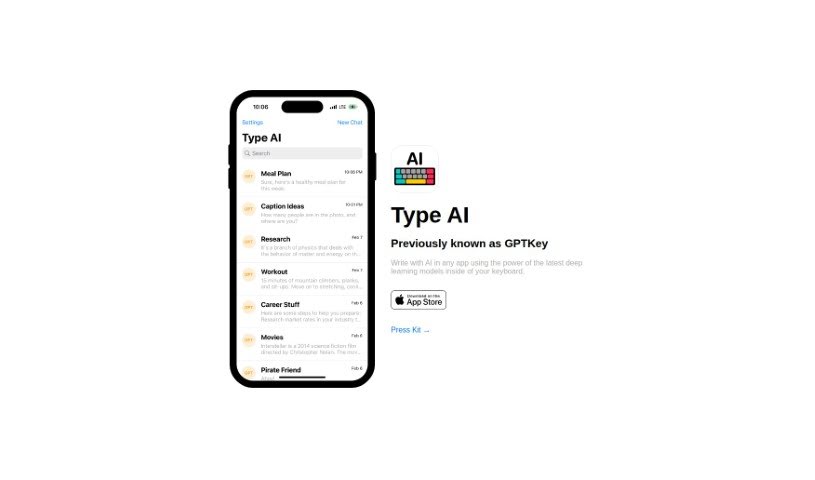
Screenshot of Type AI

Type AI

Discover Type AI, formerly GPTKey, and learn how to use this AI keyboard to boost your writing. We'll cover its features, compare it to other content writing tools, and show you how it can improve your articles, blog posts, and marketing copy.

Screenshot

What is Type AI?

Type AI, which you might know as GPTKey, is a really cool AI keyboard that completely changes how you write, no matter what app you’re using. It packs the latest deep learning models right into your keyboard, offering smart suggestions, auto-corrections, and predictive text that actually understand what you’re trying to say. It’s like having a writing assistant that learns your style – your tone, your favorite words, and what you prefer – and gives you personalized recommendations. Plus, Type AI is fantastic at creating great content for things like articles, blog posts, and marketing copy. Its deep learning models help it churn out engaging, well-written text. It works smoothly with all your favorite apps and platforms, making AI-powered writing super accessible everywhere. The interface is clean and simple, and you can tweak the settings to get just the right amount of AI help. Seriously, Type AI is ushering in a new era of writing, putting the power of deep learning right at your fingertips to make you more productive and accurate.

Who created Type AI?

Type AI, originally called GPTKey, was developed to revolutionize writing by embedding AI directly into the keyboard. The team behind Type AI is focused on using the latest deep learning models to give users smart suggestions, auto-corrections, and predictive text across all sorts of applications. This keyboard actually learns your unique writing style by looking at your past conversations and how you write, so it can offer recommendations that feel truly personal. Type AI also shines when it comes to creating high-quality content for articles, marketing copy, and more, tailoring its output to what you need. It integrates seamlessly with popular apps and platforms, offering a user-friendly experience with settings you can adjust to control how much AI assistance you get.

What is Type AI used for?

  • It makes writing better by offering smart suggestions, auto-corrections, and predictive text that fit the context of your message.
  • It personalizes its recommendations to match your tone, vocabulary, and preferences by learning from your past conversations and writing patterns.
  • It helps you generate high-quality content for articles, blog posts, and marketing copy using its deep learning models.
  • It integrates smoothly with popular apps and platforms, so you can use AI-assisted writing everywhere.
  • You can customize the settings to adjust how much AI assistance you want.
  • It helps create content that’s specifically tailored to your needs by understanding different writing styles.
  • It assists in writing error-free content across many different applications.
  • It puts the power of deep learning models right at your fingertips, offering a whole new way to write.
  • It improves your writing accuracy and helps your unique voice come through.
  • It helps you avoid typos, grammar mistakes, and writer’s block, making you more productive.
  • It enhances your writing experience with intelligent suggestions, auto-corrections, and predictive text based on context.
  • It generates high-quality content for articles, blog posts, and marketing copy using deep learning models.
  • It integrates seamlessly with popular apps and platforms for AI-assisted writing.
  • It provides personalized recommendations based on your individual writing style, tone, and vocabulary.
  • It learns from your past conversations, documents, and writing patterns to adapt to your preferences.
  • It features a clean and minimalistic interface, designed for distraction-free writing.
  • You can customize settings to adjust the level of AI assistance to your liking.
  • It offers writing assistance across various applications on both smartphones and computers.
  • It uses AI technology to minimize typos, grammatical errors, and writer’s block.
  • It brings the power of deep learning models to enhance your writing productivity and quality.
  • It improves your writing experience by providing intelligent suggestions, auto-corrections, and predictive text based on the context of the message.
  • It delivers personalized recommendations by learning from your past conversations, documents, and writing patterns.
  • It generates high-quality content using deep learning models for articles, blog posts, and marketing copy.
  • It integrates seamlessly with popular apps and platforms.
  • It has a user-friendly and intuitive design with a clean and minimalistic interface.
  • It offers customizable settings to adjust the level of AI assistance.
  • It helps you craft compelling, error-free content across various apps and platforms.
  • It brings the power of deep learning models to your fingertips for a new way of writing.
  • It reduces typos, grammatical errors, and writer’s block.
  • It provides AI support for writing across different apps and platforms.
  • It can help you write emails with AI assistance.
  • It supports drafting documents with AI.
  • It helps you chat on social media with predictive text.
  • It generates high-quality content for articles.
  • It assists in creating blog posts with AI.
  • It helps draft marketing copy using deep learning models.
  • It allows you to customize AI assistance levels for your writing.
  • You can access AI features in various applications.
  • You can enjoy AI-assisted writing on both smartphone and computer platforms.
  • It improves your writing experience with intelligent suggestions and auto-corrections.
  • It offers an enhanced writing experience with intelligent suggestions, auto-corrections, and predictive text based on context.
  • It provides personalized recommendations that adapt to your writing style, tone, and vocabulary.
  • It generates high-quality content such as articles, blog posts, and marketing copy using deep learning models.
  • It features a clean and minimalistic interface designed to be user-friendly and intuitive.
  • It has adjustable AI assistance settings to cater to different writing preferences.
  • It reduces typos, grammatical errors, and writer’s block with AI support.
  • It helps you craft compelling, error-free content across various applications and platforms.

Who is Type AI for?

  • Writers
  • Content creators
  • Marketers
  • Anyone in professions like technical writing, or really any job that involves writing!

How to use Type AI?

Here’s how to get started with Type AI:

  1. Installation: First, download and install Type AI from your device’s app store – whether that’s on your smartphone or computer.
  2. Activation: Once it’s installed, you’ll need to activate Type AI as your keyboard input method in your device’s settings.
  3. Usage: Just start typing in any app or platform where you normally would. Type AI will automatically offer intelligent suggestions, auto-corrections, and predictive text based on what you’re writing.
  4. Personalization: Type AI learns your writing style by looking at your past conversations and documents. It adapts to your vocabulary, tone, and preferences to give you recommendations that feel right for you.
  5. Content Generation: You can use Type AI to help create high-quality content like articles, blog posts, or marketing copy. The deep learning models inside Type AI understand different writing styles and can help you create content that’s just right.
  6. Integration: It works smoothly with popular apps and platforms, so you can use AI-assisted writing wherever you go on your device.
  7. Customization: Feel free to adjust Type AI’s settings to your liking. You can customize how much AI assistance you want, from getting suggestions for specific words to having support for every single word you type.
  8. User-Friendly Interface: You’ll appreciate the clean, minimalistic interface that helps you focus on writing without distractions. Type AI is designed to be intuitive and easy to use.
  9. Experience Enhanced Writing: Say goodbye to typos, grammar mistakes, and writer’s block with Type AI. Let this AI keyboard help you craft compelling, error-free content effortlessly.

Give Type AI a try and embrace the next generation of writing technology. It really maximizes the power of deep learning models to make your writing experience better across all your favorite apps and platforms.

Related AI Tools

Discover more tools in similar categories that might interest you

Stay Updated with AI Tools

Get weekly updates on the latest AI tools, trends, and insights delivered to your inbox

Join 25,000+ AI enthusiasts. No spam, unsubscribe anytime.