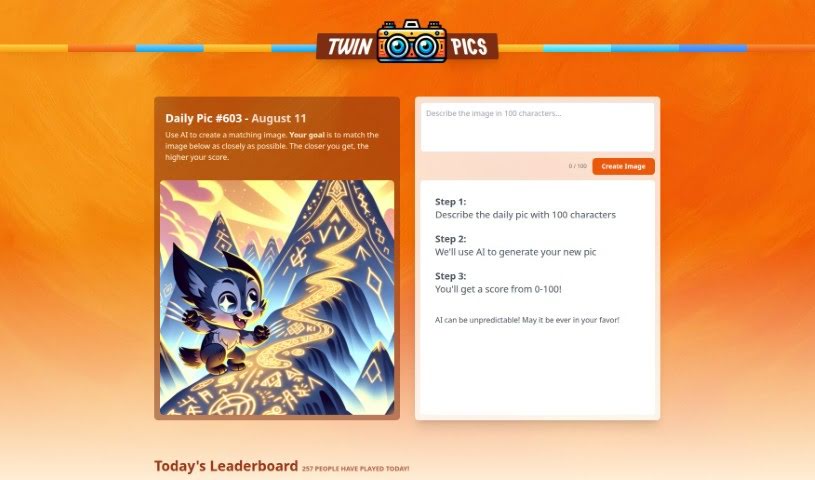
What is Twin Pics?
Twin Pics is a really neat AI tool developed by Chris Sev. It’s designed to help you create images that look a lot like a reference image you provide. How does it work? You simply describe the reference image to the system. Then, it scores your generated image based on how accurately it matches the original. While AI can be a bit unpredictable, so a perfect match isn’t guaranteed, Twin Pics offers a fun, interactive way to play around with AI’s image-making abilities. You’ll find features like daily challenges to test your skills, a leaderboard that shows off the best-scored images, and even some educational bits about how AI works in creative visual fields.
Who created Twin Pics?
Chris Sev launched Twin Pics on January 3, 2024. It’s an AI-based tool that lets users generate images to match a reference image they supply, all by describing it to the system.
What is Twin Pics used for?
Twin Pics is great for a few things:
- Making image creation interactive and engaging.
- Generating images based on descriptions you provide.
- Scoring you on how well your created image matches the reference.
- Challenging you to recreate a specific image.
- Exploring what AI can do in image creation.
- Boosting your creativity with fun image challenges.
- Improving your skills through friendly competition.
- Learning about AI in visual creative fields.
- Building a community around user-generated content.
- Practicing graphic design skills.
- Replicating reference images using AI assistance and your descriptions.
- Getting scored on how accurately your generated image matches the original.
- Showing off your creations and descriptions on the leaderboard.
- Interacting with AI’s capabilities in image creation.
- Engaging in creative tasks with an educational twist.
- Practicing image description for AI-driven graphic design.
- Competing in daily challenges to improve your image recreation skills.
- Highlighting AI’s role in visual creativity through image reproduction.
- Testing your descriptive skills for AI image tasks.
- Sharpening your creative image generation abilities.
- Creating matching images with AI.
- Generating images using short, 100-character descriptions.
- Scoring daily pictures against generated matches.
- Generating images simply by describing them.
- Climbing the daily leaderboard.
- Getting your images scored.
- Celebrating user creativity.
- Offering many artistic applications.
- Providing a structured image challenge.
- Fostering improvement through competition.
- Displaying detailed leaderboard stats.
- Showcasing high-score images.
- Creating images via descriptions.
- Scoring users on image accuracy.
- Offering interactive and engaging image challenges.
- Highlighting user creativity through image generation.
- Encouraging competition and improvement with leaderboard rankings.
- Letting you explore and interact with AI in image creation.
- Educating users on AI functions in visual creative tasks.
- Challenging users to describe images for AI to reproduce.
- Applying AI algorithms to generate images from your input.
- Using it for graphic design practice with AI image creation.
Who is Twin Pics for?
Twin Pics is a great tool for:
- Graphic designers
- Artificial Intelligence researchers
- AI enthusiasts
- Visual creatives
- Anyone curious about AI capabilities
- People interested in image creation and replication tasks
- Artists
- Creatives of all kinds
How to use Twin Pics?
Using Twin Pics is pretty straightforward. Here’s how you can get started:
- Describe the Image: First, you’ll need to give the system a description of the image you want to match.
- Let the AI Work: The system then uses its AI algorithms to generate a graphic based on what you described.
- See Your Score: You’ll get a score that shows how closely your generated image matches the original reference image.
- Try the Daily Challenges: Jump into the ‘image challenge of the day’ to see if you can accurately recreate a specific image.
- Practice Graphic Design: If you’re into graphic design, Twin Pics is a fantastic interactive tool to practice creating images with AI.
- Take the AI Challenge: Use Twin Pics as an AI Challenge to test how well you can describe images for AI to reproduce.
- Get on the Leaderboard: Scoring higher increases your chances of having your image and description featured on the leaderboard.
- Learn About AI: Beyond just being fun, Twin Pics offers educational insights into AI and how it’s used in visual creativity.
Remember, Twin Pics is all about encouraging creativity and experimentation with AI for image generation. It’s an exciting and engaging platform for you to explore your skills in describing and creating images. So, have fun with it, and let your creativity shine with this innovative AI tool!