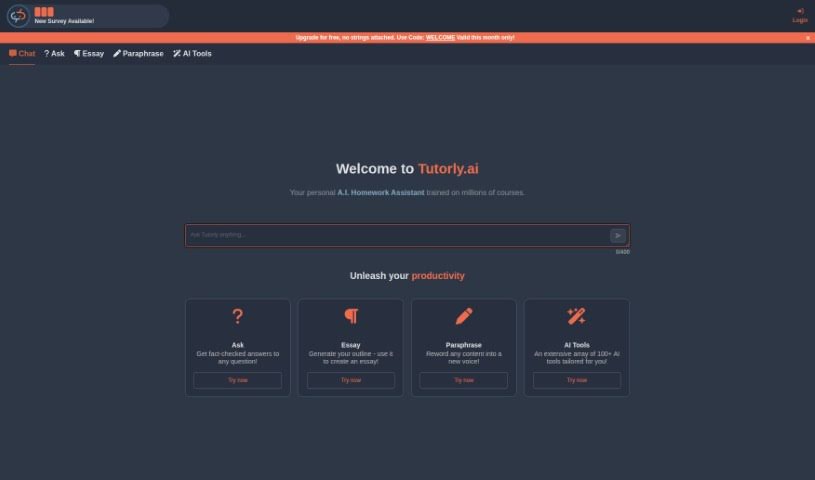
Screenshot of Tutorly

Tutorly

Discover what Tutorly is and how to make the most of it in 2025. We'll walk through its features, compare it to other student tools, and show you exactly how to use it.

Screenshot

What is Tutorly?

Tutorly.ai is a helpful AI tool designed specifically to help students tackle their homework. You can simply paste your questions, assignments, or any prompts right into the app, and it’ll provide you with answers. The platform is pretty versatile, handling different types of questions like multiple choice, short answers, and more. If you’re an elite user, you get access to special features like ‘Explain’ and ‘Show Steps.’ These are fantastic for really digging into the material and making sure you understand it thoroughly. Plus, you can share links with friends or classmates to study together. Just a heads-up, though: Tutorly.ai is still being developed, so it’s always a good idea to double-check the information it gives you. To ask more questions on the platform, you’ll need to register, and you can also choose to upgrade your account for even more benefits. Oh, and there’s a promo code, ‘WELCOME2023,’ that’s good for this month if you’re looking for a discount!

Who created Tutorly?

Tutorly was actually created by a founder who prefers to remain anonymous. It first launched on December 28, 2022. At its core, it’s an AI-powered assistant built to help students with their schoolwork. It can provide answers to questions, help you draft essay outlines, and offers a range of other AI tools aimed at boosting productivity. The platform is designed to handle various question formats, from multiple-choice to short-answer questions. For those who want a deeper dive, it also includes features like ‘Explain’ and ‘Show Steps’ to really clarify the subject matter.

What is Tutorly used for?

Tutorly is a fantastic resource for students, offering a user-friendly interface that makes homework assistance feel like a breeze. It is your one-stop shop for learning! It’s great for getting help with assignments, and it supports all sorts of question formats. You’ll find the ‘Explain’ feature particularly useful for breaking down complex topics, and the ‘Show Steps’ feature is perfect for understanding the process. You can even share links with others to study together. It’s incredibly easy to use – you just paste your questions right in. There’s an Elite Plan available that unlocks even more features, and you can upgrade your account to get the most out of it. The app’s design is interactive, making the learning process more engaging. It really supports a wide variety of question formats, and those ‘Explain’ and ‘Show Steps’ features are invaluable. Plus, the link sharing makes collaboration simple. You can paste questions to get help, and the Elite Plan offers even more. It’s a great way to get fact-checked answers to pretty much any question you have, and it can even help you generate an outline for essay writing or reword content into a new voice. With access to over 100 AI tools, it’s a comprehensive learning companion.

Who is Tutorly for?

Tutorly is a valuable tool for a wide range of people involved in education and learning. Primarily, it’s a fantastic resource for students who need help with their homework. But it’s not just for students; teachers and tutors can also use it to find explanations or create study materials. Educators in general will find it helpful for understanding how AI can support learning. Even professionals who are seeking homework assistance for further education or academic professionals looking for quick answers or outlines will find Tutorly incredibly useful. Essentially, anyone involved in an academic or learning context can benefit from its capabilities.

How to use Tutorly?

Using Tutorly.ai is pretty straightforward, and here’s how you can get the most out of it:

  1. First off, head over to the Tutorly.ai website. Once you’re there, you can either log in if you already have an account or register to create a new one so you can start using all the features.
  2. Next, find the input area on the website and paste whatever homework question, assignment, or prompt you need help with.
  3. If you’re an elite user, definitely take advantage of the ‘Explain’ and ‘Show Steps’ features. They really help you get a much deeper understanding of the material you’re working on.
  4. When Tutorly.ai gives you an answer, it’s always a good practice to quickly check it for accuracy. Remember, fact-checking is encouraged!
  5. Want to study with friends? You can easily share links with other users to collaborate on your learning.
  6. If you’re looking for more advanced capabilities, consider upgrading your account. This will give you access to premium features and other great benefits.
  7. Don’t forget about that promo code! ‘WELCOME2023’ can give you a discount, and it’s valid for the current month.
  8. Just keep in mind that Tutorly.ai is still in its development phase. This means some features might still be a bit limited, so be patient as they continue to improve it.
  9. To make sure Tutorly.ai runs smoothly on your web browser, ensure that JavaScript is enabled.
  10. Lastly, remember that while Tutorly.ai is great at handling different question formats, like multiple choice and short answer, you might run into limits on how many questions you can ask if you haven’t registered yet.

Related AI Tools

Discover more tools in similar categories that might interest you

Academic Help Free Essay Generator

Education Academic Writing
Learn More

Stay Updated with AI Tools

Get weekly updates on the latest AI tools, trends, and insights delivered to your inbox

Join 25,000+ AI enthusiasts. No spam, unsubscribe anytime.