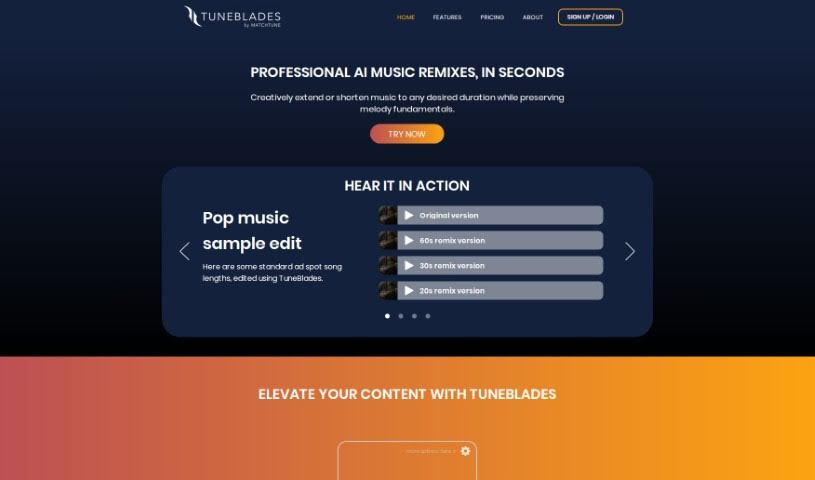
What is TuneBlades?
TuneBlades is a really smart audio editing software from MatchTune. It lets you automatically change the length of songs, remix them, and tweak them, all while keeping the core melody and vocals sounding great. It uses AI to make tasks like resizing audio, remixing tracks, and preserving the original melody and voice incredibly simple. You can choose from different pricing plans: a starter option for just $0.99 per track, an Essential plan at $5.99 per month, or the Advanced plan for $9.99 per month, so there’s something for everyone, whether you’re a hobbyist or a professional music editor.
At its heart, TuneBlades is all about automatically resizing, remixing, and altering songs. The key is that it does this while making sure the fundamental melody and vocal integrity are kept intact. What really makes TuneBlades stand out is how versatile it is. You get smart audio editing, automated resizing, and it even supports various HD audio formats. Plus, it’s super easy to use, works on both MacOS and iOS, and makes enhancing your audio content a breeze for any creator.
So, to sum it up, TuneBlades from MatchTune is a powerful tool that lets you get creative with your music tracks. It uses the latest AI technology to make high-quality edits easy, all while making sure the original feel of the music stays right where it should be.
Who created TuneBlades?
TuneBlades first came out on July 23, 2023. It was actually co-founded by the well-known jazz musician André Manoukian, and Philippe Guillaud, a seasoned entrepreneur, is leading the charge. The company behind TuneBlades is MatchTune Inc. They’re really focused on helping out both independent and commercial artists through their Artist Music Program (AMP) and are working to grow the micro-sync licensing market.
What is TuneBlades used for?
- It’s got a user-friendly interface that’s easy to navigate.
- You can automatically resize songs, and it keeps the core melody sounding just right.
- Remix songs to fit any duration you need, and it maintains the vocal quality.
- It makes adjusting and altering songs feel effortless.
- You can really elevate your content with audio editing powered by AI.
- It helps you quickly change songs to create custom audio content.
- Editing songs with TuneBlades is a very efficient process.
- It supports exporting in various HD audio formats.
- You can creatively make music longer or shorter for whatever you need.
- The interface is designed for ease of use, making song editing simple.
- Uploading songs is a snap – just drag and drop or paste a link.
- It’s available across different platforms.
- It handles automatic audio resizing.
- It’s great for remixing songs.
- You can adjust song duration easily.
- It’s designed to preserve melody fundamentals and vocals.
- Song manipulation is made effortless.
- It’s perfect for tailored audio content generation.
- It offers quick song editing.
- It helps elevate your content.
- You get versatile editing capabilities.
- It supports a range of HD audio formats.
- It ensures vocal preservation when you remix.
- There’s an adjustable song duration feature.
- Uploading is straightforward.
- It supports drag and drop functionality.
- You can use link paste functionality.
- It’s efficient for generating tailored audio content.
- It has a quick song editing capability.
- It maintains the original melody and vocals.
- It allows you to elevate your content.
- It offers automatic audio resizing and remixing.
- You can extend or shorten music to any duration you like.
- It preserves melody fundamentals and voices during editing.
- It provides AI-driven audio editing functionalities.
- It’s a versatile tool for editing all sorts of audio content.
- Uploading music files is easy.
- It supports various high-definition audio formats.
- It’s available on MacOS and iOS.
- You get 10 unique renders before you export your edited audio.
- It automatically resizes songs to any duration you want, keeping the melody and vocals intact.
- You can remix songs using AI technology.
- It lets you alter songs effortlessly.
- It maintains the original melody and vocals during the editing process.
- There are multiple sharing formats available.
- It supports various HD audio formats.
Who is TuneBlades for?
- Music professionals
- Content creators
- Industry professionals
- Music fans
- Music Industry Professionals
- Commercial artists
- Musicians
- Music Editors
- Audio editors
- Music producers
- Audio Engineers
- Creators
How to use TuneBlades?
Using TuneBlades for smart audio editing is pretty straightforward. Just follow these simple steps:
- Upload Music: You can easily upload your music by dragging and dropping files directly into the TuneBlades app, or if you have a link, just paste it in.
- Select Desired Duration: Pick the duration you want for your song. TuneBlades uses AI to rescale any track to your preferred length, and don’t worry, it keeps the melody fundamentals and vocals sounding just as good.
- Choose Render Options: You’ll have 10 unique render options to choose from, letting you customize your audio editing just the way you like it.
- Export Files: Once you’re happy, you can export your edited audio in high-definition formats like .mp3, .wav, or .m4a, ready for sharing.
- Platform Availability: You can access TuneBlades on both MacOS and iOS, making it easy to edit on whatever device you’re using.
- Subscription Plans: If you need more, there are flexible subscription plans like Starter, Essential, or Advanced, which are great for tailored audio content generation based on what you need.
These steps should give you a clear path to using TuneBlades effectively for effortless and professional-sounding audio editing.