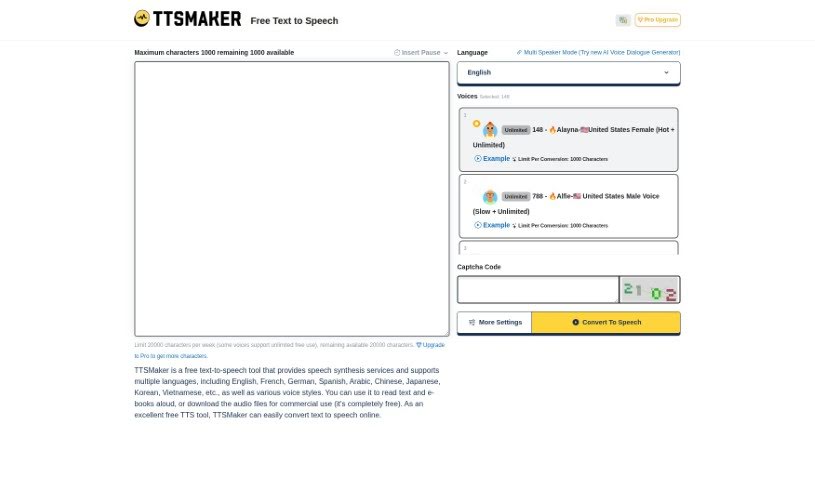
Screenshot of Ttsmaker

Ttsmaker

Discover Ttsmaker, a free online text-to-speech tool. Learn how to use its 200+ AI voices and multiple languages in 2025, and see how it stacks up against other Text To Speech options.

Screenshot

What Exactly is Ttsmaker?

Ttsmaker is a fantastic free online tool that turns text into speech. It boasts over 200 different AI voices across a wide array of languages, including English, French, German, Spanish, Arabic, Chinese, Japanese, Korean, and many more. You can pick from various voice styles to have your text or even your e-books read aloud. Plus, you have the option to download the audio files that are created. The best part? Ttsmaker doesn’t ask for any registration or payment, so you can use it online for free, whenever you need it.

Who’s Behind Ttsmaker?

This handy online text-to-speech tool was created by an individual named Wayne. He’s developed a variety of unique voice options, like Singaporean male and female voices, voices from India, Hong Kong, and even from countries like Canada, New Zealand, Ireland, and the United States. The tool itself offers more than 200 AI voices in numerous languages, and you can use it freely without needing to sign up or pay anything.

What Can You Do with Ttsmaker?

Ttsmaker is incredibly versatile. Here’s a breakdown of what it’s great for:

  • Text to Speech Conversion: Easily convert text into spoken words in many languages, such as English, French, German, Spanish, Arabic, Chinese, Japanese, Korean, Vietnamese, and more.
  • Reading Aloud: Have your text and e-books read aloud using over 200 different AI voices, with various styles to choose from.
  • Audio File Generation: Create synthesized audio files directly from your text input.
  • Commercial Use: You can use the generated audio for commercial purposes without needing to register or pay.
  • Free & Instant Access: Use it directly online, completely free, forever.
  • Multiple Languages: It supports a wide range of languages, including English, French, German, Spanish, Arabic, Chinese, Japanese, Korean, and Vietnamese, among others.
  • Downloadable Audio: You can download the synthesized audio files for your projects.
  • No Barriers to Entry: There’s no registration or payment required, making it accessible for everyone to use online for free, indefinitely.

Who Would Find Ttsmaker Useful?

This tool is a great resource for a wide range of people, including:

  • AI Enthusiasts: Anyone interested in the latest AI voice technology.
  • Content Creators: For generating voiceovers for videos, podcasts, or presentations.
  • Language Learners: To practice pronunciation or listen to texts in a new language.
  • Teachers & Students: For educational materials, audio lessons, or study aids.
  • E-book Readers: To have books read aloud.
  • Language Educators: To create engaging language learning resources.
  • Media Professionals: For various audio production needs.
  • Digital Marketers: To add voiceovers to marketing content.
  • Educators: Broadly, for any teaching-related audio needs.
  • Journalists: For creating audio versions of articles.
  • Writers: To hear their work read aloud for editing.
  • Voiceover Artists: For quick text-to-speech demos or practice.
  • Language Teachers: A repeat mention, highlighting its value for language instruction.
  • Audiobook Narrators: For practice or creating short audio clips.

How Do You Actually Use Ttsmaker?

Using Ttsmaker is pretty straightforward. Just follow these simple steps:

  1. Get Started: Head over to the Ttsmaker website. You might need to create an account or log in if that’s required.
  2. Add Your Text: Type or paste the text you want to convert into speech into the provided text box.
  3. Pick the Language: Select the language you want the speech to be in from the list of available options.
  4. Choose a Voice: Browse through the different voices and pick the one that best suits your needs. Each voice has its own unique tone and accent.
  5. Fine-Tune Settings: You can adjust settings like the speaking speed, pitch, and volume to get the perfect sound.
  6. Create the Speech: Click the “Generate” button (or something similar) to start the process of creating your audio.
  7. Listen and Adjust: Play back the generated speech to make sure you like it. If needed, you can go back and make edits or changes.
  8. Save or Share: Once you’re happy with the result, you can download the audio file to your computer or share it directly from the tool.
  9. Explore More: Check out any extra features Ttsmaker might offer, like saving your past projects or connecting with other services.
  10. Finish Up: Save your work if you plan to come back to it, and then exit the tool. Remember to log out if you logged in.

By following these steps, you can easily use Ttsmaker to convert your text into speech, with plenty of options to customize it just the way you want.

Related AI Tools

Discover more tools in similar categories that might interest you

Stay Updated with AI Tools

Get weekly updates on the latest AI tools, trends, and insights delivered to your inbox

Join 25,000+ AI enthusiasts. No spam, unsubscribe anytime.