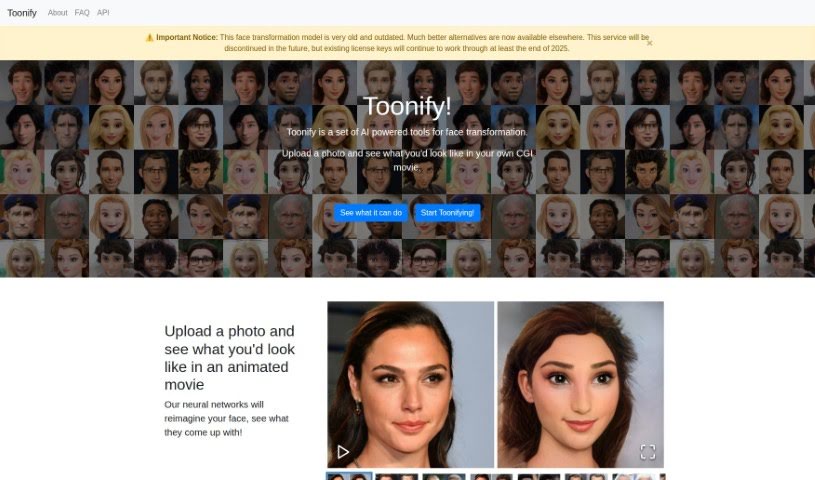
Screenshot of Toonify

Toonify

Discover Toonify in 2025! Learn what this AI face transformation tool does, how to use its features effectively, and how it stacks up against other Deepfake Makers.

Screenshot

What is Toonify?

Toonify is a neat AI platform that lets you turn your photos into all sorts of fun styles – think caricatures, emojis, comic book heroes, or even horror characters. You just upload your picture to their website. Then, you can play around with sliders to tweak things like age, smile, or anger, really personalizing the look. It uses neural networks to reimagine your features in the uploaded image. They offer both SD and HD models, depending on how much detail you want in your transformed image. The Toonify Classic model is totally free and you can use it as much as you like. However, for their other transformation styles, you’ll need to get a license, which is priced based on how many images you plan to transform. For the best results, they recommend uploading clear, sharp photos where the face is the main focus, facing the camera, and isn’t blocked by anything. Toonify has a few different transformation styles available, including caricatures, emojis, comic book heroes, and horror characters, so you can pick the one that best suits your taste.

Who created Toonify?

Justin Pinkney and Doron Adler are the minds behind Toonify, this AI tool that’s all about changing faces. They launched it back on May 11, 2021. The project gets a lot of support from generous folks who contribute through Ko-fi, and it’s also backed by DeepAI, a company dedicated to pushing AI technology forward.

What is Toonify used for?

Toonify is super versatile! You can use it for:

  • Turning your photos into all sorts of different styles.
  • Creating fun caricatures.
  • Designing your own emojis.
  • Making yourself look like a comic book character.
  • Transforming into horror characters.
  • Getting that cool CGI movie look.
  • Focusing on really high-quality face transformations.
  • Making lifelike emoji faces from your own pictures.
  • Becoming your favorite comic book superhero.
  • Adjusting features like how old you look, your smile, or even your anger level.
  • Customizing your transformations even further using handy adjustment sliders for things like age, smile, and anger.
  • It uses neural networks to alter your images, creating transformed versions that match the style you pick.
  • You can fine-tune just how much transformation happens using those feature sliders.
  • To get the best results, it’s best to use clear, sharp photos where the face is the main subject.
  • The Toonify Classic model is free to use without any limits.
  • You can create lifelike emoji faces with the ToonMoji HD option.
  • Transform images to look like they’re from a CGI movie or achieve high-quality face transformations.
  • HD models offer better image details and alterations compared to SD models.
  • You can explore unique styles like horror characters or comic book superheroes.

Who is Toonify for?

Toonify is a great tool for anyone creative, including:

  • Artists
  • Graphic designers
  • Comic book creators
  • Photographers
  • Digital artists
  • Illustrators
  • Content creators

How to use Toonify?

Ready to transform your photos with Toonify? It’s pretty straightforward:

  1. First, head over to the Toonify website and upload the photo you want to change.
  2. Give the AI a moment to work its magic and process the image. You’ll get an initial transformation right away.
  3. Now for the fun part! Use the adjustment sliders to tweak features like age, smile, and anger to get the exact look you want.
  4. Pick the style you like best – maybe a caricature, an emoji, a comic book hero, or a horror character.
  5. Keep fine-tuning the transformation level using those handy feature sliders until you’re happy with it.
  6. Just a reminder: make sure your uploaded photo is clear and sharp, with the face as the main subject.
  7. Also, try to avoid any obstructions on the face and ensure it’s facing the camera directly for the best possible outcome.

Toonify offers both free and paid options for transforming images. The Toonify Classic model is free for unlimited use. For other transformation styles, you’ll need to purchase licenses. These licenses for HD models are priced based on the number of images you want to transform, starting at £3 for 10 images and going up to £25 for 1000 images. Plus, each license includes unlimited use of the SD models. Remember, the best way to get amazing results with Toonify is to use clear, focused photos where the face is the main subject, and to follow the platform’s recommended guidelines.

Related AI Tools

Discover more tools in similar categories that might interest you

123RF AI Image Generator

Creative Image Generation
Learn More

Stay Updated with AI Tools

Get weekly updates on the latest AI tools, trends, and insights delivered to your inbox

Join 25,000+ AI enthusiasts. No spam, unsubscribe anytime.