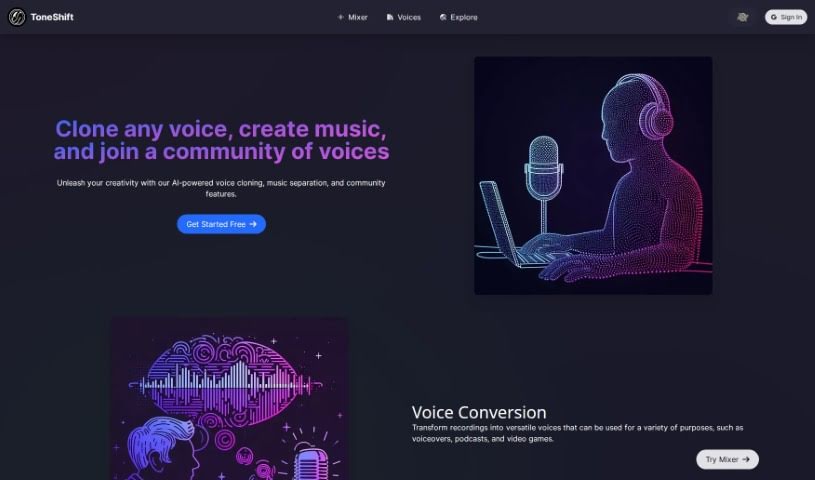
What is ToneShift?
ToneShift is a really neat AI tool that lets you clone voices, separate music into vocals and instrumentals, and even work with others. You can use its Voice Conversion feature to change your recordings into all sorts of voices – perfect for voiceovers, podcasts, or even video games. Plus, the Music Separation tool lets you pull out vocals and instruments from songs, so you can whip up your own unique remixes and mashups. What really makes ToneShift stand out, though, is its Voice Cloning. It lets you copy pretty much any voice you want, which is fantastic for creating unique characters or telling new stories. The platform also has a great community space where you can check out different voices, share what you’ve made, and team up with other users on projects. It’s a super helpful resource if you’re into voice work or customizing music.
Who created ToneShift?
We’re not exactly sure who created ToneShift – it seems to be from an unknown individual or group. It first came out on August 17, 2023. Basically, ToneShift is an AI tool that offers voice cloning, music separation, and a place for people to collaborate. You can change your recordings with Voice Conversion, pull out vocals and instruments using Music Separation, and even clone any voice to create unique characters and stories. The platform also encourages teamwork through its community area, where users can share their creations and work on projects together.
What is ToneShift used for?
Here’s a rundown of what you can do with ToneShift:
- Voice Conversion: Turn your recordings into flexible voices for voiceovers, podcasts, and video games.
- Music Separation: Create fresh remixes and mashups by separating vocals and instrumentals from songs.
- Voice Cloning: Copy any voice to craft unique characters and stories.
- Community Voices: Jump into a community to discover new tones, share your creations, and collaborate on projects.
- Mixer Tool: Play around with different tones for both voice conversion and music separation.
- Spark Creativity: ToneShift offers a variety of tools to help you customize voices and music for your projects.
- Remix Music: Easily extract vocals and instrumentals from songs to make your own remixes and mashups.
- Create Characters: Clone any voice to bring unique characters and stories to life.
- Connect with Others: Join a community of voices to find new tones, share your work, and collaborate.
- Experiment with Tones: Use the Mixer tool to explore different sound qualities.
- User-Friendly Projects: The tool’s easy-to-use interface and innovative features make voice projects and music customization a breeze.
- Versatile Voice Usage: Use Voice Conversion for voiceovers, podcasts, and video games.
- Music Customization: Separate vocals and instrumentals from songs for remixes and mashups.
- Storytelling: Clone any voice to create unique characters and stories.
- Medium Quality Voice Conversion: You can use the Voice Conversion feature at a medium quality setting.
- Custom Voice Cloning: Benefit from the Custom Voice Cloning feature.
- High-Quality Options: Access high-quality settings for both Voice Conversion and Music Separation.
- Unlimited Voices: Add as many voices as you like to your library.
- Sound Tokens: Enhance your experience with additional Sound Tokens.
Who is ToneShift for?
ToneShift is a great tool for:
- Voiceover Artists
- Podcast creators
- Video game developers
- Music producers
How to use ToneShift?
ToneShift is a really versatile AI tool that offers voice cloning, music separation, and a collaborative community platform. Here’s a simple step-by-step guide to get you started:
- Voice Conversion:
- You can transform your recordings into adaptable voices for voiceovers, podcasts, and video games.
- The Voice Conversion feature is available in medium quality.
- Music Separation:
- Extract vocals and instrumentals from songs to create your own personalized remixes and mashups.
- You can enjoy the Music Separation functionality.
- Voice Cloning:
- Clone any voice to create unique characters and narratives.
- Access Custom Voice Cloning, which offers professional quality options.
- Community Voices:
- Join a community of voices to discover new tones, share your creations, and collaborate with others.
- You can use the Community Voices feature.
- Pricing and Packs:
- Just sign up for a free account to get started – you’ll receive 200 Sound Tokens.
- You can choose from different packs, like the Starter Pack (1000 Sound Tokens) or the Enhancer Pack (5000 Sound Tokens), and there are more options too.
- You’ll get extra tokens when you make specific purchases.
- Mixer Tool:
- Use the Mixer tool for both voice conversion and music separation.
- Experiment with different tones and enjoy a dynamic environment for creating content.
- Creative Exploration:
- Make the most of ToneShift’s user-friendly interface and innovative features.
- Explore various voice options, let your creativity flow, and customize voices and music to fit your project needs.
By following these steps, you can effectively use ToneShift for all your voice-related projects, music customization, and for connecting with a lively community of creators.