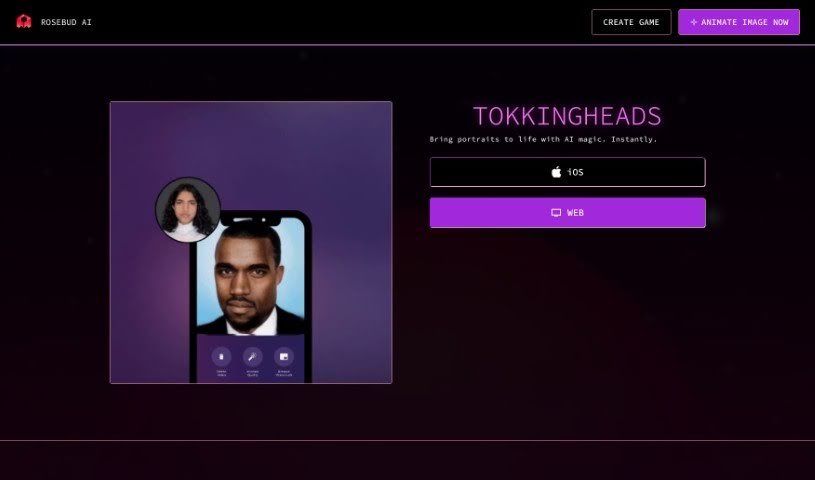
Screenshot of Tokkingheads

Tokkingheads

Curious about Tokkingheads? We'll break down what this AI animation tool is, how you can use it effectively in 2025, explore its features, and see how it stacks up against other AI Portrait Generators.

Screenshot

What is Tokkingheads?

TokkingHeads is a neat AI tool that brings portraits to life, developed by Rosebud AI, Inc. It is a way to animate still images, making them move and feel more dynamic. You can use it for all sorts of fun and creative projects, like animating old family photos, playing pranks on friends with moving pictures, making artwork come alive, or even creating unique character animations for games and avatars. It’s available on both iOS and Android, so you can animate on the go. Rosebud AI, Inc. really emphasizes quick animation generation and keeping your data safe, backed by a solid privacy policy and a clear code of ethics.

Who created Tokkingheads?

Rosebud AI, Inc. is the company behind TokkingHeads. They launched it on June 14, 2024, with the goal of making portrait animation accessible through AI. Rosebud AI, Inc. handles all the development and support, making sure everything runs smoothly and your data is protected with their strict privacy policy and ethical guidelines.

What is Tokkingheads used for?

TokkingHeads is incredibly versatile! Here’s a rundown of what you can do with it:

  • Quick Animations: Generate animated portraits in a flash.
  • Multi-Platform Support: Use it on various devices.
  • Game Assets: Create assets for your games.
  • Avatar Animations: Bring your digital characters to life.
  • Animate Old Photos: Give new life to cherished memories.
  • Photo Pranks: Have some fun by animating friends’ photos.
  • Bring Art to Life: Make static artwork move.
  • Puppet Creation: Turn images into animated puppets.
  • AI Content Creation: Generate AI stock photos, unique AI art, and designs.

Essentially, you can animate almost any static image, whether it’s for a laugh, a creative project, or even for business use. It’s a great way to make static images more engaging, whether you’re pranking friends or creating professional assets.

Who is Tokkingheads for?

TokkingHeads is a fantastic tool for a wide range of users, including:

  • AI Game Development: Perfect for creating dynamic game elements.
  • Education: Educators can use it for engaging learning materials.
  • Game Designers: Bring characters and assets to life.
  • Digital Artists & Artists: Enhance your creations with animation.
  • Photographers: Offer animated versions of portraits.
  • Content Creators: Make your social media and videos more dynamic.
  • Designers: Add animated elements to your projects.
  • Character Creation: Develop unique animated characters.
  • AI Characters: Specifically for those working with AI-generated characters.

It’s really for anyone looking to add animation to images easily.

How to use Tokkingheads?

Using TokkingHeads is pretty straightforward. Here’s a simple guide to get you started:

  1. Get Access: Head over to the official TokkingHeads website or download the app from the iOS App Store. You can also find it on Android.
  2. Upload Your Image: Pick the photo you want to animate and upload it to the platform.
  3. Generate Animation: It’s super simple – just a few clicks, and TokkingHeads transforms your static image into a lively animation right away.
  4. Explore What You Can Do: Remember, you can animate old photos, create AI stock photos, generate art and designs, make game assets, animate avatars, and even pull off fun photo pranks.
  5. Works Everywhere: TokkingHeads is accessible on iOS, Android, and the web, so you can use it on pretty much any device you have.
  6. Your Data is Safe: You can relax knowing your data is secure. TokkingHeads has a strict privacy policy and a code of ethics to protect your information.
  7. Need Help? If you run into any issues, their Discord channel is a great place to get support.
  8. For Everyone: Whether it’s for personal fun or business projects, TokkingHeads offers creative possibilities for all sorts of needs.
  9. Connect with the Creators: Want to chat with the team? You can reach Rosebud AI, Inc. on Twitter, Discord, Instagram, or via Email.
  10. See What’s Possible: Check out the amazing animations you can create, from AI stock photos and avatar animations to game assets and more.

By following these steps, you’ll be able to use TokkingHeads effectively to bring your portraits to life and really let your creativity shine!

Related AI Tools

Discover more tools in similar categories that might interest you

123RF AI Image Generator

Creative Image Generation
Learn More

Stay Updated with AI Tools

Get weekly updates on the latest AI tools, trends, and insights delivered to your inbox

Join 25,000+ AI enthusiasts. No spam, unsubscribe anytime.