What is Toastyroast?
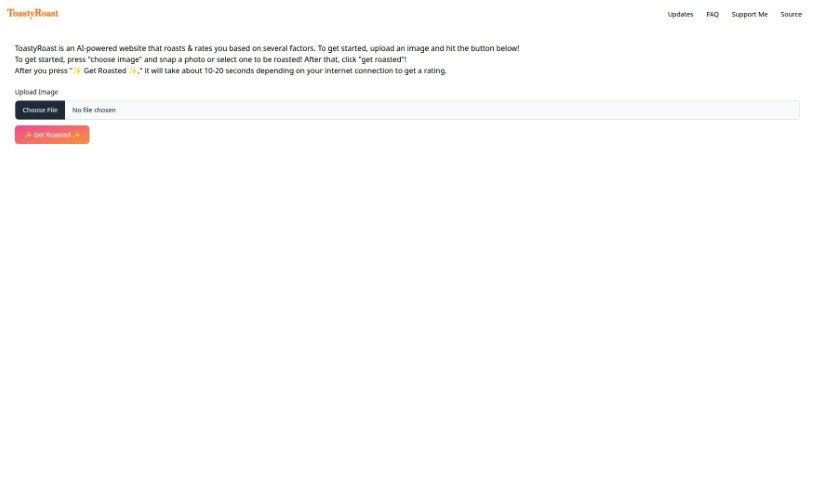
ToastyRoast is a fun, AI-powered website thatās all about roasting and rating users. You can upload a picture of yourself, take a new photo right there on the site, or pick one you already have. Just hit the āget roastedā button, and the AI will do its thing. The whole process usually takes about 10 to 20 seconds, depending on how fast your internet connection is.
Who created Toastyroast?
It looks like the creator of ToastyRoast is a bit of a mystery ā the website doesnāt mention who made it. What we do know is that itās an AI platform where you upload an image, and the AI gives you a roast and a rating based on a few different things. The instructions are simple: pick an image, click the button, and wait for your personalized roast.
What is Toastyroast used for?
Toastyroast offers a really entertaining experience, perfect for anyone looking for a bit of fun and interaction. Itās great for:
- User Entertainment: It provides a humorous and engaging way for people to interact with AI.
- Profile Evaluation: Get a funny, critical take on your profile picture.
- Humorous Feedback: The AI generates witty, critical comments based on your uploaded images.
- AI Image Analysis: It uses AI to analyze your photos and give you a rating.
- Customization: The open-source code means developers can tweak and customize it.
- Fast & Easy Use: You get a unique experience with quick processing, and thereās no need to register, making it super easy to get started.
- Interactive Fun: Itās all about engaging with the AI through your images.
- High-Resolution Support: Feel free to upload high-quality images.
- Community & Contribution: Thereās an option for users to contribute and share their feedback, with a supportive community on GitHub.
- Shared Laughter: Itās a great way to share a laugh with friends or online.
- Personalized Ratings: Get feedback tailored to your specific image.
Who is Toastyroast for?
Toastyroast is a great tool for a variety of people, including:
- Entertainers looking for new ways to engage an audience.
- Developers interested in AI and open-source projects.
- AI enthusiasts who want to explore AIās creative capabilities.
- Anyone seeking critical feedback delivered with a humorous twist.
- Web Developers who appreciate user-friendly interfaces.
- Entertainment industry professionals exploring new interactive formats.
- Image analysts curious about AIās perspective on visuals.
- Roasters who enjoy witty commentary.
- General website users looking for a quick, fun distraction.
How to use Toastyroast?
Using Toastyroast is pretty straightforward! Hereās how you can get your image roasted:
- First, head over to the ToastyRoast website. You can easily find it with a quick search.
- Once youāre on the site, look for the āChoose Imageā button. This is where youāll start.
- You have a couple of options here: you can upload a photo you already have on your computer, or if youāre feeling spontaneous, you can use the websiteās built-in camera feature to snap a new picture.
- After youāve selected or taken your photo, just click the āGet Roastedā button. Thatās the signal for the AI to get to work!
- Now, just wait a moment. The website will take about 10 to 20 seconds to process your image and give you a rating. This timing can vary a bit depending on your internet connection speed.
- As soon as itās done, youāll see your roast and the rating the AI came up with.
- Pro Tip: If you like the site, consider bookmarking it for easy access later. You can usually do this by pressing Ctrl + D.
- Navigation Shortcuts: To quickly jump to the top or bottom of the page, try using Ctrl + ā or Ctrl + ā.
- Sorting: Want to organize things? You can use Ctrl + ā or Ctrl + ā to sort entries, either chronologically or alphabetically.
- More Navigation: You can also use the standard arrow keys (āāāā) for general navigation and the Esc key to close any pop-ups or remove focus from the search bar.
Following these simple steps will let you quickly get a fun roast and rating for your uploaded image. Enjoy the experience!