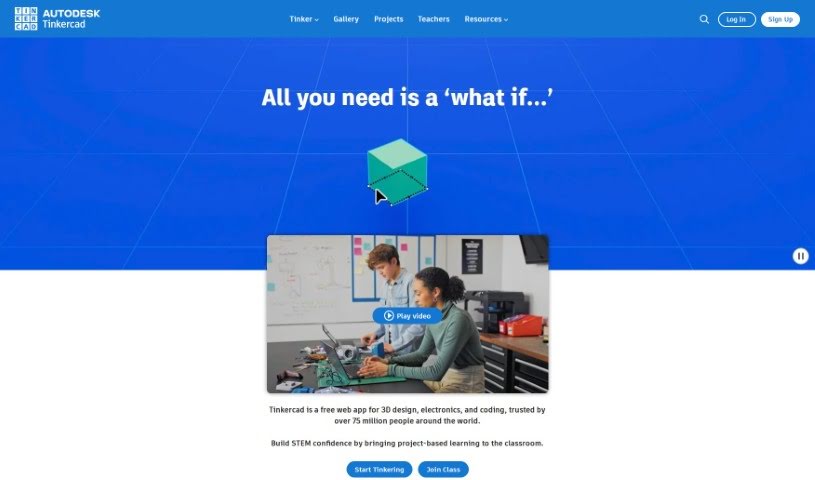
Screenshot of Tinkercad

Tinkercad

Discover what Tinkercad is and how to use it effectively in 2025. We'll explore its features and see how it stacks up against other 3D model generators.

Screenshot

What is Tinkercad?

Tinkercad is a really easy-to-use, web-based application that lets you design in 3D, play with electronics, and even get into coding. Millions of people around the world use it! The best part? It’s completely free and you can access it right from your web browser – no downloads needed. Tinkercad is all about hands-on learning, making it perfect for anyone, no matter their age or how much experience they have. You’ll find tools for creating 3D designs, simulating electronic circuits, and getting started with coding, all wrapped up in a super intuitive interface. It’s a fantastic tool for teachers, students, hobbyists, and designers looking for a safe, ad-free space to explore their creativity and learn new skills. Tinkercad really shines when it comes to project-based learning, helping users build up their STEM skills and feel more confident.

Who created Tinkercad?

Tinkercad was brought to life by Kai Backman, Mikko Mononen, Ville Miettinen, and Peter Liljedahl. This innovative web application is now trusted by over 75 million users globally for all sorts of 3D design, electronics, and coding projects. It offers a super friendly platform that’s ideal for educators, students, hobbyists, and designers, really pushing hands-on, project-based learning, especially for STEM education.

What is Tinkercad used for?

  • It’s incredibly user-friendly.
  • You can create amazing 3D designs.
  • It’s great for simulating electronics.
  • It offers introductory coding tools.
  • It’s a fantastic resource for STEM education.
  • Perfect for classroom projects.
  • Design anything you want for 3D printing.
  • It’s a valuable educational tool.
  • Ideal for hobby projects.
  • A must-have for designers.

Who is Tinkercad for?

  • Educators
  • Students
  • Hobbyists
  • Designers

How to use Tinkercad?

Tinkercad is a super versatile web application that covers 3D design, electronics, and coding, and it’s great for both beginners and those with more experience. Here’s a simple, step-by-step guide to get you started:

  1. Getting Started: First off, head over to the Tinkercad website. If you don’t have an account yet, it’s easy to create one.
  2. Exploring the Interface: Take a moment to get acquainted with the user-friendly interface. You’ll find tools specifically for 3D design, simulating electronics, and even some basic coding.
  3. Making 3D Designs: Jump right in and start using the 3D design tools to bring your ideas to life. You can begin by sketching out your concept or even import existing designs to modify.
  4. Trying Electronics Simulations: Dive into the electronics section to design and test circuits virtually. You can use components like LEDs, resistors, and more to build and simulate your circuit designs.
  5. Getting into Coding: Play around with the coding tools to add some interactivity to your designs. Starting with block-based coding is a great way to create animations or control components within your projects.
  6. Saving Your Designs: Once you’re happy with what you’ve created, you can export your designs in various file formats. These are usually compatible with 3D printers or ready for further development.
  7. Finding Learning Resources: Make sure to check out the wealth of educational resources available on Tinkercad’s website. They offer projects, tutorials, and lesson plans that are often aligned with educational standards.
  8. Connecting with the Community: Get involved with the Tinkercad community! You can share your own designs and get inspired by exploring what others have created.
  9. Getting Help: If you run into any issues or have questions, don’t hesitate to use the support resources Tinkercad provides. They’re there to help.
  10. Just Practice and Explore: Honestly, the best way to get good at Tinkercad is just by practicing and exploring. Try out different tools, experiment with your designs, and most importantly, have fun with the creative process!

By following these steps, you can really make the most of Tinkercad and let your creativity flow in 3D design, electronics, and coding projects. Happy tinkering!

Related AI Tools

Discover more tools in similar categories that might interest you

123RF AI Image Generator

Creative Image Generation
Learn More

Stay Updated with AI Tools

Get weekly updates on the latest AI tools, trends, and insights delivered to your inbox

Join 25,000+ AI enthusiasts. No spam, unsubscribe anytime.