What is Text To Handwriting?
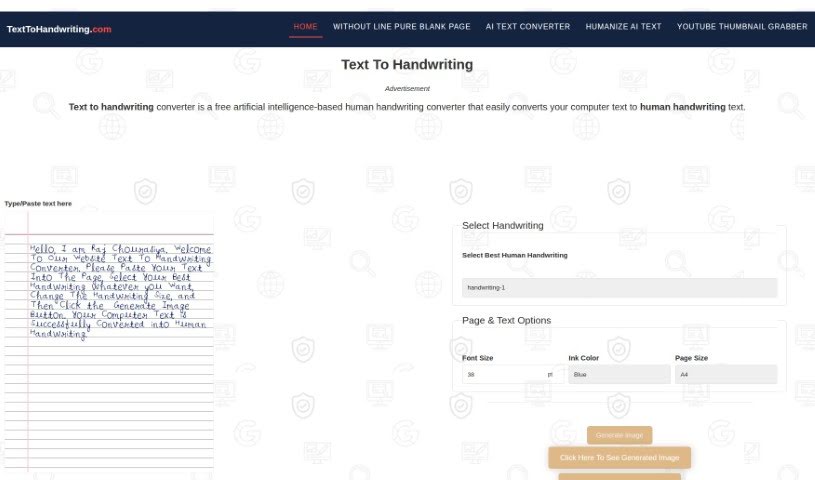
The Text To Handwriting Converter is a handy free online tool that quickly creates images of text that look like they were written by a real person. You can tweak the size of the writing, pick from different handwriting styles, choose your ink color, and then download the finished image. It’s a great way to add a personal, almost nostalgic feel to your digital messages. You can use it right in your browser without downloading anything, which makes it super convenient for all sorts of projects, like putting handwritten notes onto a blank page. The converter also supports different page sizes, which can make your school assignments more interesting and generally make your digital text look much nicer.
Just a heads-up, it doesn’t have a built-in plagiarism checker, so if you’re using it for assignments, you’ll want to run those through a separate tool to make sure everything’s 100% unique.
Who created Text To Handwriting?
This Text To Handwriting Converter was developed by an individual or a team who prefer to remain anonymous. It first launched on April 22, 2023. The tool’s main job is to turn your typed text into something that looks like handwriting. You get to play around with different styles, pick your favorite ink color, and download the result as an image. It’s a free online service designed to bring back that classic handwritten feel to our digital world.
What is Text To Handwriting used for?
This tool is fantastic for a bunch of things:
- Making college assignments more engaging: Give your papers that personal touch.
- Adding a personal flair to digital messages: Make emails or social media posts feel more unique.
- Boosting the look of digital content: Simply make your text presentations more visually appealing.
- Creating content with a nostalgic vibe: Tap into that warm, familiar feeling of handwritten notes.
- Capturing attention with handwritten content: Handwritten text often stands out and draws people in.
- Crafting unique and creative presentations: Make your slides or reports more memorable.
- Simulating the look of handwriting: It’s a neat way to convert typed text into a handwritten format.
- Making digital communications feel more personal: It bridges the gap between digital and physical writing.
- Crafting messages that are more engaging and compelling: Handwritten notes can feel more heartfelt.
- Evoking nostalgic feelings: It can bring back fond memories for your audience.
- Improving the appearance of digital text: A simple way to make text look better.
- Increasing text engagement: People are often more drawn to handwritten elements.
- Adding a personal touch to digital text: It’s a simple yet effective way to personalize.
- Creating truly unique content: Stand out from the crowd with custom handwriting.
- Improving aesthetics in all your content creations: Make everything look a bit more polished and thoughtful.
- Easily creating handwritten content on a blank page: Perfect for notes, letters, or designs.
- Allowing for creative text presentation: Experiment with different looks and styles.
- Generating shareable images: Create visuals you can easily share online.
- Personalizing your digital communication: Make every message feel like it came directly from you.
- Creating nostalgia in your communication: Bring back the charm of old-fashioned letters.
- Allowing for unique content creation: Your words, your style, uniquely presented.
- Facilitating the creation of handwritten content: It’s straightforward to get the look you want.
- Adding a personal touch to digital communications: Make your messages feel more intimate.
- Capturing the nostalgia of handwritten content: Recreate that classic feel.
- Eliciting nostalgic feelings in audiences: Connect with people on an emotional level.
- Generating content with a unique and unforgettable effect: Make your message stick.
- Evoking a feeling of yearning in audiences: Sometimes, a touch of nostalgia is powerful.
- Creating shareable images: Make your handwritten text ready for social media or other platforms.
- Adding a nostalgic aesthetic to communication: Give your messages a timeless charm.
- Generating handwritten content: It’s the core function, and it does it well.
Who is Text To Handwriting for?
This tool is a great resource for several groups:
- Students and Educators: Perfect for making assignments, notes, and study materials more engaging.
- Marketers and Advertisers: Use it to create eye-catching content that stands out in digital campaigns.
- Content Creators: Add a personal, unique touch to blogs, social media, and websites.
- Anyone needing personal use: Craft unique, nostalgic messages for friends and family.
- Writers and Business Professionals: Enhance reports, letters, and presentations.
- Researchers: Add a visual element to findings or notes.
- Designers: Incorporate custom handwritten text into visual projects.
How to use Text To Handwriting?
Using the Text To Handwriting Converter is pretty straightforward. Just follow these simple steps:
- Type Your Text: Start by typing the message you want to convert into the text box provided on the platform.
- Pick a Handwriting Style: Browse through the different handwriting styles offered and choose the one that best suits your needs or preferences.
- Adjust the Size: You can customize how big or small you want the handwriting to be. This helps ensure it fits perfectly wherever you plan to use it.
- Choose Your Ink Color: Select the color for your text. Common options like black, blue, or red are usually available, letting you match your project’s theme.
- Generate the Image: Once you’ve set up your text, style, and color, just click the generate button. The tool will quickly create an image that looks like your text was handwritten.
- Download Your Image: After it’s generated, you can download the image. This is great for adding it to documents, presentations, or even just creating content on a blank page.
- Further Customization: Don’t forget you can always go back and tweak the size, styles, and colors to perfectly match what you’re working on.
- Explore New Styles: The platform often adds new handwriting styles, so check back regularly for fresh options!
- Enhance Your Communications: Remember, using this tool can really add a personalized touch to your digital messages and assignments, making them more impactful.
Overall, this tool offers a really user-friendly experience, delivers quick results, is completely free to use, and makes the whole conversion process simple. It’s a fantastic time-saver if you’re looking to create unique, personalized handwritten content for just about any purpose.