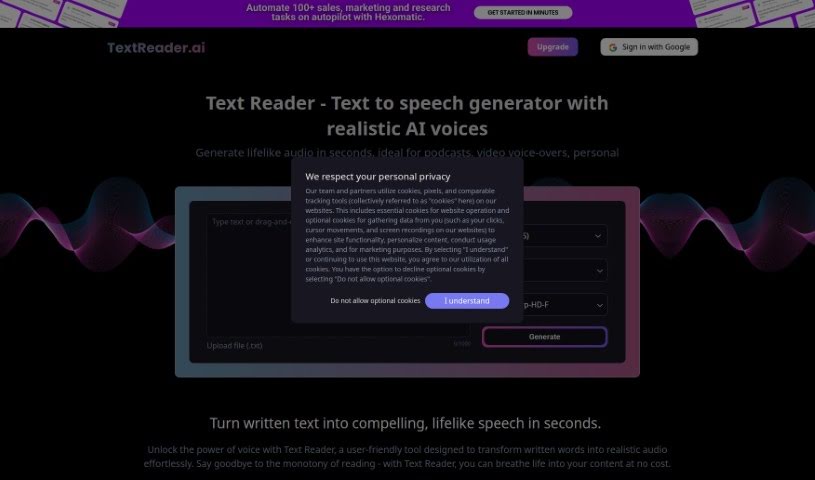
Screenshot of Text Reader

Text Reader

Discover what Text Reader is and how to use it effectively in 2025. We'll explore its features and see how it stacks up against other Text-to-Speech tools.

Screenshot

What is Text Reader?

Text Reader is a really handy text-to-speech generator. It’s super easy to use and turns written words into natural-sounding audio in just seconds. It is a way to bring your text to life with lifelike voices. It uses high-quality TTS WaveNet voices and supports over 40 languages, which is pretty great for all sorts of personal and business needs. The platform has a straightforward interface, making it quick to convert text to audio. Plus, it’s budget-friendly, saving you both time and the cost of production.

You can use Text Reader for all sorts of things, like creating podcasts, adding voice-overs to videos, setting up IVR phone systems, or even making personal greetings. It’s designed for a global audience, helping to bridge language gaps.

What makes Text Reader’s voices sound so good? They’re powered by advanced AI and WaveNet technology. This means the speech sounds incredibly natural, really mimicking how humans speak, including all those little nuances. The platform is always getting better as AI advances, making AI voiceovers a much more affordable and time-saving option compared to hiring human narrators. These AI voices are perfect for commercial projects like animations, audiobooks, podcasts, game characters, educational materials, and marketing content. You get consistent quality, and it’s easy to make changes if you need to.

In schools, Text Reader can be a real game-changer for learning and making content more accessible. It’s especially helpful for students who might struggle with things like dyslexia. By converting educational texts into audio, it can really boost comprehension, help with memory, improve pronunciation, and sharpen listening skills across different languages. Teachers can create more inclusive materials for all sorts of learners, ensuring everyone can get the information they need.

Who created Text Reader?

Text Reader comes from an innovative tech company that’s really focused on AI. They’ve developed an AI voice generator that uses advanced AI algorithms and WaveNet technology to create speech that sounds incredibly natural. This company aims to provide a user-friendly way to turn text into high-quality audio. You’ll find features like support for many languages, really clear voices, and cost-effective solutions for both personal use and businesses. The Text Reader tool is built to serve a global audience, supporting over 40 languages, making it a fantastic choice for a wide variety of projects.

What is Text Reader used for?

  • Turn Your Notes into Audio: Easily convert written notes into spoken words.
  • Make Content Speak: Transform blogs, articles, or any written material into audio.
  • Quick Greetings: Create personalized audio greetings in just seconds.
  • AI Voice for Business: Use it as an AI voice generator for commercial projects.
  • Connect with Clients: Engage prospective clients with spoken messages.
  • Boost Customer Service: Enhance your customer service with clear audio.
  • Accessible Education: Create educational content that’s easy for everyone to learn from.
  • Flexibility and Ease: You can easily change or update voiceovers without needing to hire someone new.
  • Always Consistent: Get the same great vocal quality every time, with no variation between readings.
  • Global Reach: Offers natural voices in multiple languages for audiences worldwide.

Who is Text Reader for?

  • Video & Animation Voiceovers: Perfect for adding narration to videos and animations.
  • Audiobook Creation: Produce audiobooks with natural-sounding voices.
  • Podcast Narratives: Create engaging podcast content.
  • Game Character Voices: Bring game characters to life with unique voices.
  • Educational Tools: Develop tutorials and courses that are easy to follow.
  • Marketing Materials: Craft compelling marketing and promotional content.

How to use Text Reader?

Using Text Reader is pretty straightforward. Just follow these simple steps:

  1. Add Your Text: Paste or type the text you want to convert into the provided text box.
  2. Choose Your Voice: Select the language and voice you prefer from the options available.
  3. Convert: Click the “Go” button to start the conversion.
  4. Listen: Once it’s done, you can listen to the natural-sounding speech.
  5. Download: If you’re happy with it, download the audio file for your use.

Here are some of the key features you’ll find:

  • Smart AI: Uses advanced AI algorithms for highly accurate voice output.
  • Natural Sound: Delivers speech that truly captures human nuances.
  • Many Languages: Offers multilingual capabilities with a wide selection of languages and accents.
  • Always Improving: Continuously gets better through AI and machine learning advancements.

When you compare AI voiceovers to human narration, you’ll find that AI is often more cost-effective, saves you time, offers greater versatility, and provides consistent quality. Text Reader is great for all sorts of commercial projects, including videos, audiobooks, podcasts, gaming, educational materials, and marketing content.

Related AI Tools

Discover more tools in similar categories that might interest you

Stay Updated with AI Tools

Get weekly updates on the latest AI tools, trends, and insights delivered to your inbox

Join 25,000+ AI enthusiasts. No spam, unsubscribe anytime.