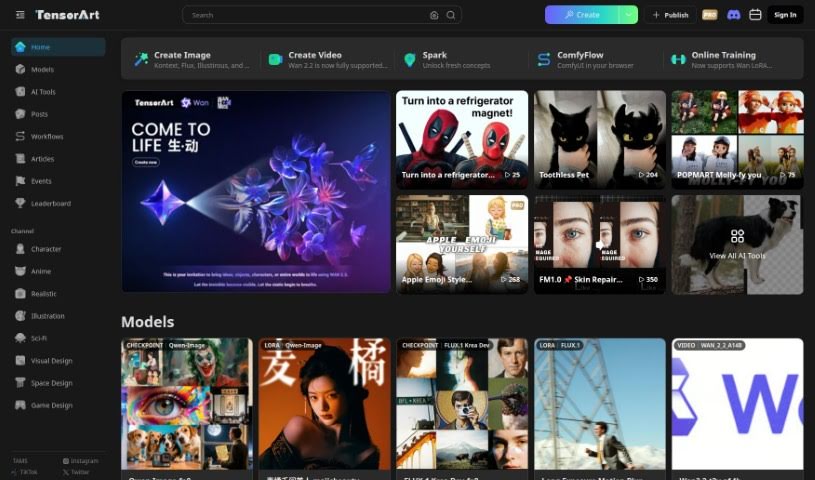
Screenshot of Tensor.art

Tensor.art

Curious about Tensor.art? We'll break down what this AI art platform is, how to use its powerful features like TA Nodes, and how it stacks up against other image generators in 2025.

Screenshot

What is Tensor.art?

Tensor.art is a platform that’s really changing the game for AI-driven art creation. They’ve recently rolled out TA Nodes, which is a pretty neat tool that gives you a lot more control and flexibility when you’re making AI art. TA Nodes are a system where you connect different ‘nodes’ to build your image creation process. One particularly useful node is the SelectParams Node. This lets you fine-tune the input parameters, essentially controlling how much influence the Style Model has on the final artwork. It’s designed to help you manage how intensely the Style Model is applied, making sure the output really matches your creative vision. This makes the whole art creation process feel more intuitive and much more tailored to what you want.

Who created Tensor.art?

Tensor.art was actually created by a company called Illustrious. The founder started it with a real passion for advancing the open-source ecosystem and supporting innovation in AI models. It’s pretty impressive how quickly they’ve grown; they hit their 3 millionth user in just 18 months! Their user base is really diverse, with people from all over the world and across different generations. Illustrious is all about encouraging creativity and collaboration in the AI art space, and they’re constantly introducing new tools and models to keep creators engaged.

What can you do with Tensor.art?

Tensor.art is incredibly versatile. You can use it for:

  • Generating brand new images
  • Editing existing photos
  • Transferring styles from one image to another
  • Restoring old or damaged photos
  • Increasing image resolution (Super Resolution)
  • Filling in missing parts of an image (Image Inpainting)
  • Translating one image into another (Image-to-Image Translation)
  • Creating artistic renderings
  • Adding color to black and white images (Colorization)
  • Seamlessly blending different images together (Deep Image Blending)

Who is Tensor.art for?

If you work with visuals or create digital content, Tensor.art could be a great fit. It’s particularly useful for:

  • Graphic designers
  • Digital artists
  • Illustrators
  • Art educators
  • Game developers
  • Marketing professionals
  • Content creators
  • Advertising Agencies
  • Fine Artists
  • Virtual Reality Designers

How do I use Tensor.art?

Getting started with Tensor.art is pretty straightforward. Here’s a general rundown of the steps:

  1. Installation: First, you’ll need to install Tensor.art. Just follow the instructions specific to your operating system. Make sure you’ve got all the necessary dependencies installed too.
  2. Initialization: Once installed, you’ll initialize Tensor.art in your project. This usually involves importing the right modules and setting up your environment so you can start working with the tool.
  3. Data Preparation: Next, you’ll prepare your dataset. Load your data into formats that Tensor.art can understand and organize it nicely for whatever you plan to do, whether it’s training a model or just analyzing data.
  4. Model Training: Now it’s time to train a model. You can pick a pre-existing model architecture or build your own custom one. Then, you’ll train it using your prepared data, defining things like the loss function, the optimizer, and how you’ll evaluate its performance.
  5. Evaluation: After training, you’ll want to evaluate how well the model is doing. Use validation or test datasets for this. It helps you see its performance and make any tweaks if needed.
  6. Inference: Once your model is trained and evaluated, you can use it for inference. This means running new data through the model to get predictions or classifications.
  7. Visualization: Tensor.art offers great visualization tools. Use them to get a better look at your model’s performance, understand your data distributions, and check other important metrics.
  8. Deployment: When you’re happy with how the model works, you’ll prepare it for deployment. You can set it up locally or on a production server, depending on your needs.
  9. Monitoring and Updates: Finally, it’s important to keep an eye on your model’s performance over time. Gather feedback, and update the model as necessary to keep its accuracy and effectiveness sharp.

Following these steps should help you make the most of Tensor.art for your machine learning projects.

Related AI Tools

Discover more tools in similar categories that might interest you

123RF AI Image Generator

Creative Image Generation
Learn More

Stay Updated with AI Tools

Get weekly updates on the latest AI tools, trends, and insights delivered to your inbox

Join 25,000+ AI enthusiasts. No spam, unsubscribe anytime.