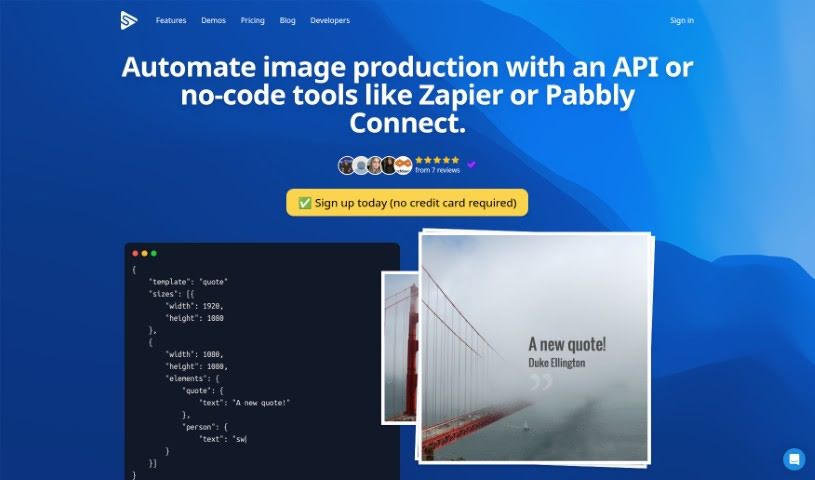
Screenshot of Switchboard Canvas

Switchboard Canvas

Discover what Switchboard Canvas is and how to use it effectively in 2025. We'll explore its features and compare it to other Image Generators.

Screenshot

What is Switchboard Canvas?

Switchboard Canvas is a really handy tool designed to make your workflows smoother and more automated. It is a powerful API for creating assets. What’s great about it is you can generate multiple images all at once with just one API call. This makes it super easy to integrate with your existing automation services. Plus, you get precise control over asset creation – you can set specific dimensions and even swap out template values for each size you need. On top of that, Switchboard Canvas can translate text into over 70 languages, which is pretty efficient. They offer different plans, like Creator, Agency, and Enterprise, each with its own set of features. These plans vary in how many images you can create per API call and offer things like multilingual content creation. You can try it out with a 14-day trial, but there’s a limit on image sizes per API call during that time. If you don’t switch to a paid plan after the trial, any content or templates you made will be removed. Just so you know, if you go over your usage limit, each extra API call will cost $0.10.

Who created Switchboard Canvas?

Switchboard Canvas was developed by a company called Switchboard. The specific founder isn’t mentioned in the information I have. What’s key about Switchboard Canvas is its powerful asset creation API. It’s built for automating workflows efficiently, letting you create many images with a single API call, adjust individual sizes, and even translate text into more than 70 languages all in one go.

What is Switchboard Canvas used for?

  • Making workflows smoother and more automated
  • Creating several images with just one API call
  • Swapping out individual sizes for precise control
  • Translating text into over 70 languages
  • Creating, resizing, and translating all in a single API call
  • Generating different versions of templates at once
  • During the trial, you can create one image size per API call
  • Making multilingual content with one API request
  • Upgrading to a paid plan after your trial ends
  • Being charged $0.10 for extra API calls if you go over your limit

Who is Switchboard Canvas for?

  • Graphic designers
  • Content creators
  • Social media managers
  • Marketers
  • API Developers

How to use Switchboard Canvas?

Here’s how you can get the most out of Switchboard Canvas:

  1. Streamline Your Workflow: Start by using the powerful asset creation API to make your workflow more efficient and automated.
  2. Create Many Images at Once: Once you’ve got your responsive templates ready, you can begin creating images. You can do this directly through the API or by connecting it with automation services. The cool part is you can generate multiple assets with just one API call by simply listing the dimensions you need in the sizes array.
  3. Get Precise Control: You can really fine-tune how your assets are made. Just overwrite specific template values for each size you’re working with.
  4. Translate Text on the Fly: Need to translate text into over 70 languages? Switchboard Canvas lets you do that easily. You can actually create, resize, and translate all within that single API call.
  5. Understanding API Calls: Basically, an API call is a request your program makes to our servers to generate one or more image assets.
  6. Images Per Plan: How many images you can create in one API call depends on your plan. The Creator plan lets you make one image, Agency gets you three, and Enterprise allows for five.
  7. Trial Period Details: You can try out the platform for 14 days. During this trial, you’re limited to one image size per API call, and you don’t even need a credit card to start.
  8. Translation in Action: When you make an API call, you can easily overwrite and translate text into different languages. This makes creating multilingual content a breeze.
  9. After Your Trial: Just a heads-up, any content or templates you create during the trial will be removed once it ends. We’ll send you an email before the trial is up, giving you a chance to pick a paid plan or add your credit card details to keep using it.
  10. Going Over Your Limit: If you happen to exceed your usage quota, each additional API call will cost $0.10. It’s a good idea to keep an eye on your current usage in your billing profile.

For more in-depth details and information, definitely check out the Switchboard Canvas API documentation and their billing guidelines on their website.

Related AI Tools

Discover more tools in similar categories that might interest you

123RF AI Image Generator

Creative Image Generation
Learn More

Stay Updated with AI Tools

Get weekly updates on the latest AI tools, trends, and insights delivered to your inbox

Join 25,000+ AI enthusiasts. No spam, unsubscribe anytime.