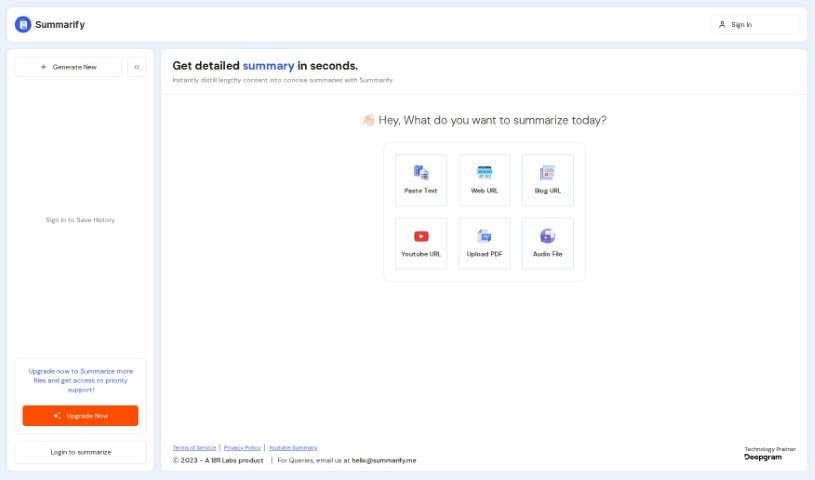
Screenshot of Summarify.me

Summarify.me

Discover what Summarify.me is all about and learn how to use its powerful features in 2025. We'll cover its capabilities, compare it to other summarizers, and show you how to get the most out of it.

Screenshot

What is Summarify.me?

Summarify.me is a really handy AI tool, brought to you by 1811 Labs, that’s designed to make summarizing content a breeze. It is your all-in-one solution for getting the gist of pretty much anything. You can feed it blogs, PDFs, plain text, websites, or even YouTube videos, and it’ll whip up a concise summary for you. The main idea is to take all that lengthy stuff and turn it into something you can quickly understand. It’s pretty neat because you get instant, detailed summaries, and you can even have them in different languages. What’s more, you can pick a specific writing style – like channeling Naval Ravikant, Elon Musk, Balaji Srinivasan, Joe Rogan, or Jordan Peterson, among others. To use it, you just paste your text, upload a PDF, drop in a web or blog URL, or even give it a YouTube video or audio link. It’s built to be straightforward and efficient, focusing on getting the job done without a lot of fluff.

Who created Summarify.me?

Summarify.me first appeared on October 19, 2023. It’s an AI-powered tool that was developed by 1811 Labs. This tool is all about helping users create clear, short summaries from a wide range of sources. Whether it’s blogs, PDFs, text, websites, or YouTube videos, Summarify.me can handle it. To get started, you’ll need to sign in. For free users, there’s a limit, allowing you to create up to 10 summaries. The tool offers both quick, instant summaries and more detailed ones, and you can even choose from various languages and writing styles. The focus is really on making summarization efficient and functional, steering clear of unnecessary marketing hype.

What is Summarify.me used for?

Here’s a breakdown of what you can do with Summarify.me:

  • Summarize Anything: Get concise summaries from blogs, PDFs, text, websites, and YouTube videos.
  • Easy Access: Log in to the tool using your avatar.
  • Free Tier: Free users can create up to 10 summaries.
  • Multilingual Support: Get instant and detailed summaries in languages like Pidgin, Marathi, Telugu, Turkish, Tamil, Yue Chinese, and Vietnamese.
  • Style Your Summary: Choose from popular writing styles such as Naval Ravikant, Elon Musk, Balaji Srinivasan, Joe Rogan, Jordan Peterson, and many more.
  • Input Flexibility: Paste text directly or upload PDF files.
  • Web & Blog Summaries: Simply input web or blog URLs to generate summaries.
  • YouTube Content: Extract condensed summaries from YouTube video or audio URLs.
  • Transparency: Access links to the tool’s terms of service and privacy policy for clear understanding and compliance.
  • Straightforward Functionality: The tool is presented in a clear, functional way, without a lot of marketing jargon.
  • Multiple Output Options: Generate summaries with various language choices.
  • Personalized Styles: Select specific writing styles to match your preference.
  • Efficient Summarization: Quickly distill lengthy content into easily digestible information.
  • Compliance and Transparency: Links to terms of service and privacy policy are readily available.
  • Focus on Efficiency: The tool emphasizes speed and ease of use.

Who is Summarify.me for?

Summarify.me is a great tool for anyone who needs to process information quickly. This includes:

  • Bloggers
  • Writers
  • Students
  • Content creators
  • Researchers
  • Journalists

How to use Summarify.me?

Summarify.me is designed to be really user-friendly, making it simple to create concise summaries from all sorts of sources – think blogs, PDFs, plain text, websites, and even YouTube videos. Here’s a straightforward way to get the most out of it:

  1. Get Started: Head over to the Summarify website and sign in. Remember, if you’re a free user, you can create up to 10 summaries, which is a great way to test it out.
  2. Pick Your Source: You’ve got options! You can paste text directly, upload a PDF file, or just pop in a web URL or blog URL. If it’s video or audio content, you can even provide a YouTube URL.
  3. Choose Your Language: Select the output language that works best for you. They offer a good range, including Pidgin, Marathi, Telugu, Turkish, Tamil, Yue Chinese, and Vietnamese.
  4. Select a Writing Style: Want your summary to sound like someone specific? You can choose from popular styles like Naval Ravikant, Elon Musk, Balaji Srinivasan, Joe Rogan, Jordan Peterson, and more.
  5. Get Your Summary: You’ll receive instant, detailed summaries. The goal here is to quickly break down long content into something easy to digest.
  6. Stay Informed: For peace of mind, you can always check out Summarify’s terms of service and privacy policy, which are available on the website.
  7. Consider Upgrading: If you find yourself needing more, like summarizing more files or getting priority support, there’s always an option to upgrade.

By following these simple steps, you can really make Summarify.me work for you, creating summaries that are perfectly tailored to what you need.

Related AI Tools

Discover more tools in similar categories that might interest you

Academic Help Free Essay Generator

Education Academic Writing
Learn More

Stay Updated with AI Tools

Get weekly updates on the latest AI tools, trends, and insights delivered to your inbox

Join 25,000+ AI enthusiasts. No spam, unsubscribe anytime.