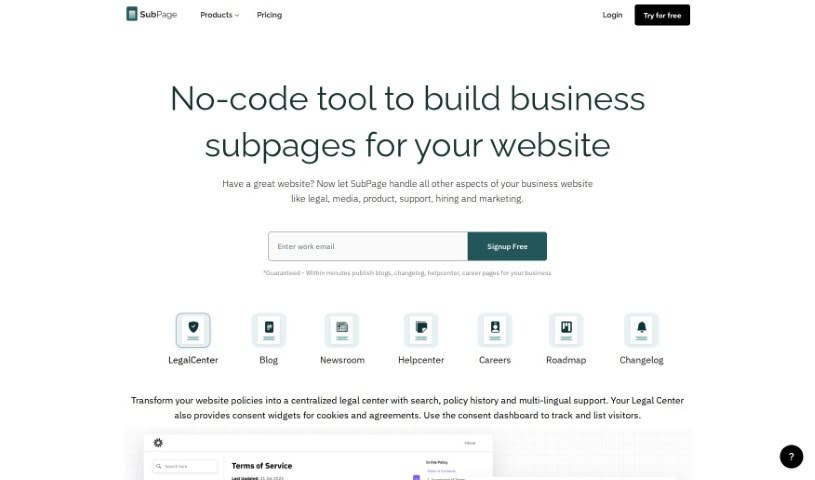
Screenshot of SubPage

SubPage

Discover what SubPage is and how to use it to your advantage in 2025. We'll explore its features, compare it to other blogging tools, and show you how it can streamline your content creation.

Screenshot

What is SubPage?

SubPage.app is a really handy all-in-one platform built for businesses. It lets you create and manage all sorts of important subpages for your website, like your blog, changelogs, policy pages, and even your help center. What’s great about it is that it’s a no-code solution, meaning you don’t need to be a tech wizard to use it. It comes with a page-based editor, helps you keep your branding consistent across all these different pages, and includes features you’ll actually use right away, like search boxes and support forms. Plus, you can collaborate with your team in real-time, get custom analytics, and it’s all designed to be super simple and optimized for SEO. On top of all that, SubPage.app offers AI help for creating content, making images, scheduling your blog posts, checking for plagiarism, managing your content calendar, and even generating SEO reports. It also has review comment features, various blog layouts, and integrates with tools like Zapier.

Who created SubPage?

Subpage.app was actually created by a dedicated team, led by their founder. Their main goal is to provide businesses with no-code solutions that make building and maintaining website pages feel effortless. They really focus on making things easy with features like AI content generation, simple blog scheduling, and built-in SEO optimization. Subpage.app aims to keep your brand messaging unified and offers a variety of themed layouts and widgets, so you can really personalize the user experience.

What is SubPage used for?

SubPage is incredibly versatile. You can use it to:

  • Create and manage all the essential subpages your website needs.
  • Get AI-powered help for generating both text and image content.
  • Host your pages on a custom domain or use a SubPage domain.
  • Help Google find your content better by publishing in sub-directories.
  • Quickly generate blog content using the AI Blog Builder.
  • Design your blog’s visuals with the AI image creator or stock images.
  • Schedule your blog posts so you can manage your publishing calendar easily.
  • Track your blog’s analytics to see what’s working and what’s not.
  • Make sure your content is original with a built-in plagiarism checker.
  • Capture more leads using forms for newsletters or ebook downloads.
  • Create and maintain all your important business subpages – think blogs, changelogs, policy pages, and help centers – all in one place.
  • Get AI assistance for text and image content on every page.
  • Host your pages on either a SubPage domain or your own custom domain.
  • Generate blog content super fast with the AI Blog Builder.
  • Design your blog’s visuals using AI-generated images.
  • Schedule your blog posts for the perfect publishing time.
  • Capture leads through newsletter sign-up forms and offer downloads like ebooks.
  • Check your articles for plagiarism to ensure they’re original.
  • Use content analytics to understand your performance and refine your strategies.
  • Get AI help for text and images across all your pages.
  • Host your pages on a subpage domain or set up a custom domain.
  • Boost your Google indexing by publishing in sub-directories.
  • Quickly generate blog outlines or even full drafts with the AI Blog Builder.
  • Design your blog visuals using the image creator or pick from stock images and AI-generated options.
  • Simplify your blogging routine with post scheduling and insightful analytics.
  • Boost lead generation with easy-to-use forms for newsletters and ebook/template downloads.
  • Ensure your articles are original with the plagiarism checker.
  • Plan and schedule your blog posts using the Content Calendar.
  • Create and maintain all your business subpages – like your Blog, changelog, policy pages, help center, etc. – all within a single platform.
  • Get AI-assisted content generation for text and images on all your pages.
  • Choose between hosting on a SubPage domain or a custom domain.
  • Generate blog content efficiently with the AI Blog Builder.
  • Use the Blog Image Creator to design your visuals.
  • Simplify your posting schedule with the Blog Scheduling feature.
  • Enhance lead capture with forms for newsletters, ebook downloads, and templates.
  • Ensure your content is original with the plagiarism checker.
  • Engage your audience with blog widgets, banners, and pop-ups for notifications.
  • Create and manage business subpages like Blogs, Changelogs, Policies, and more.
  • Enjoy no-code, no-design solutions for building and managing your subpages.
  • Utilize professional layouts specifically designed for each subpage type.
  • Collaborate with your team using role-based permissions.
  • Integrate various widgets to make your website even more functional.
  • Generate leads with features like lead capture forms and ebook downloads.
  • Use the plagiarism checker to guarantee content originality.
  • Plan and schedule your posts with the Content Calendar.
  • Generate SEO reports to help optimize your blog posts.
  • Use review comments, much like in Google Docs, for feedback.
  • Create and maintain all your business subpages (like Blog, changelog, policy pages, helpcenter, etc.) for your website in one convenient platform.
  • Effortlessly build and maintain website pages such as Changelog, Policies, Blog, Career pages, etc., without needing to code or use complicated website builders.
  • Take advantage of the AI-generation option for content and images for a truly hassle-free experience.
  • Boost your Google indexing by using the support for sub-directory publishing.
  • Quickly generate listicles, blog outlines, or even complete blog drafts with the AI Blog Builder feature.
  • Design your blog visuals using a powerful image creator or select from stock images and AI-generated options.
  • Simplify your entire blogging routine with post scheduling, a content calendar, and SEO reports.
  • Enhance your lead generation efforts with streamlined solutions like Lead Capture and Newsletter Signup Forms.
  • Ensure the originality and credibility of your articles with the Plagiarism Checker feature.
  • Track visitor engagement, traffic sources, and content performance with the Insightful Analytics feature.

Who is SubPage for?

SubPage is a great tool for a wide range of professionals and businesses, including:

  • SaaS Startups
  • Content marketers
  • Bloggers
  • Lead generation specialists
  • Content editors
  • SEO specialists
  • Digital marketers
  • Business owners
  • Content creators
  • SEO professionals
  • Marketing professionals
  • Content strategists
  • Content writers
  • Blog editors
  • Lead generation experts
  • Web Developers
  • Online Publishers
  • Content managers

How to use SubPage?

To get the most out of Subpage.app, here’s a simple step-by-step guide:

  1. Sign Up and Choose a Plan: First, pick a plan that best suits your needs. Think about how many collaborators you’ll have, how much AI credit you’ll need, your storage requirements, and the level of support you’re looking for.
  2. Start Building Subpages: Jump into the page-based editor to create all sorts of pages – blog posts, changelogs, policies, you name it. Each page is designed with specific solutions in mind, so you won’t have to relearn a whole new system for each one.
  3. Maintain Consistent Branding: Don’t dilute your brand by juggling multiple apps. SubPage helps you unify your brand identity with its ready-to-use features and professionally designed layouts.
  4. Real-Time Collaboration: You can work alongside your team members at the same time, just like you would in Google Docs. This is perfect for creating content like blog posts, press articles, or support documentation together.
  5. Customized Analytics and SEO Optimization: You’ll get customized analytics that track the metrics most relevant to the type of page you’re creating. Plus, you can ensure your pages are optimized for SEO with features like sub-directory publishing, custom slugs, and more.
  6. Utilize Blogging Features: Make the most of the user-friendly blog editor, the AI blog builder, the blog image creator, scheduling options, analytics, and the various blog layouts specifically designed for SaaS blogs.
  7. Enhance Reader Experience: Keep your readers engaged with blogs that load fast, use W3C verified layouts, offer dark mode support, make social sharing easy, include search options, and integrate with RSS feeds.
  8. Utilize Additional Features: Don’t forget to explore the lead capture solutions, plagiarism checker, content calendar, review comments, and the more than 10 unique blog layouts available for a truly comprehensive blogging experience.

By following these steps, you can really make Subpage.app work for you, creating and managing all sorts of pages for your website with its user-friendly interface and a wide range of helpful features.

Related AI Tools

Discover more tools in similar categories that might interest you

Stay Updated with AI Tools

Get weekly updates on the latest AI tools, trends, and insights delivered to your inbox

Join 25,000+ AI enthusiasts. No spam, unsubscribe anytime.