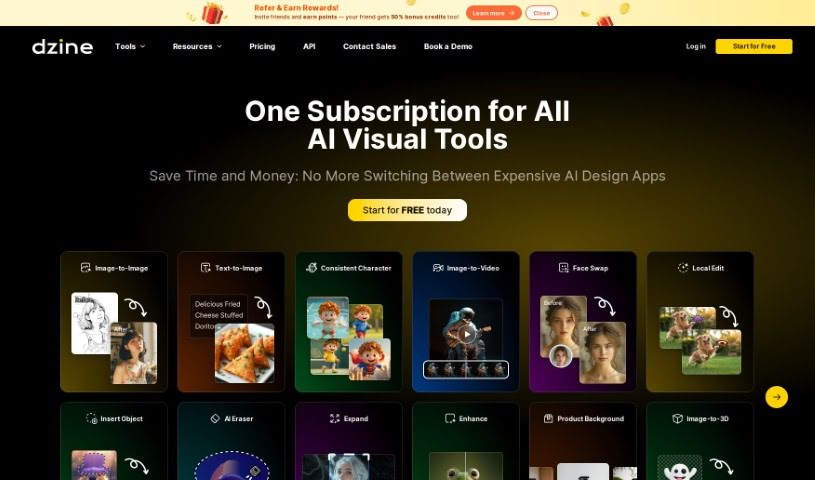
Screenshot of Stylar

Stylar

Discover Dzine, the AI-powered design platform that helps creators bring their ideas to life. Learn about its features, how to use it effectively in 2025, and how it stacks up against other image generators.

Screenshot

What is Dzine (Formerly Stylar)?

Dzine, which you might know as Stylar, is an online design platform that really uses generative AI to help creators turn their initial ideas into polished, professional visuals. It’s packed with features designed to make your creative process smoother and more impactful. You can transform photos into cartoons with its AI Photo Filter, blend images together using AI, and use handy generative fill and modify tools. Need to clean up a photo? It’s got background removal and object removal covered. Plus, you can add cool text effects, create logos, and even turn your sketches into finished art. What’s more, it offers AI-assisted tools specifically for generating consistent characters, and its combined approach to image generation and editing has earned praise from users, especially graphic designers and game developers.

Who created Dzine (Formerly Stylar)?

Rachel Johnson, who also owns an E-commerce Store, founded Dzine (formerly Stylar). The platform is built around AI-powered design features. Think image generation, editing, background removal, and text effects – all designed to help creators and designers work more efficiently and make their visual projects shine. Dzine’s whole aim is to spark creativity and boost productivity through its generative AI tools.

What is Dzine (Formerly Stylar) used for?

  • Create Consistent Characters: Generate characters that look the same across different images.
  • Streamline Workflows: Makes things much simpler for graphic designers.
  • Save Time & Resources: A big help for game developers looking to speed up their process.
  • Clean Up Photos: Easily remove unwanted objects or backgrounds from your pictures.
  • Sketch to Art: Turn your rough sketches into impressive artwork.
  • Text-to-Image Art: Create art just by describing it in text.
  • Automatic Prompt Generation: Get AI-generated prompts to help you create images.
  • Explore Design Styles: Dive into a wide variety of design styles to find the perfect look.
  • Enhance Images: Add stunning details and improve the overall look of your images.
  • AI Selection Tools: Use smart AI tools to select parts of an image automatically.
  • Art Generation with AI: Create unique art using artificial intelligence.
  • Add Text and Titles: Easily incorporate text and titles to enrich your images.
  • Improve Image Quality: Make your images sharper and generally better looking.

Who is Dzine (Formerly Stylar) for?

  • Graphic Designers
  • Game Developers
  • E-commerce Store Owners

How to use Dzine (Formerly Stylar)?

Ready to get started with Dzine (formerly Stylar AI)? Here’s a simple guide:

  1. Start Your First Project: Use the generative AI tools on Dzine to bring your creative ideas to life and turn them into professional visuals.
  2. All-in-One Design Platform: You can generate and edit your designs all in one place, thanks to an AI-powered workflow.
  3. AI Photo Filter: Want to turn photos into cartoons? This style transfer tool keeps the original photo details and characters intact while creating generative art.
  4. Combine Images with AI: Merge different elements into a single image. The Image-to-Image generator helps ensure everything matches stylistically.
  5. Generative Fill and Modify: Need to add or change something in an image? Just type what you want, and the tool handles it, saving you a lot of manual editing time.
  6. Remove Objects and Backgrounds: Use the generative tools to quickly clean up photos. You can easily remove objects, watermarks, or change backgrounds.
  7. AI Text Effects and Logo Maker: Make your texts and logos stand out with impressive textures, perfect for impactful projects.
  8. Turn Sketches into Art: Transform your rough drafts into stunning artwork, offering great inspiration and creative possibilities.
  9. AI Art Generator: Create art directly from text descriptions, bringing your conceptual visions into visual reality.
  10. Explore More Features: You can also upscale images, enhance photos, auto-select objects, and explore a huge library of styles for endless inspiration and creative production.

Related AI Tools

Discover more tools in similar categories that might interest you

123RF AI Image Generator

Creative Image Generation
Learn More

Stay Updated with AI Tools

Get weekly updates on the latest AI tools, trends, and insights delivered to your inbox

Join 25,000+ AI enthusiasts. No spam, unsubscribe anytime.