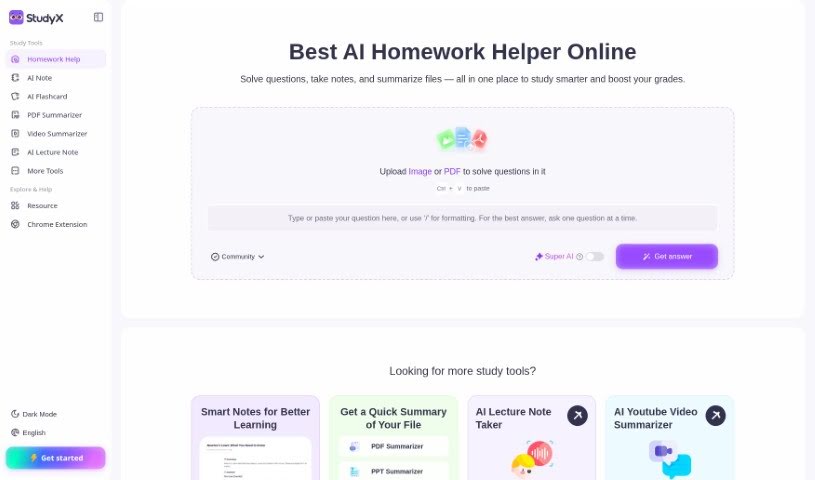
Screenshot of StudyX

StudyX

Discover what StudyX is and how to use it effectively in 2025. We'll explore its features and see how it stacks up against other student tools.

Screenshot

What is StudyX?

StudyX is a really smart homework assistant platform. It’s packed with tools designed to help students tackle their academic work. It is a comprehensive suite that makes studying easier. It can even recognize questions automatically and generate answers using powerful AI, like GPT-4. Plus, there’s a huge community Q&A section where you can find inspiration from millions of answers shared by other students. Need more help? StudyX offers a personalized editor and expert Q&A services available 24/7, so you always get the specific help you need. It also works smoothly with popular educational platforms like Canvas, Blackboard, and Moodle, which really speeds up your learning. You’ll find handy features like a Math Solver, Essay Writer, Grammar Checker, and Code Generator that simplify and improve your homework experience. You can even ask questions using text or images, and its user-friendly design makes it a top pick for over 200,000 students from more than 1,000 universities.

Who created StudyX?

StudyX was built by a team passionate about creating innovative learning tools for students everywhere. The platform brings together AI-generated answers, a Math Solver, an Essay Writer, a Grammar Checker, and a community Q&A feature. Their main goal is to empower young people globally by offering a user-friendly study tool that really focuses on what each student needs. The company is committed to supporting students through their academic journeys with personalized help and advanced features, including GPT-4 and ChatGPT, to ensure responses are accurate and detailed.

What is StudyX used for?

  • Works across different platforms
  • Offers personalized learning experiences
  • Generates AI answers
  • Matches you with community Q&As
  • Provides 24/7 expert support
  • Includes a Math Solver
  • Features an Essay Writer
  • Has a Grammar Checker
  • Includes a Code Generator
  • Lets you input questions using text and images
  • AI Answer Generation: It uses GPT-4 and ChatGPT to give you accurate, detailed answers to your homework questions.
  • Community Q&A Matching: You can look through over 75 million community answers to get different viewpoints and solutions for your assignments.
  • Personalized Learning: Work with the AI to get step-by-step explanations tailored just for you, helping you learn more deeply.
  • 24/7 Expert Support: Connect with experts in different subjects anytime for detailed guidance and help with your homework.
  • Cross-Platform Compatibility: Your learning progress syncs easily across devices and platforms like Canvas, Blackboard, Moodle, and others.

Who is StudyX for?

  • Students
  • Educators
  • Academic Professionals
  • Researchers
  • Online learners
  • AI enthusiasts
  • Teachers
  • Academics
  • Professionals in various fields

How to use StudyX?

Here’s how you can get the most out of StudyX:

  1. Access StudyX Platform: First, head over to the StudyX website. You’ll need to create an account to log in.
  2. Input Your Questions: Use the platform to ask your questions. You can type them out or even upload images. StudyX is designed to handle all sorts of question formats, fitting different types of assignments.
  3. AI Answer Generation: Take advantage of StudyX’s AI system that generates answers. It uses advanced models like GPT-4 to provide accurate and detailed responses to whatever homework questions you have.
  4. Community Q&A Matching: Dive into the more than 75 million community answers available on StudyX. This is a great way to see different perspectives and find solutions for your academic tasks.
  5. Personalized Learning Experience: Interact with the AI on StudyX. You’ll get explanations that are tailored step-by-step, designed specifically for how you learn best.
  6. 24/7 Expert Support: Need more in-depth help? You can connect with subject matter experts who are available around the clock on StudyX.
  7. Cross-Platform Compatibility: Enjoy a smooth experience as your learning progress syncs across different devices and educational platforms, including Canvas, Blackboard, and Moodle.
  8. Utilize Additional Tools: Don’t forget to use StudyX’s other helpful features like the Math Solver, Essay Writer, Grammar Checker, and Code Generator. They’re there to make your homework simpler and better.
  9. Explore FAQs: If you have common questions about the platform or its features, check out the FAQs section. It’s a good place to find quick answers.

By following these steps, you can really make StudyX work for you, improving your academic experience and making homework much smoother.

Related AI Tools

Discover more tools in similar categories that might interest you

Academic Help Free Essay Generator

Education Academic Writing
Learn More

Stay Updated with AI Tools

Get weekly updates on the latest AI tools, trends, and insights delivered to your inbox

Join 25,000+ AI enthusiasts. No spam, unsubscribe anytime.