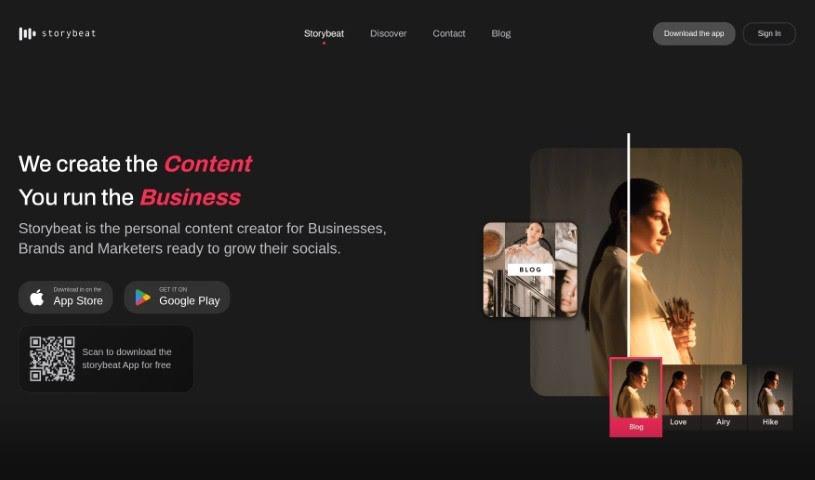
Screenshot of Storybeat

Storybeat

Discover what Storybeat is and how to use it effectively in 2025. Explore its features, from AI avatars to music sync, and see how it stacks up against other photo editors.

Screenshot

What is Storybeat?

Storybeat is your go-to, all-in-one app for making incredible social media content. It’s built for today’s creators who want to easily whip up stunning, viral posts. It is your creative sidekick, packed with super intuitive tools, ready-to-go professional templates, and smart AI features. Storybeat really helps you craft those eye-catching stories and reels that grab attention on platforms like Instagram, TikTok, and beyond. You can even sync your visuals perfectly with music, try out cool, unique filters, transform yourself into different characters using AI avatars, and use pro editing tools to make your photos and videos look absolutely top-notch. It’s no wonder over 10 million creators worldwide are already part of the Storybeat community – the creative possibilities here are pretty much endless for anyone who loves telling stories digitally.

Who created Storybeat?

While the specific team or individual behind Storybeat isn’t mentioned in the details we have, what’s clear is the massive community they’ve built. We’re talking over 10 million creators globally! The app itself is an all-in-one image editing powerhouse, specifically designed for modern content creators. It makes it a breeze to create those eye-catching stories and reels, offering professional templates, seamless music synchronization, and powerful AI tools, all alongside pro editing features. Storybeat has clearly struck a chord, gaining a huge following on social media and among its users.

What is Storybeat used for?

Storybeat is fantastic for a whole range of creative tasks:

  • Making stunning and viral social content: Get your posts noticed and shared.
  • Crafting eye-catching stories and reels: Design engaging visual narratives.
  • Accessing professional templates: Choose from a variety of templates for different themes and occasions.
  • Synchronizing visuals with music: Match your videos and images to the perfect soundtrack.
  • Transforming into characters with AI avatars: Stand out by becoming different people or personalities.
  • Enhancing photos and videos: Use user-friendly pro editing tools to make your content shine.
  • Optimizing your editing workflow: The Beat Sync feature helps you work faster and smarter.
  • Joining a community of creators: Connect with over 10 million other users.
  • Exploring unlimited creative possibilities: Let your imagination run wild.
  • Reflecting high-quality standards: Ensure your photos and videos look professional.

Who is Storybeat for?

Storybeat is perfect for:

  • Content creators
  • Digital storytellers
  • Social media creators

How to use Storybeat?

Getting started with Storybeat is pretty straightforward. Here’s a simple step-by-step guide:

  1. Download and Install: First things first, grab the Storybeat app for free. You can find it on the App Store or Google Play Store.
  2. Sign Up or Log In: If you’re new, create an account. If you’ve used it before, just log in.
  3. Explore Templates: Take a look around! There’s a huge variety of professional templates for all sorts of themes and occasions – think Women’s Day special templates, cool Polaroid filters, or stylish Aesthetic layouts.
  4. Add Music: Want to add some flair? You can easily sync your visuals with the perfect soundtrack from the app’s own music library.
  5. Use AI-Powered Tools: Get creative with the AI tools! You can transform yourself into different characters or personalities, which really helps your social feed stand out.
  6. Pro Editing: Make your photos and videos look their absolute best. The app offers user-friendly professional editing features to boost quality.
  7. Beat Sync Feature: This is a real time-saver. Use the Beat Sync feature to make your editing workflow super efficient.
  8. Join the Community: You’re not alone! Storybeat has a community of over 10 million creators. You can check out what others are doing and be part of this network of digital storytellers.
  9. Create and Share: Now, put it all together! Craft those eye-catching stories and reels. With Storybeat, you can create content that really engages your audience and has a great chance of going viral.

By following these steps, you’ll be well on your way to unleashing your creativity and producing amazing social media content with Storybeat. It’s all about making your stories unique and captivating for everyone who sees them.

Related AI Tools

Discover more tools in similar categories that might interest you

123RF AI Image Generator

Creative Image Generation
Learn More

Stay Updated with AI Tools

Get weekly updates on the latest AI tools, trends, and insights delivered to your inbox

Join 25,000+ AI enthusiasts. No spam, unsubscribe anytime.