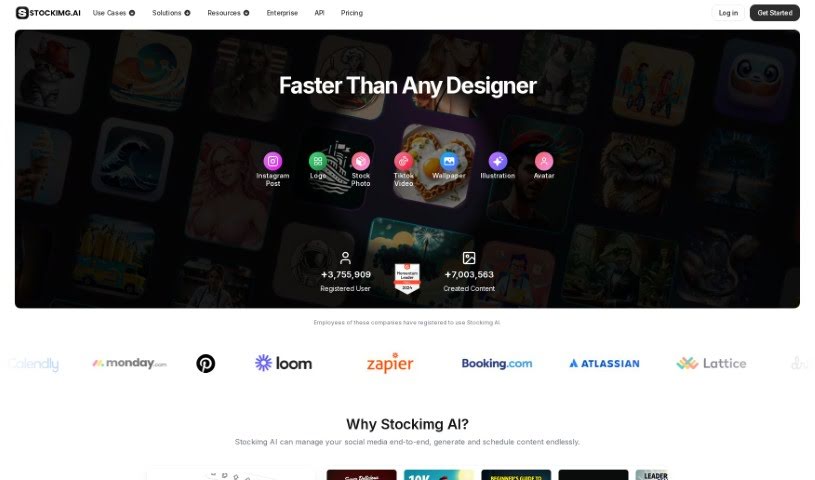
Screenshot of Stockimg AI

Stockimg AI

Discover what Stockimg AI is and how to make the most of its features in 2025. We'll cover its capabilities, compare it to other design generators, and show you how to get started.

Screenshot

What is Stockimg AI?

Stockimg AI is an all-in-one design and content creation tool that uses artificial intelligence to help you easily generate all sorts of visuals. Think logos, illustrations, wallpapers, posters, and much more. It also offers handy features for social media, like managing your accounts and automating posts by scheduling them with AI. What’s great about Stockimg AI is that it offers a variety of categories, lets you create stock images, has a super user-friendly interface, generates images at high speed, and provides a wide range of design options.

You can link your Instagram, Facebook, Twitter, and LinkedIn accounts directly to Stockimg AI. This lets you create posts for these platforms and then schedule them to go out automatically. Plus, if you decide to get a paid subscription, you’ll own the commercial and copyright rights to everything you create. They also offer a free trial, so you can give it a spin and see if it’s the right fit before you commit.

Stockimg AI is capable of generating a wide array of images. This includes things like logos, book covers, posters, wallpapers, stock images, illustrations, icons, and even designs for web and mobile user interfaces. The process for creating something like a book cover is pretty straightforward: you just pick the category you need and follow the prompts to bring your design to life. The whole tool is built to be easy to use, allowing for really quick image generation with plenty of options to customize your creations.

So, to sum it up, Stockimg AI is a really flexible tool that makes the design process much simpler. It gives you lots of design choices and generates images fast, making it a super helpful resource for pretty much any creative project you have in mind.

Who created Stockimg AI?

Stockimg AI first launched on November 7, 2022. The company behind it is Stockimg AI, Inc. While the exact founder isn’t mentioned in the information I have, the company itself operates under that name.

What is Stockimg AI used for?

Stockimg AI is incredibly versatile. Here’s a breakdown of what you can do with it:

  • Social Media Management:
    • Automate your social media posts.
    • Generate social media posts.
    • Automate social media content generation.
    • Create promotional images specifically for social media posts.
    • Enhance your social media content using AI.
  • Image Generation:
    • Generate logos (also listed as Logo creation).
    • Design posters (also listed as Poster design).
    • Create wallpapers (also listed as Wallpaper creation).
    • Produce illustrations (also listed as Illustration Generation and AI-made illustrations).
    • Develop icons (also listed as Icon creation).
    • Generate book covers (also listed as Create book covers and Book cover design).
    • Design web and mobile UI elements (also listed as Web and mobile UI design and Produce web and mobile UI images).
    • Produce stock images (also listed as Stock image generation).
    • Create avatars (also listed as AI-based avatar creation).
  • Overall Design:
    • Create various visual content.
    • AI-made image creation.

Who is Stockimg AI for?

Stockimg AI is a great tool for a wide range of professionals and individuals who need to create visual content:

  • Graphic designers
  • Illustrators
  • Social media managers
  • Web designers
  • Marketing professionals
  • Content creators
  • Logo Designers
  • Marketers
  • Small Business Owners
  • Brand managers

How to use Stockimg AI?

Getting started with Stockimg AI is pretty straightforward. Just follow these steps:

  1. Head over to the Stockimg AI website. Once you’re there, click on the “Let’s Get Started” link to jump right into creating images.
  2. Take a look around at all the different categories they offer. You’ll find options for stock images, book covers, posters, wallpapers, logos, illustrations, icons, and designs for web and mobile user interfaces.
  3. Choose the type of image you want to create. Whether it’s a logo, a book cover, or a wallpaper, just select your category.
  4. The tool will guide you with prompts. Follow these instructions to customize and generate the image you’re looking for.
  5. If you want to use it for social media, connect your accounts like Instagram, Facebook, Twitter, and LinkedIn. This lets you generate and schedule posts right through the AI.
  6. You’ll notice the interface is really user-friendly, making it easy to generate images quickly – often in just seconds!
  7. Don’t forget to try out the free trial! It’s a great way to get familiar with everything Stockimg AI can do before you decide on a paid subscription.
  8. It’s always a good idea to check out the Privacy Policy and Terms of Service on their website. This helps you understand exactly how you can use your creations and what the guidelines are.
  9. If you do decide to go with a paid subscription, you’ll have full ownership of the commercial and copyright rights for all the images and posts you create using Stockimg AI.

Basically, Stockimg AI makes designing much easier with its AI tools, offering a complete solution for creating all sorts of visual content efficiently and professionally. Its speed, helpful guidance, and diverse creative options make it a really valuable asset for generating images for any purpose. Plus, its social media integration, reliable customer support, and secure login all contribute to a smooth and positive user experience.

Related AI Tools

Discover more tools in similar categories that might interest you

123RF AI Image Generator

Creative Image Generation
Learn More

Stay Updated with AI Tools

Get weekly updates on the latest AI tools, trends, and insights delivered to your inbox

Join 25,000+ AI enthusiasts. No spam, unsubscribe anytime.