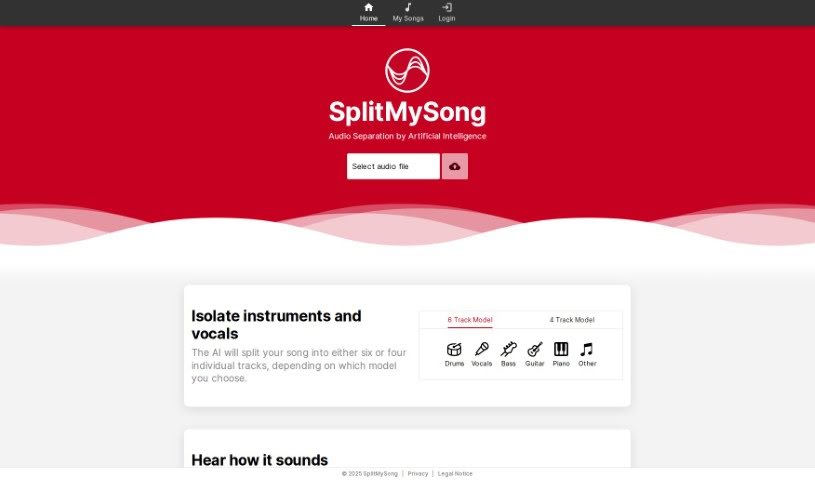
Screenshot of Splitmysong

Splitmysong

Discover what Splitmysong is and how to use it effectively in 2025. We'll explore its features and see how it stacks up against other music generators.

Screenshot

What is Splitmysong?

SplitMySong is a specialized tool designed for music splitting, audio separation for music production, and mixing. It uses AI-powered audio separation to help you isolate individual tracks from your songs – think vocals, drums, bass, guitar, piano, and more. Plus, you can tweak each track’s volume and panning, and even adjust the tempo and pitch using its handy mixer feature. Once you’ve got your custom mix just right, you can download it for your personal use. The whole process usually takes about 1 to 3 minutes. Just a heads-up, the free version has some limits on file size, song duration, and how many times you can upload each day. Also, songs uploaded to the free tier get automatically deleted after about a day. If you’re a Patreon subscriber, you get access to full-length song splitting, and there’s a handy Credit Calculator to keep track of your credit usage.

Who created Splitmysong?

SplitMySong was launched on May 28, 2022, by an unspecified founder. The company focuses on providing a specialized AI tool for music splitting, audio separation for music production, and mixing. It lets users easily isolate individual tracks like vocals, drums, bass, guitar, and piano. You can then control panning and volume, adjust tempo and pitch, and download your personalized mix for your own use.

What is Splitmysong used for?

SplitMySong is incredibly versatile for music creators. Here’s a breakdown of what you can do with it:

  • Isolate Tracks: Easily pull out individual instruments or vocals, such as drums, bass, guitar, piano, and even an ‘other’ category for remaining sounds.
  • Mixer Controls: Fine-tune each isolated track by adjusting its volume and panning. You can also control the overall tempo and pitch of your songs.
  • Download Custom Mixes: Once you’ve made your adjustments, download your personalized mix for personal use.
  • Tempo & Pitch Adjustment: Change the key of songs to better suit your vocal range or instrument tuning, or adjust the tempo to help you master difficult passages or push your playing technique.
  • Web App Access: Use the SplitMySong Web App directly on your mobile device or desktop computer.
  • Mute Instruments/Vocals: Effectively silence specific instruments or vocals within a song.
  • Create Samples & Remixes: Craft custom samples for your remixes or original compositions.
  • Advanced Splitting: Access full-length song splitting and manage your usage with a credit system.
  • Analyze Music: Dive deep into the nuances of music, examining riffs, fills, solos, and vocal performances.
  • Fill Missing Parts: If a song has gaps, you can mute certain instruments to fill them in.
  • Discover Details: Uncover the intricacies of every riff, fill, solo, or vocal performance within a full mix.
  • Master Difficult Passages: Lower the tempo to practice and perfect challenging musical sections.
  • Push Musical Boundaries: Increase the tempo to explore and improve your playing technique and overall musical proficiency.
  • Mobility: Install it as a web app for easy access on the go.
  • Storage Management: Be aware that uploaded songs and processed tracks are automatically deleted after about a day, so download your work promptly.
  • Patreon Benefits: Get monthly credits for full-length song splitting as a Patreon subscriber.
  • Credit Tracking: Use the Credit Calculator to estimate your monthly credit needs.

Who is Splitmysong for?

SplitMySong is a fantastic tool for anyone involved in music creation or manipulation:

  • Musicians
  • Music producers
  • Audio Engineers
  • Sound engineers
  • DJs
  • Remixers

How to use Splitmysong?

Using SplitMySong is pretty straightforward. Here’s how to get the most out of it:

  1. Upload Your File: Start by uploading your audio file. Make sure it’s between 0.1 and 200 MB and in a common format like MP3, OGG, FLAC, WAV, or AIFF.
  2. Let the AI Separate: SplitMySong’s AI will then break down your song into individual tracks – think vocals, drums, bass, guitar, piano, and an ‘other’ category for anything else.
  3. Make Your Adjustments: Jump into the mixer feature to tweak the volume, panning, tempo, and pitch of each track until it sounds just right for you.
  4. Download Your Mix: Once you’re happy with your custom mix, download it for your personal use.
  5. Mind the Deletion: Remember, uploaded songs and processed tracks are automatically deleted after about a day. So, be sure to download your results to avoid losing them!
  6. Use on Mobile: While there isn’t a dedicated mobile app, you can easily use the SplitMySong Web App right on your mobile device or desktop for a similar experience.
  7. Full-Length Splitting: If you’re a Patron subscriber, you get monthly credits that allow you to split full-length songs.
  8. Track Your Credits: Use the Credit Calculator on SplitMySong to figure out how many credits you’ll need each month based on how many songs you plan to upload and their lengths.

For the best results, it’s a good idea to use major web browsers like Chrome, Firefox, Edge, or Safari. And if you want the highest quality export, choose the lossless ‘WAV’ format. Following these steps will help you really make the most of SplitMySong’s music splitting and mixing capabilities.

Related AI Tools

Discover more tools in similar categories that might interest you

Stay Updated with AI Tools

Get weekly updates on the latest AI tools, trends, and insights delivered to your inbox

Join 25,000+ AI enthusiasts. No spam, unsubscribe anytime.