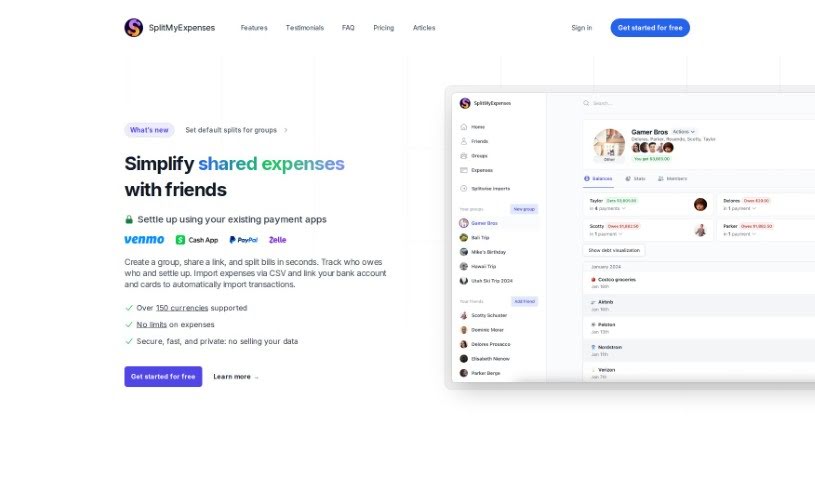
Screenshot of SplitMyExpenses

SplitMyExpenses

Discover SplitMyExpenses in 2025! Learn what it is, how to use its features for splitting bills, and how it stacks up against other finance tools.

Screenshot

What is SplitMyExpenses?

SplitMyExpenses is a handy platform built to make splitting bills with your friends super simple. You just enter your expenses, and the tool divides them up equally among everyone involved. It’s got some neat features, like automatically scanning receipts and breaking down what each item costs. Plus, you can even charge your friends directly through apps like Venmo and CashApp. What’s really cool is that SplitMyExpenses uses AI to handle tasks like scanning receipts and sorting out the items, which just makes splitting expenses way more efficient and convenient. You can even link your credit cards and bank accounts securely to have expenses imported automatically. Don’t worry about your financial info; the platform keeps everything safe by handling financial account integrations securely through Stripe.

Who created SplitMyExpenses?

Bradley Bernard is the person behind SplitMyExpenses. He launched it on June 20, 2024, with the main goal of making it easier for friends to split bills. He wanted to create a user-friendly way to manage group expenses without any hassle. The platform offers automated bill splitting, receipt scanning, easy integration with payment apps like Venmo and PayPal, and it handles your financial data securely. Bradley Bernard is still actively developing SplitMyExpenses, always looking to use the latest technologies to make the user experience and features even better.

What is SplitMyExpenses used for?

  • Splitting bills automatically
  • Charging friends directly on Venmo, CashApp
  • Scanning receipts and itemizing them automatically
  • Connecting with credit cards and bank accounts
  • Importing expenses from all sorts of places
  • Keeping a detailed history of charges
  • A feature to review charges, making things clearer
  • Charts that help you track spending effectively
  • It offers a free plan, which is great!
  • Pricing is clear and straightforward
  • Your financial data is handled securely
  • It helps payments go through faster
  • Requesting payments with just one tap

Who is SplitMyExpenses for?

  • Students
  • Roommates
  • People traveling together
  • Anyone who eats out often
  • Colleagues
  • Event organizers
  • Finance professionals
  • Freelancers
  • Travel buddies
  • Accountants
  • Analysts
  • Financial Planners
  • Friends who often split bills
  • People with busy schedules
  • Anyone managing expenses with friends
  • Professionals who need to split bills easily with colleagues or clients

How to use SplitMyExpenses?

Here’s how to get the most out of SplitMyExpenses:

  1. Sign Up: First, register on the SplitMyExpenses platform. You can use the link provided.
  2. Input Expenses: Add your expenses into the tool. It will then figure out how to divide them equally among everyone involved.
  3. Receipt Scanning: Use the AI-powered receipt scanning. Just upload a picture of your receipt, and the AI will automatically list out all the items, making it super easy to split.
  4. Charge Friends: You can charge your friends directly through popular apps like Venmo, CashApp, PayPal, and Zelle.
  5. Link Accounts: To make things even easier, link your credit cards and bank accounts. This way, expenses can be imported automatically every day.
  6. Expense Import: You can import expenses by linking your financial accounts for automatic daily imports, or you can import them in bulk from files you get from your bank or other personal finance tools.
  7. Review Charges: Check out the charge history to see who was charged, when, and how much. You can even share a link with your friends so they can review the charges too, which really helps with transparency.
  8. Track Spending: Use the nice-looking charts SplitMyExpenses provides to keep a good eye on your spending over time.
  9. Subscription Plans: Pick the plan that fits you best. There’s a Free plan, a plan for $3/month that includes AI receipts and one linked card, or the Unlimited plan for $9/month.
  10. Cancel Anytime: You can cancel your subscription whenever you need to.

By following these steps, you’ll be able to split bills and expenses with your friends efficiently using SplitMyExpenses, taking full advantage of its AI features and payment integrations.

Related AI Tools

Discover more tools in similar categories that might interest you

Stay Updated with AI Tools

Get weekly updates on the latest AI tools, trends, and insights delivered to your inbox

Join 25,000+ AI enthusiasts. No spam, unsubscribe anytime.