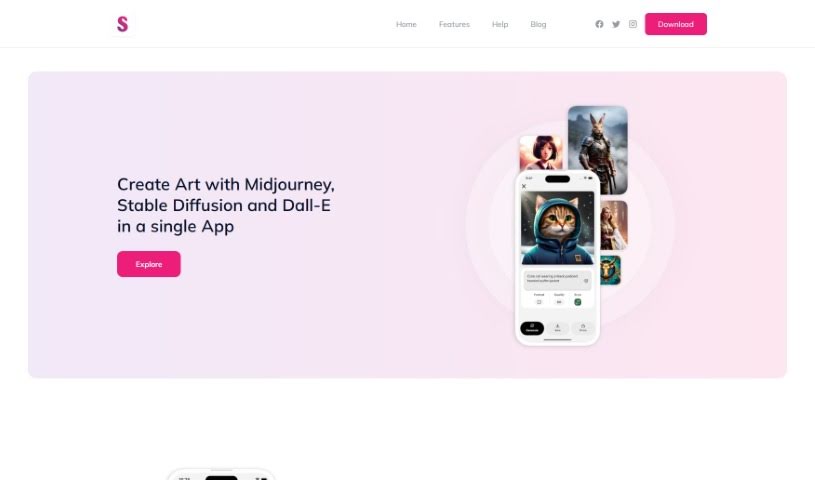
What is Splend AI?
Splend AI is a really neat app that brings together three powerful AI art generators: Midjourney, Stable Diffusion, and Dall-E. It’s designed to help you bring your creative ideas to life, letting you generate unique portraits, artwork, and landscapes just from simple text descriptions. You can pick from styles that are already set up, or you can create your own custom styles to make sure the art looks exactly how you imagine it. But Splend AI isn’t just about making art; it’s also about building a community. You can set up your own profile, share the amazing art you create, and connect with other people who are into AI art. What’s even better is that Splend AI is completely free! You can grab it from the Google Play Store or the App Store and dive into the world of AI art creation, all while adding your own pieces to a growing collection of art made by users like you.
Key Features of Splend AI:
- Works with Multiple AI Models: You can use Midjourney, Stable Diffusion, and Dall-E all within the same app. It’s like having a whole studio in one place!
- Lots of Art Styles: Whether you want portraits, landscapes, or something else entirely, you can create it. Plus, you can use styles that are already there or make your own unique ones.
- Connect with Others: Build your profile, show off your art, and chat with other AI artists right there on the platform.
- See What Others Are Making: The app gives you a peek at the latest creations from Splend AI users, which is a great way to get inspired.
- Free and Easy to Get: You can download Splend AI for free on both Google Play and the App Store.
Basically, Splend AI offers a complete and easy-to-use space for creating art with AI. It encourages creativity, teamwork, and community among all its users.
Who created Splend AI?
Splend AI was developed by an innovative founder who wanted to create a single application that combined the strengths of AI models like Midjourney, Stable Diffusion, and Dall-E. This platform lets users create unique artwork, portraits, and landscapes simply by typing in a text description. On top of that, Splend AI really focuses on building a community, allowing users to share their creations and connect with other artists, and it’s all available for free.
What is Splend AI used for?
- You can create portraits, landscapes, or any kind of artwork using styles that are either pre-set or ones you make yourself.
- It’s a great way to share your art with friends and the wider AI artist community.
- You can check out a selection of recent artwork made by other Splend AI users for inspiration.
- Easily generate portraits, artwork, and landscapes just by describing them in text.
- Use styles that are already available or create your own custom ones to make your artistic pieces truly unique.
- It helps build a community where you can share your art and connect with other AI artists.
- The user gallery is a fantastic place to find inspiration from art that’s been created recently.
- Download the app for free and let your creativity flow with AI-powered art.
- You can combine the power of Midjourney, Stable Diffusion, and Dall-E AI models for all your creative projects.
- Generate all sorts of art styles, including portraits, landscapes, and pretty much anything else you can imagine.
- Share your artwork with friends and the AI artist community by creating a profile.
- Use Splend AI to create art from simple text descriptions.
- Enjoy free access to Splend AI, which you can download from Google Play or the App Store.
- Create art from text descriptions.
- Generate unique portraits.
- Create artwork using pre-defined or custom styles.
- Share your art with the community.
- Access user-generated content.
- Use Midjourney, Stable Diffusion, and Dall-E AI models.
- Download from Google Play or the App Store.
- Contribute to a growing gallery of art.
- Access recent creations from Splend AI users.
- Connect with fellow AI artists.
- Use pre-defined or custom styles for your artistic creations.
- Share artwork and connect with fellow AI artists in a community setting.
- Access a gallery of user-generated content for inspiration.
- Use multiple AI models (Midjourney, Stable Diffusion, and Dall-E) for creative projects.
- Create portraits, artwork, and landscapes from text descriptions.
- Use multiple AI models (Midjourney, Stable Diffusion, Dall-E) in a single app.
- Generate art with pre-defined or custom styles.
- Share art with friends and the AI artist community through profile creation.
- Access a user gallery for inspiration.
- Enjoy free access and availability on Google Play and the App Store.
Who is Splend AI for?
- Artists
- Art creators
- AI artists
- Graphic designers
How to use Splend AI?
Splend AI is a really versatile platform that brings together three powerful generative AI models: Midjourney, Stable Diffusion, and Dall-E. Here’s a simple, step-by-step guide to get you started:
- Download the App: First things first, Splend AI is free to download on both Google Play and the App Store. Just find it and install it on your device.
- Create an Account: Once you open the app, you’ll want to create a user profile. This is handy because it lets you save all the art you create, share it with others, and connect with the whole AI artist community.
- Choose an AI Model: Take a look at the different AI models available – Midjourney, Stable Diffusion, and Dall-E. Pick the one that best suits what you want to create for your project.
- Generate Art: Now for the fun part! Start creating by simply typing a text description of what you imagine – whether it’s a portrait, a landscape, or any other kind of artwork. You have the choice to use styles that are already set up or to define your own to really personalize the final output.
- Share Your Art: After you’ve finished creating your masterpiece, share it with the community! By posting your art on Splend AI, you can connect with other users, get new ideas, and really show off your creativity.
- Explore the User Gallery: Take some time to discover all sorts of recent creations from other Splend AI users in the user gallery. It’s a great way to get inspiration for your own projects and see the amazing variety of work the community is producing.
- Check Out the FAQs: If you have more questions, the FAQs section within Splend AI is a great resource. You can find more info about the app, what you can create, how sharing works, and where to download the app for free.
By following these steps, you can really make the most of Splend AI. You’ll be able to unleash your creativity using the power of generative AI models, connect with other artists, and become part of a lively AI artist community.