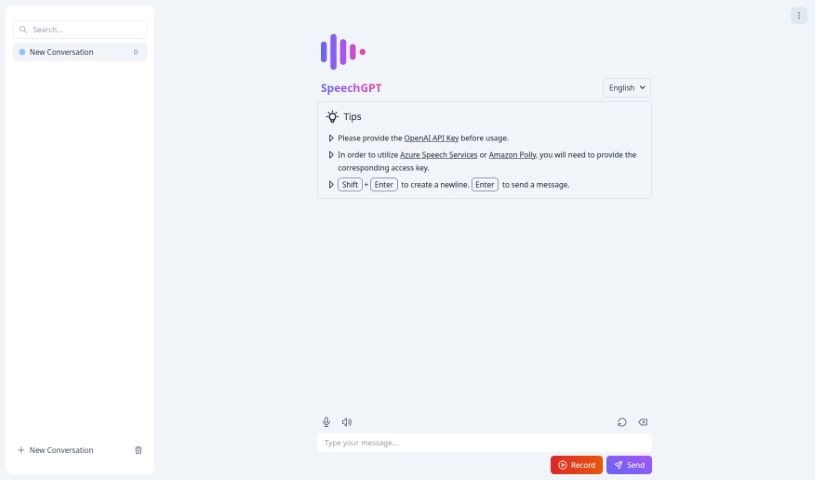
Screenshot of Speechgpt

Speechgpt

Discover Speechgpt, a powerful AI tool for creating realistic audio. Learn its features, compare it to other voice generators, and find out how to use it for voiceovers, podcasts, and more in 2025.

Screenshot

What is Speechgpt?

SpeechGPT is a really neat tool that helps you create top-notch audio content using some pretty advanced AI. It is your go-to for generating speech that sounds incredibly realistic and natural. It’s perfect for all sorts of things, like making voiceovers for videos, producing podcasts, or creating any other kind of audio media. The platform itself is super easy to use, meaning you can get to its features without a hassle. Plus, they’ve put together detailed guides, so even if you’re new to making synthesized speech, you’ll have a smooth experience.

One of the standout things about SpeechGPT is how much you can customize. You can really tweak the voices, pick different accents, and adjust speech patterns to make your audio truly unique and exactly what you need. They also take privacy seriously, so you can rest assured that your data and whatever you create stays safe and sound. Whether you’re a content creator, a marketer trying to reach more people, or an educator looking for new ways to engage students, SpeechGPT gives you flexible audio tools to make your projects shine and really connect with your audience.

Who created Speechgpt?

SpeechGPT is a leading solution for generating speech, offering advanced AI-powered audio creation services. This platform really focuses on letting you customize everything and keeping your data private, so you can efficiently create audio that’s tailored just for you and stays secure. It was founded by a forward-thinking entrepreneur who wanted to make workflows simpler and content better for creators, marketers, and educators.

What is Speechgpt used for?

SpeechGPT is incredibly versatile! Here’s a look at what you can do with it:

  • Voiceovers: Produce professional voiceovers for videos, presentations, and more.
  • Podcasts: Create engaging audio content for your podcast episodes.
  • Audio Media: Generate all sorts of audio media for different projects.
  • Voice Customization: Fine-tune voices, accents, and speech patterns to get just the right sound.
  • Personalized Audio: Craft unique audio content that’s specifically made for your needs.
  • Content Enhancement: Boost your projects as a content creator, marketer, or educator.
  • Audience Engagement: Captivate your audience with unique and tailored audio pieces.
  • Workflow Simplification: Make your content creation process much easier.
  • Rapid Production: Get your audio produced quickly without sacrificing quality.
  • Security & Privacy: Trust that your data and creations are kept secure.

Who is Speechgpt for?

SpeechGPT is designed for:

  • Content Creators: Anyone making videos, podcasts, or other digital content.
  • Marketers: Professionals looking to enhance their campaigns with audio.
  • Educators: Teachers and trainers seeking new ways to deliver information.

How to use Speechgpt?

SpeechGPT is a really user-friendly tool, making it simple to generate high-quality audio. To get the most out of it, just follow these steps:

  1. Visit the Site: Head over to the SpeechGPT website and find the section dedicated to speech generation.
  2. Get Familiar: Take a moment to look around the site. Everything’s laid out to be easy to navigate and access.
  3. Check the Docs: Seriously, give the detailed documentation a read. It’s there to guide you through the whole speech generation process smoothly.
  4. Start Customizing: Begin by picking the options that fit what you need – think different voices, accents, and speech styles.
  5. Fine-Tune: Once you’ve chosen your basics, spend a little time fine-tuning those settings. This is how you create that truly unique, personalized audio piece.
  6. Use Advanced Features: Don’t forget to explore the advanced customization options. They can really boost the quality and make your generated speech sound even more authentic.
  7. Trust the Privacy: You can feel confident knowing that all your data and the audio you create are kept secure on the SpeechGPT platform.
  8. Elevate Your Projects: Whether you’re a content creator, marketer, or educator, use SpeechGPT to really lift your projects with dynamic audio.
  9. Enjoy the Process: Experience how seamless and efficient speech generation can be with SpeechGPT. You can produce audio rapidly without ever compromising on how good it sounds.
  10. Simplify and Captivate: Use SpeechGPT to streamline your workflow, create content that really grabs attention, and keep your audience hooked with audio that sounds completely natural.

By following these straightforward steps, you’ll be able to take full advantage of everything SpeechGPT offers, making your audio content creation process both effective and efficient.

Related AI Tools

Discover more tools in similar categories that might interest you

Stay Updated with AI Tools

Get weekly updates on the latest AI tools, trends, and insights delivered to your inbox

Join 25,000+ AI enthusiasts. No spam, unsubscribe anytime.