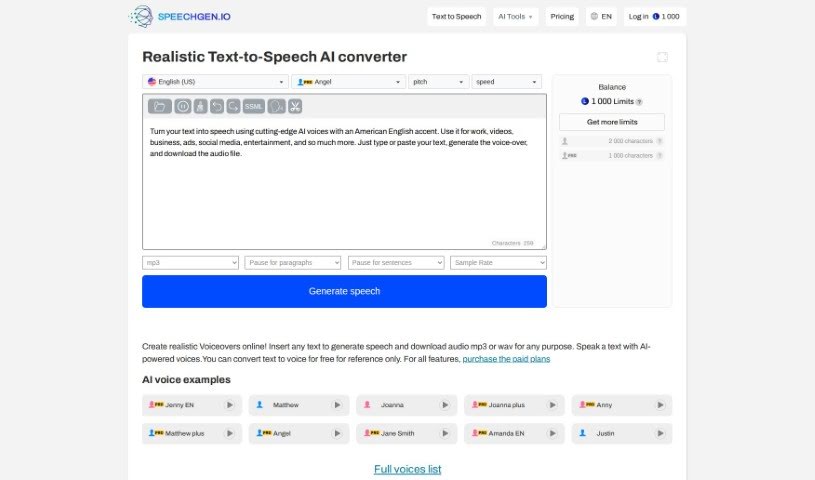
Screenshot of Speechgen.io

Speechgen.io

Discover what Speechgen.io is and how to use it effectively in 2025. We'll explore its features and see how it stacks up against other Text To Speech Tools.

Screenshot

What is Speechgen.io?

Speechgen.io is a really handy online tool that’s all about text-to-speech (TTS) technology. It lets you turn written words into natural-sounding spoken audio, and you can pick from lots of different languages and voices. This makes it super useful for all sorts of things, like creating content, making things more accessible for people, or for your multimedia projects. Speechgen.io has a simple interface, so you can easily type or paste your text, choose the voice and language you like, and then get high-quality speech audio pretty quickly. Plus, you can tweak the settings and even integrate it with other tools if you need to, which is great for meeting different user needs.

Who created Speechgen.io?

Speechgen.io was actually built by a team of developers who are really into AI and how we process language. While we don’t have a specific name for the founder, they’re probably someone with a lot of experience in this area, aiming to create new ways for people and computers to interact more smoothly. The company itself is focused on making top-notch text-to-speech tech for all sorts of industries and uses. Their dedication to quality and pushing technological boundaries really makes them stand out in the AI software world.

What is Speechgen.io used for?

  • Video creators can make voiceovers for their videos without needing expensive studio equipment.
  • News outlets can convert written news into speech for reporting and sports announcements.
  • Students and professionals find it a quick way to go through content.
  • Foreign language learners can use it to practice pronunciation and improve their understanding.
  • Software developers can add synthesized speech to their programs to make them easier for users.
  • Marketers can easily produce audio content for their startups.
  • It’s used to generate IVR voice recordings for interactive voice response systems.
  • Educators use it to create audio examples for teaching foreign languages.
  • Book lovers can use it as an audiobook reader, with the option to download the TTS voiceovers.
  • HR departments and e-learning specialists create learning modules and training materials using AI text-to-speech.
  • Second-language students can improve their pronunciation and text comprehension.
  • Software developers can enhance user experience by adding synthesized speech to their programs.
  • Marketers can create easy-to-produce audio content for startups.
  • IVR voice recordings can be generated for interactive voice response systems.
  • Educators use it to create audio examples for foreign language teaching.
  • Book lovers can use it as an out-loud book reader with downloadable TTS voiceovers.
  • HR departments and e-learning professionals utilize it for learning modules and employee training.
  • Video makers can create voiceovers for videos without costly studio production.
  • Newsmakers convert text to speech for news and sports reporting.
  • Second-language learners use it for pronunciation improvement and text comprehension.
  • Software developers enhance user experience by adding synthesized speech to programs.
  • IVR voice recordings can be generated for interactive voice response systems.
  • Educators use it to create audio examples for foreign language teaching.
  • Book lovers utilize it as an out-loud book reader with downloadable TTS voiceovers.
  • HR departments and e-learning professionals create learning modules and employee training with AI text to speech software.

Who is Speechgen.io for?

  • Content creators
  • Podcasters
  • Educators
  • Translators
  • Developers
  • Marketing specialists
  • Accessibility coordinators
  • Voice-over artists
  • Filmmakers
  • Journalists

How to use Speechgen.io?

Using Speechgen.io is pretty straightforward. Just follow these simple steps:

  1. Head over to the website: Open your web browser and go to Speechgen.io.
  2. Sign up or log in: If you’re new, create an account. If you already have one, just log in.
  3. Pick your voice: Choose the voice type you like best for your text-to-speech conversion.
  4. Type or paste your text: Put the text you want to convert into the text box provided.
  5. Adjust the settings: You can customize things like the speed, pitch, and volume of the speech.
  6. Preview it: Give it a listen to make sure the generated speech sounds just right.
  7. Download or share: Once you’re happy with it, you can download the speech in your preferred format or share it directly.
  8. Save your settings (if you want): If you’ve got custom settings you like, you can save them for next time.
  9. Check out extra features: Explore other options like different languages, accents, and more for further customization.
  10. Share your thoughts: Feel free to give feedback; it really helps us improve the platform and your experience.

By following these steps, you’ll be able to use Speechgen.io effectively to convert text to speech, with plenty of options to make it perfect for your needs.

Related AI Tools

Discover more tools in similar categories that might interest you

Stay Updated with AI Tools

Get weekly updates on the latest AI tools, trends, and insights delivered to your inbox

Join 25,000+ AI enthusiasts. No spam, unsubscribe anytime.