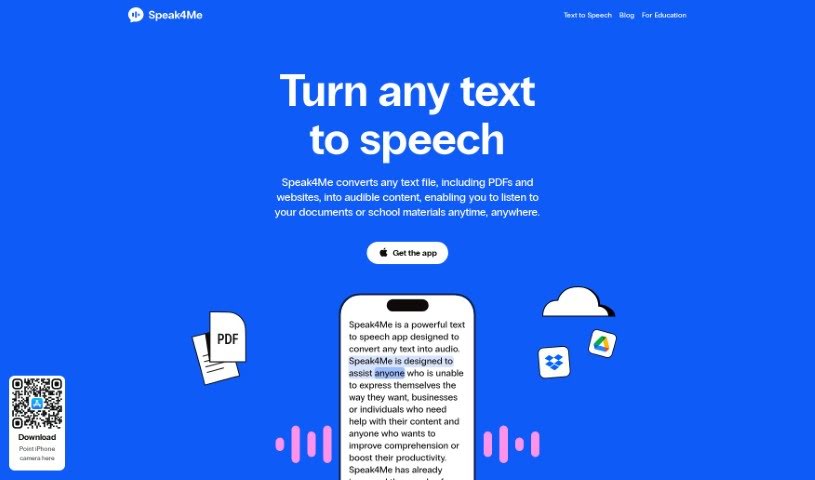
Screenshot of Speak4Me

Speak4Me

Discover what Speak4Me is and how to use it effectively in 2025. We'll explore its features and see how it stacks up against other Text-to-Speech tools.

Screenshot

What is Speak4Me?

Speak4Me is a really handy tool that turns any text file – think PDFs, websites, you name it – into spoken words. This means you can actually listen to your documents or study materials while you’re on the go. Plus, it lets you chat with any PDF! You can ask it questions or get quick summaries of what’s inside. Some of its best features include letting you listen at your own speed, easily uploading files from iCloud, Dropbox, or Google Drive, and even scanning physical or digital text to create natural-sounding audio. You can also have web pages read aloud, which is great for hands-free listening or when you’re multitasking. It’s especially useful for anyone involved in education, looking to boost productivity, or needing help with school, university studies, or just staying focused.

Who created Speak4Me?

Speak4Me was developed by a company that goes by the same name, Speak4Me. This platform’s main job is to convert different kinds of text, like PDFs and websites, into audio content. This makes it super easy for users to listen to their documents or study notes wherever they are. Beyond just reading aloud, Speak4Me also lets you interact with your PDFs. You can use a chat feature to ask questions or get summaries of the content in a flash. The information about the founder or specific company details isn’t readily available in the provided text.

What is Speak4Me used for?

Here’s a look at what you can do with Speak4Me:

  • Listen to any content you’d normally read, all at your own pace.
  • Easily listen to PDFs or any other text file by uploading them from iCloud, Dropbox, or Google Drive.
  • Scan both physical and digital text to convert it into natural-sounding audio.
  • Have web pages read aloud so you can enjoy articles hands-free or multitask without missing a beat.
  • Chat directly with any PDF – just ask questions or request summaries of the content.
  • It’s a great aid for studying, focusing, and boosting productivity in educational settings.
  • It helps people who have reading difficulties by reading text aloud for easier comprehension.
  • It’s a fantastic support for students in universities and schools with their study materials.
  • It enhances accessibility by providing audible versions of documents and websites.
  • It can improve your learning experience by offering a different way to take in information.
  • You can listen to any content you usually read, all at your own pace.
  • Read web pages aloud to enjoy articles hands-free and multitask easily.
  • Upload any PDF and chat with it directly to get precise information about its content.
  • It’s really helpful for education, productivity, school, university, study, and focus.
  • Listen to PDFs or any other text file; just upload them easily from iCloud, Dropbox, or Google Drive.
  • Read web pages aloud to enjoy articles hands-free.
  • Chat directly with any PDF file, asking questions or requesting summaries of the content.
  • Listen to PDFs or other text files. You can easily upload them from iCloud, Dropbox, or Google Drive.
  • Scan any physical or digital text and convert it into natural-sounding audio.
  • Read web pages aloud. Enjoy articles hands-free, giving your eyes a break or allowing you to multitask.
  • Chat directly with any PDF by asking questions or requesting a summary of its content.
  • It helps with education by letting you listen to documents or school materials anytime, anywhere.
  • It assists in increasing productivity by offering a hands-free reading experience.
  • It’s perfect for university students to help them study and focus on their materials.
  • It aids individuals with reading issues by converting text to speech for easier understanding.
  • It enhances accessibility by converting text to speech, which is beneficial for users with visual impairments.
  • Listening to any content you usually read, all at your own pace.
  • Listening to PDFs or any other text file, and easily uploading files from iCloud, Dropbox, or Google Drive.
  • Scanning any physical or digital text and converting it into natural-sounding audio.
  • Reading web pages aloud to enjoy articles hands-free or multitask.
  • Chatting directly with uploaded PDFs to ask questions or get summaries of the content.
  • You can listen to PDFs or any other text files by easily uploading them from iCloud, Dropbox, or Google Drive.
  • Chat with any PDF, asking questions or requesting summaries of content for precise information within seconds.

Who is Speak4Me for?

  • Students
  • Teachers
  • Professionals who work with text materials
  • People who have reading difficulties
  • Anyone who finds it easier or more convenient to listen to text instead of reading it
  • Education
  • Productivity
  • School
  • University
  • Study
  • Focus

How to use Speak4Me?

Using Speak4Me is pretty straightforward. Just follow these simple steps:

  1. Head over to the Speak4Me website to access the tool.
  2. Upload your text file or PDF document onto the platform.
  3. Then, take advantage of the various features:
    • Listen to the content at your own pace.
    • Import files directly from iCloud, Dropbox, or Google Drive.
    • Convert physical or digital text into natural-sounding audio.
    • Have web pages read aloud for a hands-free reading experience.
  4. You can also interact with your PDF files by asking questions or requesting summaries.
  5. Finally, enjoy the convenience of listening to your documents or study materials whenever and wherever you need to.

By following these steps, you’ll find it easy to access and use Speak4Me’s features to boost your productivity and improve accessibility.

Related AI Tools

Discover more tools in similar categories that might interest you

Stay Updated with AI Tools

Get weekly updates on the latest AI tools, trends, and insights delivered to your inbox

Join 25,000+ AI enthusiasts. No spam, unsubscribe anytime.