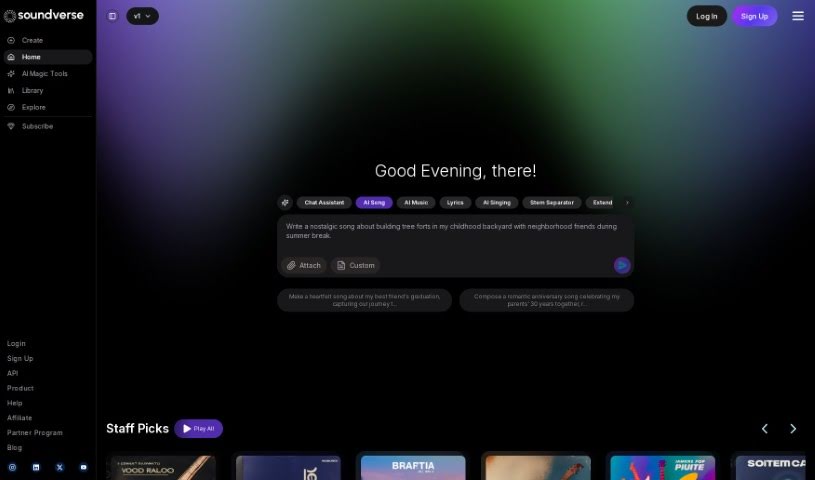
What is Soundverse AI?
Soundverse AI is a platform designed for creating audio content, powered by artificial intelligence. It helps creators quickly produce music and other audio using the SoundVerse Assistant and its various AI tools. It is a way to blend your own creative ideas with AI’s capabilities, making it much faster and easier to bring your musical visions to life. You’ll find features like Text to Music, an Arranger tool, and AI-powered Lyrics generation, all working together to give you a smooth experience when making music or audio content. Whether you’re just starting out or you’re a seasoned musician, Soundverse AI is designed to be easy to use, with advanced options for those who need them. What really makes Soundverse AI stand out is its focus on new ideas and making things user-friendly, which is why many people in the music world choose it.
Who created Soundverse AI?
Soundverse was actually started by Philip Srebrev and Sourabh Pateriya. Philip is the Co-founder and CTO, meaning he’s in charge of the technology side, while Sourabh is the Co-founder and CEO, leading the business. Both have impressive backgrounds, having worked at places like Robinhood, Meta, Spotify, and Samsung. They bring together a great mix of tech and music knowledge to push the boundaries in areas like Machine Learning (ML), AI, and Augmented Reality (AR). Their big dream is to create something like the ‘Canva for Music’ – a platform that’s as accessible and powerful for music creation as Canva is for design. They’re doing this by combining strong engineering skills with a real passion for art.
What is Soundverse AI used for?
- You can create music by mixing your own creativity with AI assistance.
- It helps you generate lyrics.
- It can separate audio tracks into individual stems.
- There’s an AI-powered assistant specifically for making music.
- It converts text into music.
- You can arrange music using its tools.
- It generates lyrics with AI help.
- You can chat with the AI music assistant for any music-related questions or help.
- Need to add more to a song? You can extend existing tracks with new sections.
- Want to remix or edit specific parts of a song? It isolates individual audio tracks for you.
- You can use its ‘AI Magic Tools,’ which include Text to Music, Lyrics Writing, and Stem Separation, to bring your creative ideas to life faster.
- It’s an AI-first platform for creating audio.
- You can generate music instantly just by typing in text prompts.
- You can interact with a voice assistant for help with music.
- You can chat with an AI assistant for music generation ideas and recommendations.
- It lets you isolate individual audio tracks from a mixed song, which is perfect for remixing and detailed editing.
- It’s an AI-powered assistant for all sorts of content creation.
- You can generate music from short text prompts.
- You can expand existing music tracks.
- It isolates individual audio tracks from a mix, making remixing easier.
- You can complete a song with AI, starting from your initial ideas.
- It helps you craft lyrics for any occasion with AI assistance.
- It generates lyrics with AI help.
- You can use AI tools like Text to Music, Lyrics Writing, and Stem Separation to realize your content dreams much quicker.
- It does Text to music conversion.
- It includes an Arranger tool.
- It features SAAR - a Voice Assistant.
- You can Extend Music.
- You can Separate Stems.
- It has an Auto-Complete Song feature.
- It can Generate Lyrics.
- You can extend existing tracks.
- It can auto-complete songs.
- It generates lyrics.
- You can interact with the AI assistant using your voice.
- It allows for music looping with AI.
- It aims to achieve Audio AGI (Artificial General Intelligence).
- You can create auto-loop song creations.
- It generates AI music from text prompts.
- You can interact with SAAR, the Voice Assistant.
- You can expand existing tracks with new sections.
- It helps you craft lyrics with AI assistance.
- You can create perfect loops for electronic music or background tracks using the AI music looper.
Who is Soundverse AI for?
- Anyone creating content.
- People who make music.
- Musicians.
- Music producers.
How to use Soundverse AI?
Here’s how you can get started with SoundVerse:
- First, head over to the SoundVerse website. You can sign up for a free trial to check out everything it can do.
- Dive into the AI Magic Tools! You can use features like Text to Music, Lyrics Generation, and Stem Separation to create music collaboratively with AI.
- Get to know SAAR, the AI music assistant. Just talk to it to get help with anything music-related.
- Want to turn your ideas into music instantly? Use the Text to Music feature to generate AI music from text prompts in just seconds.
- If you have a track you want to expand, use the Extend Music feature to add new sections.
- Need to isolate specific audio tracks from a mix for remixing or detailed editing? The Separate Stems tool is perfect for that.
- You can create music clips that are ideal loops for various music genres using the Auto-Loop Song feature.
- For any occasion, you can craft lyrics with AI assistance using the Generate Lyrics tool.
- Take a moment to explore the deep experience and expertise of the SoundVerse founders. They’ve combined technology and music in unique ways to really drive innovation in the music industry.
SoundVerse offers different subscription plans to fit what users need, whether you’re a content creator or a music maker. These plans come with different amounts of tokens and features. The platform is really easy for beginners to use, but it also has advanced features for those who are more experienced. This makes it a great choice for musicians and producers at any skill level. It really stands out from other AI music platforms because it’s so innovative, versatile, and dedicated to shaping the future of music with AI technology.
Following these steps should help you use SoundVerse to bring your creative music and audio ideas to life quickly and effectively.