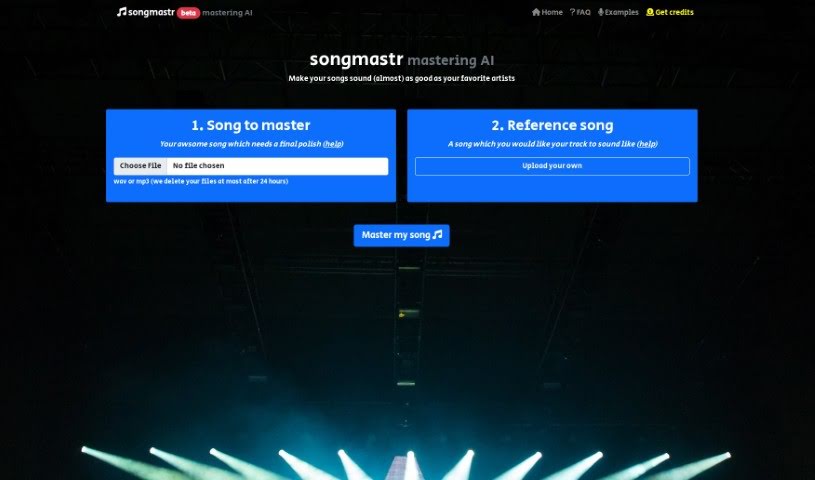
What is Songmastr?
Songmastr is a cool service that uses AI to automatically master your songs. You can upload a reference track, and the AI will master your song to match it. It’s free for up to seven songs each week, and it’s built on the open-source Matchering library. You can master songs that are up to 10 minutes long and under 80MB. Songmastr aims to give you professional-quality mastering that sounds just like your chosen reference track, giving your music that commercial-grade polish for whatever genre or vibe you’re going for. It’s super easy to use, you don’t even need to sign up, and if you need more, they have paid plans starting at just C$8. For the best results, it’s a good idea to upload songs that are already well-mixed, have some headroom (around -6db), and don’t have limiters on them. This lets the AI do its job with the dynamic range. Picking a reference track that really fits your song’s genre and mood will help Songmastr work its magic even better.
Who created Songmastr?
Songmastr was actually started by one person, Sergree. He used open-source technology, specifically the Matchering library, to build this AI-powered music mastering service. The main goal here is to give people professional-quality music mastering that sounds like their chosen reference tracks. Songmastr makes it really easy to use – you get seven free masterings every week without needing to register, and they also offer paid plans if you need more.
What is Songmastr used for?
Songmastr is great for a bunch of things:
- User-friendly interface: It’s really easy to navigate.
- Automatic Song Mastering: It handles the mastering process for you.
- AI Mastering: It uses artificial intelligence to do the mastering.
- Reference Track Matching: It matches your song to a reference track you provide.
- High-Quality Audio Mastering: It aims for professional sound quality.
- Genre and Vibe Alignment: It helps your music fit the right mood and style.
- Mix Optimization: It helps make your mixes sound better.
- Server Efficiency: It keeps things running smoothly by managing song limits.
- Avoiding Saturating the Server: By setting limits, it ensures the service stays available.
- Commercial-Grade Sound: It helps your music sound like it was professionally produced.
- Automatic song mastering to a reference track: This is its core function, making your song sound like a specific track you like.
- Fine-tuning songs to achieve commercial-grade sound: It helps your music get that polished, professional finish.
- Aligning music with desired genre and vibe: You can guide the AI to match the feel of your song.
- User-friendly and registration-free service: No need to sign up to start mastering.
- Providing seven free masterings per week: A generous free tier to get you started.
- Additional paid plans for more masterings: Options if you need to master more songs.
- Utilizing AI to match the reference track’s sound: The core technology that makes it work.
- Maintaining server efficiency with song length and size limits: Helps keep the service running smoothly for everyone.
- Offering high-quality reference track selection guidance: Tips to help you pick the best reference track.
- Employing open-source Matchering library for professional results: Uses proven technology for great outcomes.
- Automatic Song Mastering aligned with chosen reference track: Its main purpose is to match your song to a reference.
- AI Mastering for achieving a commercial-grade sound: Uses AI to give your music a professional polish.
- No-registration access to the service: Jump right in without creating an account.
- Quality Reference Tracks selection guidance: Helps you choose the right reference track.
- Utilization of open-source Matchering library for professional results: Leverages reliable open-source tech.
- Mastering songs up to 10 minutes in length: Handles standard song lengths.
- Mastering songs with a file size limit of 80MB: Standard file size for audio.
- Music production: A tool for musicians and producers.
- No Registration Required: Easy access.
- Automatic Song Mastering aligned with a chosen reference track: Its primary function.
- AI-Powered Matching of Commercial Sound: Uses AI to get that professional sound.
- Guidance on Selecting Quality Reference Tracks: Helps you pick the best reference.
- Utilization of Open Source Matchering Library for Professional Results: Relies on proven open-source tech.
- Mastering Songs up to 10 minutes in length and 80MB in file size: Standard limits for the service.
- User-Friendly Platform for Music Production: Makes mastering accessible.
- Providing Instructions for Song Pre-processing before Mastering: Tips for preparing your track.
- Quality Audio Mastering with Features like Matching RMS, Frequency Response, and Stereo Width: Offers detailed audio adjustments.
- Offering 7 Free Song Masterings per week with Affordable Paid Plans: Great free option and affordable upgrades.
- Obtaining a commercial-grade sound for music: Helps your tracks sound professional.
- Utilizing artificial intelligence for audio mastering: The technology behind the service.
- Free mastering of up to 7 songs per week: A generous free offering.
- Enhancing music quality by matching RMS, frequency response, and stereo width: Specific technical improvements.
- User-friendly platform with no registration requirement: Easy to start using.
- Optimizing music for specific genres and vibes: Tailors the sound to your needs.
- Accessing professional mastering services without software installation: It’s all online.
- Employing the Matchering library for high-quality results: Uses reliable tech for good outcomes.
- Maintaining a 10-minute length and 80MB size limit per song for server efficiency: Keeps the service running smoothly.
- Achieving a commercial-grade sound for songs: Helps your music sound professional.
- Utilizing artificial intelligence for mastering: The core technology.
- Free masterings are available, limited to 7 per week: A good free starting point.
- No registration is required to access the service: Quick and easy to use.
- Applying RMS, frequency response, and stereo width matching to the reference track: Specific technical matching processes.
- Limiting songs to 10 minutes in length and 80MB in size for server efficiency: Helps maintain service performance.
- Offering additional paid plans for more masterings: Options for heavier users.
- Instructions provided for selecting high-quality reference tracks: Guidance for better results.
- Based on the open-source Matchering library: Uses reliable, open technology.
- Commercial Sound Enhancement: Improves the overall sound quality.
- Music Production Assistance: Helps producers get a better final mix.
- Free Mastering Service: A great way to try professional mastering.
- Quality Reference Track Instructions: Tips for choosing the best reference.
- Open Source Technology Utilization: Built on reliable, open tech.
- Limit of 10 Minutes and 80MB per Song: Standard usage limits.
- Automatic song mastering to a chosen reference track: Its main function.
- Aligning song characteristics (RMS, frequency response, peak amplitude, stereo width) with the reference track: Detailed technical matching.
- Offering 7 free song masterings per week: A generous free tier.
- No registration required to access the service: Easy and quick to start.
- Capacity to master songs up to 10 minutes in length and 80MB in size: Handles typical song files.
- User-friendly platform for mastering music: Makes the process simple.
- Providing affordable paid plans for additional mastering services: Good value for more usage.
- Instructions for selecting high-quality reference tracks: Helps you get the best results.
- Based on open-source technology (Matchering library) for professional results: Uses reliable tech for quality.
- Commercial sound mastering: Helps your music achieve a professional sound.
- Audio mastering: The core service provided.
- Mastering with a Matchering library: Uses specific technology for mastering.
- Maintenance of RMS, frequency response, and stereo width: Technical aspects of mastering.
- Limitation of song length to 10 minutes: Standard song length limit.
- 80MB file size limit: Standard file size limit.
Who is Songmastr for?
Songmastr is perfect for:
- Music producers
- Artists
- Music Engineers
- Mixing and Mastering Engineers
- Audiologists (though this might be a niche use case, perhaps they mean sound engineers in general?)
- Sound engineers
- Musicians
- Music Artists
- Music Studios
How to use Songmastr?
Using Songmastr for automatic song mastering is pretty straightforward. Just follow these simple steps:
- Upload Your Track: First, upload your song or beat from your computer onto the Songmastr platform. Make sure your song is in WAV or MP3 format, and keep it under 10 minutes long and 80MB in file size.
- Choose a Reference Track: Next, pick a reference track that really matches the genre and overall feel of your song. This track acts as the guide for the mastering process.
- Master Your Song: Now, let Songmastr’s AI do its thing! The algorithm will match your track’s RMS, frequency response, peak amplitude, and stereo width to the reference track you selected.
- Download Your Mastered Track: Once the processing is finished, you’ll be sent to the download page. Just click the download button to get your newly mastered song.
- Optimize Your Mix: Before you upload, it’s a good idea to make sure your mix is well-balanced. Give it some headroom (around -6db) and try not to use limiters, as the AI will handle the dynamic range control during mastering.
- Enjoy Professional Quality: With Songmastr, you can experience high-quality music mastering, getting that commercial-grade sound easily and quickly.
Just a reminder, Songmastr gives you seven free masterings each week, and you don’t need to register. So, make the most of this AI mastering service to really boost the quality of your music!