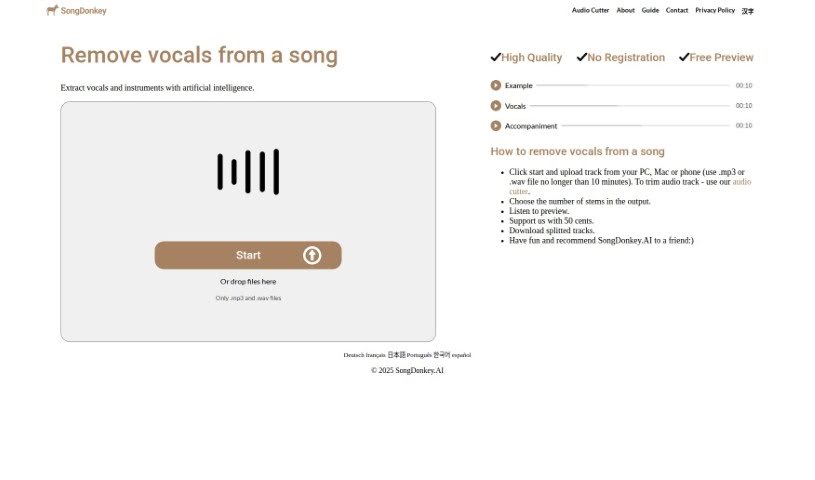
Screenshot of Songdonkey

Songdonkey

Discover what Songdonkey is and how to use it effectively in 2025. We'll walk through its features, compare it to other music generators, and show you how to get the most out of it.

Screenshot

What is Songdonkey?

SongDonkey is a handy online tool that uses AI to split audio files and remove vocals. Think of it like a digital assistant for your music. It can expertly separate different parts of a song – like the vocals, drums, bass, piano, and other instruments – all from a single track. It’s pretty impressive how it uses advanced AI to do this, giving you high-quality vocal removal without a fuss, all within a really easy-to-use interface. You can work with both MP3 and WAV files, pick how you want the song split (maybe just the vocals, or several separate instrument tracks), and it processes everything quickly, all at a reasonable price. Plus, you don’t even need to sign up or create an account; you can just upload your file directly or drag and drop it. It’s designed to be straightforward and efficient.

Who created Songdonkey?

Ben Jameson is the person behind Songdonkey. He launched it on September 21, 2021. It’s an online service that splits audio and removes vocals, actually using the Deezer Spleeter algorithm to get the job done. The company’s main focus is on being fast and accessible, offering priority access for quicker results and deleting user data daily to keep your privacy safe.

What is Songdonkey used for?

Songdonkey is incredibly versatile for anyone working with audio. Here’s a breakdown of what you can do with it:

  • Affordable Pricing: It’s budget-friendly.
  • Fast and Efficient Processing: Get your results quickly.
  • Acapella or Karaoke Making: Easily create vocal-only tracks or instrumental versions for singing along.
  • Instrumental Extracting: Pull out just the instrumental parts of a song.
  • Voice Isolating: Isolate specific vocal tracks.
  • Removing Background Music: Clean up audio by taking out the main music track.
  • Drum Removing: Specifically remove drum beats.
  • High-Quality Vocal Removal: Get clean vocal separation.
  • Supports MP3 and WAV: Works with common audio file types.
  • Direct File Upload: Upload files easily.
  • Multiple Extraction Options: Choose how you want your audio split.
  • Download All Tracks Simultaneously: Get all your separated stems at once.
  • Download in MP3 or WAV: Save your results in your preferred format.
  • Option for Vocals Only Extraction: Get just the singing part.
  • Extract Accompaniment Only Feature: Pull out everything but the vocals.

Who is Songdonkey for?

This tool is a great resource for a wide range of people involved in music and audio creation:

  • Acapella or karaoke makers
  • Instrumental extractors
  • Voice isolators
  • Drum removers
  • Musicians
  • Music producers
  • Karaoke Creators
  • Audio Engineers
  • Sound Technicians
  • Sound engineers (yes, again! It’s that useful for them)
  • Audiobook narrators
  • Podcasters
  • Singers

Basically, if you need to separate elements within an audio track, Songdonkey is likely a good fit for you.

How to use Songdonkey?

Using SongDonkey is pretty straightforward. Just follow these simple steps:

  1. Upload Audio: You can either upload your audio files directly through the platform or simply drag and drop them onto the page. It’s designed to be quick and easy.
  2. Select Stems: Next, you’ll choose how you want the audio split. You can opt for just the vocals, just the accompaniment, or select multiple stems like vocals, bass, drums, and more, depending on what you need.
  3. Wait For Processing: The tool will then process your request. It usually takes about 1 minute and 20 seconds, which is quite fast for this kind of task.
  4. Download Output: Once the processing is complete, you can download the separated tracks. You have the choice to save them in either MP3 or WAV format.
  5. Troubleshooting: If you run into any issues or errors, SongDonkey provides troubleshooting tips. You can also reach out to their customer support for help if needed.
  6. Cost and Limits: SongDonkey is quite affordable, with prices starting at just $0.34 per song. There’s also a time limit of 10 minutes per song, which covers most standard tracks.
  7. Unique Features: Remember, Songdonkey offers high-quality vocal removal, works with MP3 and WAV files, doesn’t require you to sign up, and provides customer support if you hit any snags.
  8. Enjoy the Results: Finally, just enjoy the benefits of Songdonkey’s fast and efficient audio splitting capabilities. You’ll be able to use your separated tracks right away.

This guide should give you a clear path to using Songdonkey effectively for all your audio separation and vocal removal needs.

Related AI Tools

Discover more tools in similar categories that might interest you

Stay Updated with AI Tools

Get weekly updates on the latest AI tools, trends, and insights delivered to your inbox

Join 25,000+ AI enthusiasts. No spam, unsubscribe anytime.