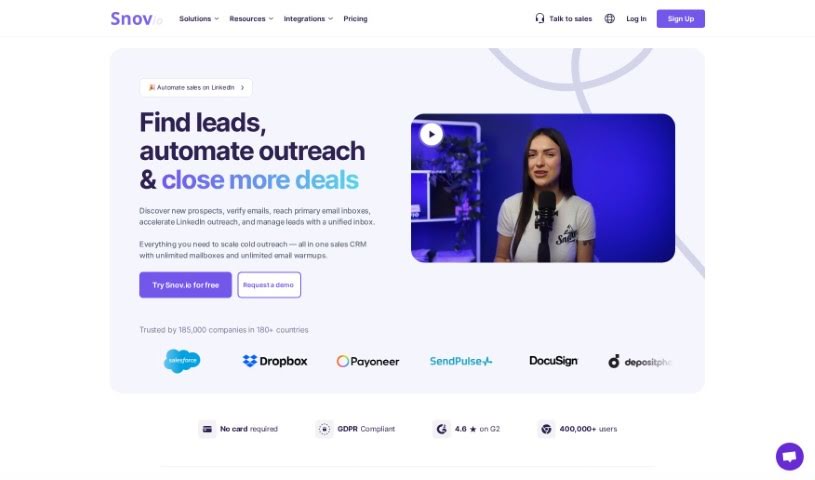
Screenshot of Snov Email Writer

Snov Email Writer

Discover what Snov Email Writer is and how to use it effectively in 2025. We'll explore its features and see how it stacks up against other email marketing tools.

Screenshot

What is Snov Email Writer?

Snov Email Writer is a handy browser extension designed to make finding email addresses on company websites and search pages super simple – you can do it with just one click! It’s a really convenient way to find and verify email addresses, which helps you build your contact list much more efficiently. People seem to really like it; it’s highly rated on Trustpilot with a solid user base, which tells you it’s reliable and popular. By adding Snov Email Writer to Chrome, you can boost your productivity. You get direct access to and validation of email contacts right from your browser, making email outreach and communication a whole lot easier.

Who created Snov Email Writer?

Snov Email Writer comes from Snov.io, a company based in New York, US. While the founder’s name isn’t mentioned in the info I have, Snov Email Writer itself was launched on July 19, 2023.

What is Snov Email Writer used for?

This tool is fantastic for a bunch of things:

  • Saving you time: It speeds up your workflow considerably.
  • Crafting personalized emails: It helps you generate emails that feel like they were written just for the recipient.
  • Expert-designed prompts: You get custom prompts created by email experts to guide your writing.
  • Tailored content: The emails are made to fit your specific needs.
  • Editable copy: You can easily tweak the generated text after it’s created.
  • Improvement suggestions: It offers ideas on how to make your emails even better.
  • Spelling and grammar checks: It catches mistakes so your emails look professional.
  • Multilingual support: You can translate your emails into 36 different languages.
  • Integration with Drip Campaigns: It works seamlessly with your drip campaign sequences.
  • Boosting sales conversions: By making emails more effective, it helps improve your sales results.
  • Personalized drip email sequences: Create sequences that resonate with each contact.
  • Unique prompt creation: You can develop your own custom prompts.
  • No copywriting skills needed: You don’t need to be a pro writer to create great emails.
  • Generate engaging emails: It helps you write content that captures attention.
  • Simplify the writing process: Makes writing emails much less of a chore.
  • Create compelling outreach content: Develop strong emails for your campaigns.
  • Eliminate the need for specialized skills: You can achieve professional results without being a dedicated copywriter.
  • Provide customizable prompts: Get prompts tailored by experts.
  • Allow unique prompt creation: Make your own prompts.
  • Tailor email content: Adjust the content to fit your audience.
  • Edit generated copy: Make any necessary changes to the output.
  • Improve spelling and grammar: Ensure your emails are error-free.
  • Translate into 36 languages: Reach a wider audience.
  • Email Tracker feature: Keep tabs on your email opens and clicks.
  • Sales CRM integration: Connects with your CRM for a smoother sales process.

Who is Snov Email Writer for?

This tool is a great asset for a wide range of professionals:

  • Sales Representatives
  • Marketing professionals
  • Recruiters
  • Business development executives
  • Entrepreneurs
  • Freelancers
  • Customer Support Agents
  • Networkers
  • Content creators
  • Real Estate Agents

How to use Snov Email Writer?

Using Snov Email Writer is pretty straightforward. Just follow these steps:

  1. Access Snov Email Writer: First, head over to the Snov website and log in to your account. Easy peasy.
  2. Navigate to Snov Email Writer: Once you’re in, find the Email Writer tool. It’s usually in the menu or on your dashboard. Click on it to open up the Email Writer interface.
  3. Compose Your Email: Time to start writing! You’ll begin by entering the recipient’s email address in the spot provided. Then, you can craft your email by writing the subject line and the main body of the message.
  4. Personalize Email Content: Make your email stand out by using Snov Email Writer’s personalization features. You can easily add things like the recipient’s name or their company name to make it feel more custom.
  5. Review and Edit: After you’ve written your email, give it a good read-through. Check for any mistakes or things that could be clearer. Make any edits you need to ensure your message is professional and easy to understand.
  6. Add Attachments (If Needed): If you have files you need to send along with your email, just use the attachment feature to add them.
  7. Preview Your Email: Before you hit send, it’s always a good idea to use the preview option. This lets you see exactly how your email will look to the person receiving it.
  8. Send Your Email: Once you’re happy with everything, just click the send button, and your email will be on its way to the recipient.

By following these steps, you can really make the most of Snov Email Writer to create and send personalized emails to your contacts effectively.

Related AI Tools

Discover more tools in similar categories that might interest you

Stay Updated with AI Tools

Get weekly updates on the latest AI tools, trends, and insights delivered to your inbox

Join 25,000+ AI enthusiasts. No spam, unsubscribe anytime.