What is Snipo?
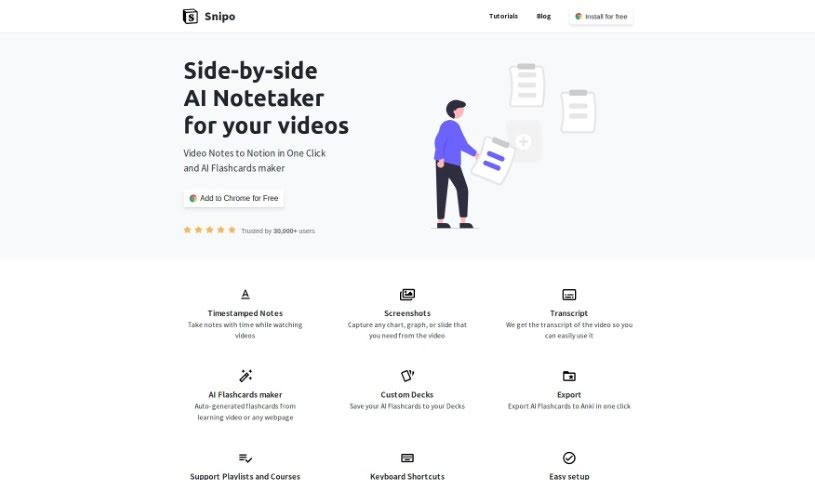
Snipo is a really handy tool designed to help you take video notes and send them straight over to your Notion workspace. It lets you grab specific moments in videos with timestamps, jot down notes right when something important happens, and even snag screenshots of key visuals like charts, graphs, or slides. Plus, Snipo can automatically create a transcript of the video, making it super easy to find what you need later.
One of its standout features is the AI flashcard maker. This cool part can whip up flashcards from learning videos or even webpages you’re looking at. You can save these flashcards into your own custom decks and then, with just one click, export them to Anki. If you’re into organizing your video learning, Snipo makes it simple to sync YouTube playlists or entire courses directly into your Notion notes.
It also comes with keyboard shortcuts, so you can navigate and take notes efficiently without ever having to leave Notion or your keyboard. Snipo fits right into both YouTube and Notion layouts, offering a genuinely valuable way for anyone who learns from video content. People seem to really like how simple it is, how well it connects with other tools, and how easy it is to take notes. Big names like IBM, Intel, Samsung, Harvard University, and Stanford University have even given it their stamp of approval. It’s developed by a dedicated team in Kyiv, Ukraine, and you can install it for free on Chrome, Edge, and Firefox.
Who created Snipo?
Snipo was actually created in Kyiv, Ukraine, and it first launched on June 4, 2023. A dedicated team got it off the ground, and they’ve seen it grow to over 10,000 users! It’s a fantastic tool for anyone who learns a lot from videos. Think of it for taking notes while you watch, grabbing screenshots of important stuff, making AI flashcards, and connecting with popular platforms like YouTube and Notion.
What is Snipo used for?
Here’s a rundown of what Snipo helps you do:
- Take notes with timestamps while you’re watching videos.
- Capture any chart, graph, or slide you need directly from the video.
- Get the full transcript of the video, making it easy to reference later.
- Automatically generate flashcards from learning videos or any webpage you’re on.
- Save these AI-generated flashcards into your own personalized decks.
- Export your AI flashcards to Anki with just one click.
- Sync YouTube playlists or learning courses straight into your Notion notes.
- Use handy keyboard shortcuts for efficient navigation and note-taking.
- Seamlessly fit Snipo into your YouTube and Notion layouts for a smooth experience.
- Efficiently capture and organize video notes right within your preferred workspace.
- Get video transcripts for easy reference.
- Save your AI flashcards into your custom decks.
- Sync YouTube playlists or learning courses to Notion notes in one click.
- Use keyboard shortcuts for efficient navigation.
- Seamlessly fit into YouTube and Notion layouts.
- Organize video notes within your preferred workspace.
- Capture any chart, graph, or slide from the video.
- Get the video transcript for easy use.
- Save AI Flashcards to decks.
- Sync YouTube playlists or learning courses to Notion notes in one click.
- Use keyboard shortcuts for efficient use.
- Save AI Flashcards to your Decks.
- Seamlessly fit into YouTube and Notion layout.
- Organize video notes efficiently within your preferred workspace.
- Auto-generate flashcards from learning videos or any webpage.
- Sync YouTube playlists or learning courses to Notion notes.
- Organize video notes within a preferred workspace.
- Sync YouTube playlists or learning courses to Notion notes in one click.
- Use keyboard shortcuts to navigate efficiently in Notion or YouTube.
Who is Snipo for?
Snipo is perfect for anyone who learns a lot from video resources.
How to use Snipo?
Snipo is a really versatile tool that makes taking video notes and getting them into your Notion workspace super simple. Here’s a step-by-step guide to using it effectively:
- Install It: First, install Snipo as a browser extension. You can get it for Chrome, Edge, or Firefox, which makes it really easy to access.
- Capture Your Notes: While you’re watching a video, use Snipo to mark important moments with timestamps. You can also take notes right alongside the video timeline and grab screenshots of any crucial charts, graphs, or slides you see.
- Get the Transcript: Snipo can provide the video’s transcript, which is great for quick lookups and reviews.
- Make AI Flashcards: Use the AI flashcard maker to automatically create flashcards from learning videos or any webpage. You can save these into your own custom decks for studying later.
- Export to Anki: Need to use Anki? You can export your AI flashcards there with just one click.
- Sync Playlists: If you have YouTube playlists or learning courses, you can sync them directly with your Notion notes. This really helps organize all your video-based learning materials.
- Use Keyboard Shortcuts: Snipo offers keyboard shortcuts that can speed things up. You can use them to navigate, change playback speed, pause videos, and capture content without leaving Notion.
- Works with Notion and YouTube: You’ll find Snipo integrates really smoothly with both YouTube and Notion layouts, giving you a user-friendly space for taking notes and staying organized.
- Community Support: You’re backed by a dedicated team that supports Snipo. Plus, you’ll join over 10,000 users who trust it for its simplicity, how well it connects, and how convenient it is for managing video notes.
- User-Friendly Interface: You’ll enjoy Snipo’s user-friendly interface. It was developed in Kyiv, Ukraine, and has endorsements from well-known companies and universities like IBM, Intel, Samsung, Harvard University, and Stanford University.
By following these steps, you can really make the most of Snipo to improve how you learn from videos and keep your notes organized in your favorite workspace.