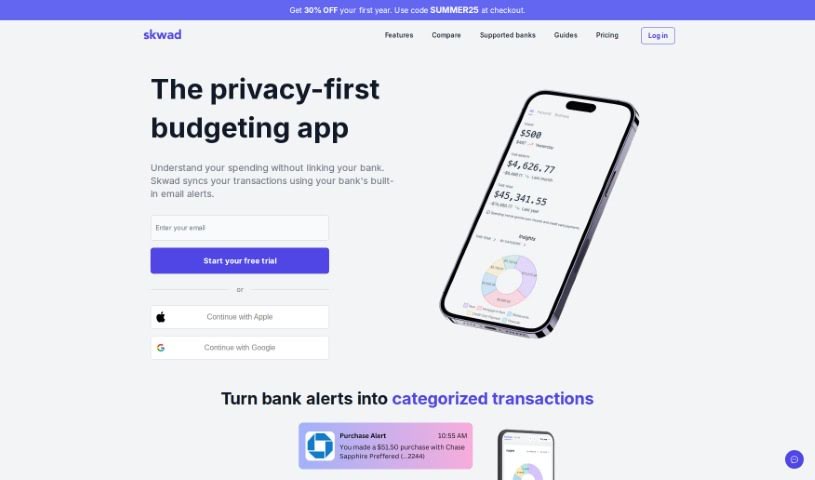
Screenshot of Skwad App

Skwad App

Discover what Skwad App is and learn how to use it effectively in 2025. We'll explore its features and see how it stacks up against other finance tools.

Screenshot

What is Skwad App?

Skwad App is a neat financial management tool that really puts your privacy and security first. It offers a unique way to keep tabs on your spending without ever needing to share your bank login details. Here’s how it works: you get a special Skwad App scan email address. You can then forward any alerts or receipts you get from your banks or credit card companies to this address. Skwad App takes those alerts and turns them into nicely categorized transactions, giving you a really clear picture of your finances. Plus, you can upload past transactions, get alerted if you’re spending unusually, and keep track of bills and subscriptions to manage your money better. Skwad App helps you keep your financial information private because you don’t have to share sensitive stuff like passwords, account numbers, or your entire transaction history. You’re in control, deciding exactly which transaction and balance alerts get sent to Skwad App, so it only accesses the information it needs for tracking and analysis. What really sets Skwad App apart from other apps is this privacy-first approach to tracking spending – no bank logins required! It also updates your transactions much faster because it processes alerts the moment they come in. This is quite different from other apps that might only refresh your transactions when you log in or on a set schedule.

Who created Skwad App?

Skwad was actually created by TCS Digital, LLC, and they launched it on April 2, 2024. It’s a finance management tool that really focuses on privacy and security, which means it doesn’t ask for your bank logins. Skwad gives you a special email address where you can send bank alerts, and it then turns those into categorized transactions, making it super easy to track your spending. The company is based in the USA, keeps its data with AWS, and is funded by its users.

What is Skwad App used for?

Skwad App is really handy for a few key things:

  • Spotting financial risks: It alerts you to any transactions that seem out of place or changes in your spending habits.
  • Real-time financial overview: It keeps a live record and categorizes your expenses, so you get a complete picture of where your money is going.
  • Bill and subscription tracking: It helps you keep track of bills and subscriptions, even sending notifications for upcoming payments or fee changes.
  • Spend calendar: You can use its spend calendar feature to organize your spending in a visual, calendar format.
  • Google Sheets sync: It lets you sync your expenses with Google Sheets, which is great for deeper analysis.
  • Adding receipts: You can enhance your transactions by adding receipt images directly.
  • Spending habit insights: It alerts you to changes in your spending habits with personalized insights.
  • Collaborative tracking: You can even invite trusted friends or family to share transactions, budgets, and insights in a group setting (your ‘Skwad’).
  • Maintaining privacy: It helps you keep your finances clear without sharing bank login details, all thanks to that dedicated Skwad Scan email address.
  • Better money management: It converts spending alerts into categorized transactions, giving you that comprehensive financial overview.

How to use Skwad App?

If you want to manage your money efficiently with Skwad, here’s a simple breakdown of how to get started:

  1. Get Your Scan Address: First, sign up for Skwad. You’ll get your very own dedicated Skwad scan email address.
  2. Send Transaction Alerts: Next, set up your bank or credit card provider to automatically send spending and deposit alerts to that Skwad scan email address.
  3. Skwad Handles the Rest: Skwad will then take these alerts and convert them into categorized transactions for you. This gives you a clear overview of your finances without any extra work.
  4. Use All the Features: You can then customize your expenses, re-categorize transactions if needed, split them, or even hide them. Plus, you’ll enjoy reliable connectivity without having to constantly reconnect.
  5. Understand Your Finances Better: Keep track of your cash flow and categories, compare how your spending changes over time, and even export your data for more in-depth analysis. You’ll also get alerts for bills that are coming up and can sync them to your calendar.
  6. Collaborate with Others: Want to share the experience? You can invite friends or family to join in ‘multiplayer mode’ to share transactions, budgets, and insights together.
  7. Keep Your Privacy Secure: Skwad really prioritizes your financial privacy. It never asks for your bank passwords; it only ever accesses the transaction alerts that you choose to forward to your Skwad scan email address.

By following these steps, you’ll be able to track your finances efficiently, stay in control of your spending, and keep your sensitive financial information safe and secure.

Related AI Tools

Discover more tools in similar categories that might interest you

Stay Updated with AI Tools

Get weekly updates on the latest AI tools, trends, and insights delivered to your inbox

Join 25,000+ AI enthusiasts. No spam, unsubscribe anytime.