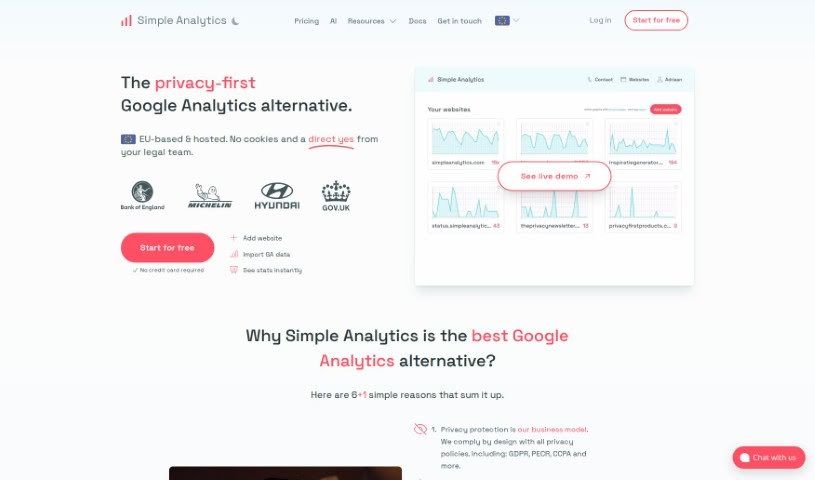
Screenshot of Simple Analytics Ai

Simple Analytics Ai

Discover Simple Analytics AI in 2025! Learn about its features, how it works, and how it stacks up against other SEO tools. Get practical tips for using it effectively.

Screenshot

What Exactly is Simple Analytics AI?

Simple Analytics AI is your go-to digital analytics tool. It gives you real-time insights straight from your website’s traffic data. What’s really neat is that you can chat with its AI system, kind of like having a conversation. This lets you generate detailed charts and visuals that make understanding your website’s traffic patterns and how visitors behave super easy. The AI really simplifies digging into your data, offering reports that are easy to grasp. Plus, you can just ask it direct questions for a deeper dive. It’s built with privacy as a top priority – it doesn’t store any personal visitor data and encrypts everything to keep user privacy safe. It’s designed to be really user-friendly, even if you’re not a tech whiz. You can try it out with a free trial, no credit card needed, and you can cancel whenever you want.

Who’s Behind Simple Analytics AI?

Adriaan van Rossum is the person who started Simple Analytics AI. He founded the company back in September 2018 and was the only one working on it for a while. Then, in 2022, he teamed up with Iron to help the company grow faster. The company is based in the Netherlands, and they’re really focused on making sure users have privacy and control over their data.

What Can You Do with Simple Analytics AI?

This tool is great for a bunch of things:

  • Getting insights in real-time.
  • It’s built with privacy as a core principle.
  • Generating real-time insights.
  • Using an interactive chat feature to ask questions.
  • Creating detailed charts to visualize data.
  • Visualizing your traffic patterns.
  • Comparing how visitors behave over different periods.
  • Using comparative analytics.
  • Analyzing traffic sources in groups.
  • Creating images of your data that are perfect for social media.
  • Trying it out with a trial-based model.
  • Simplifying complex data so it’s easy to understand.
  • Creating actionable information you can use.
  • Analyzing your website traffic.

Who Should Use Simple Analytics AI?

This tool is a great fit for a wide range of people, including:

  • Anyone who isn’t a technical expert.
  • Digital marketers looking for clear data.
  • Entrepreneurs wanting to understand their audience.
  • Content creators aiming to see what resonates.
  • Small business owners who need straightforward analytics.
  • Marketers focused on performance.
  • Data Analysts seeking efficient tools.
  • Business owners who value clear insights.
  • Bloggers wanting to track their readership.
  • Web Analysts needing reliable data.
  • Marketing Managers overseeing campaigns.
  • Website Owners wanting to understand their visitors.
  • Web Developers who need quick data checks.
  • Product Managers looking at user engagement.

How Do I Get Started with Simple Analytics AI?

Using Simple Analytics AI is pretty straightforward. Here’s a simple guide:

  1. Start a Trial: First off, you can sign up for a free 14-day trial on the Simple Analytics website. Don’t worry, you won’t need to enter any credit card details to get started.
  2. Add Your Website: Once you’re signed up, the next step is to add your website to the tool so it can begin analyzing your traffic.
  3. Import Google Analytics (GA) Data: If you’re currently using Google Analytics, you can easily import your data. This makes switching over to Simple Analytics a smooth process.
  4. Explore Instant Stats: After everything’s set up, you can immediately start exploring your website statistics. Everything is presented clearly on a single dashboard.
  5. Engage with the AI: This is where the magic happens! Use the interactive chat feature to talk directly with the AI. You can ask it questions and get real-time insights on your data.
  6. Analyze Traffic Patterns: The tool is excellent for analyzing traffic patterns. You’ll get detailed visualizations that show you exactly how people are interacting with your website.
  7. Understand Visitor Comparisons: You can also gain valuable insights into visitor behavior by comparing different time periods. See how things change over weeks or months.
  8. Generate Social-Media Friendly Images: Need to share your findings? You can create images of your analytics data that are perfectly formatted for sharing on social media platforms.
  9. Respect User Privacy: Remember, the tool has a strong privacy-first approach. This means your user data is kept safe and private.
  10. Cancel Flexibly: If you decide it’s not for you, you can cancel your subscription at any time. You’ll still have access to everything until the end of the period you’ve paid for.

By following these steps, you’ll be able to use Simple Analytics AI effectively for a thorough analysis of your website data and gain valuable insights.

Related AI Tools

Discover more tools in similar categories that might interest you

Stay Updated with AI Tools

Get weekly updates on the latest AI tools, trends, and insights delivered to your inbox

Join 25,000+ AI enthusiasts. No spam, unsubscribe anytime.