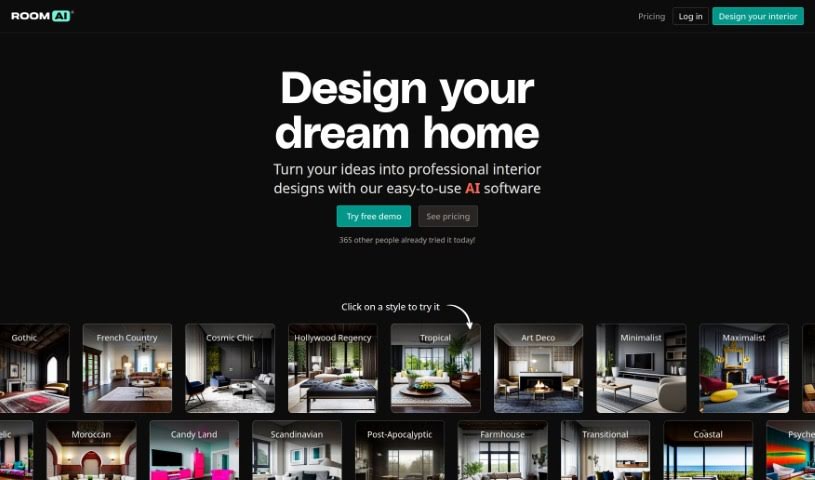
Screenshot of Room AI

Room AI

Discover what Room AI is and how to use it effectively in 2025. We'll explore its features and see how it stacks up against other interior design tools.

Screenshot

What is Room AI?

Room AI is an interior design software that uses artificial intelligence, created by Marc Köhlbrugge with input from industry pros. It lets you give existing rooms a makeover or create entirely new room designs from scratch. You can pick from over 40 different design styles to customize your space. Want to see how wood, fabrics, glass, or metals look? You can experiment with them, plus choose from color palettes like Soft Neutrals, Coastal Calm, and Nordic Lights.

This tool is really helpful for homeowners, interior designers, real estate agents, and architects alike. It’s super user-friendly and gives you photo-realistic images of your design ideas. For your security, transactions are handled through Stripe, and they’re serious about your privacy, keeping any content you upload confidential. You can try Room AI for free, or opt for paid subscriptions if you need it for personal or commercial projects. While it’s a pretty comprehensive tool for most people, you might still need a human interior designer for very specific needs where their expert touch really makes a difference. Real estate agents, for instance, can use Room AI to show clients what a space could look like, and architects can speed up their design process and communicate better with clients.

Who created Room AI?

Marc Köhlbrugge, working alongside industry professionals, is the creator behind Room AI. Their goal was to build an AI-powered interior design tool that’s easy to use, highly customizable, and covers a lot of ground. It first launched in September 2022, and right away, it offered users more than 40 design styles to play with. Room AI makes it possible to either restyle rooms you already have or generate brand-new designs from the ground up. It’s designed to be useful for homeowners, interior designers, real estate agents, and architects. Plus, they use Stripe for secure payments and make sure your privacy is protected by keeping your uploaded content confidential.

What is Room AI used for?

  • It’s a great tool for homeowners.
  • It’s ideal for interior designers.
  • Real estate agents find it very useful.
  • It’s helpful for architectural planning.
  • It allows for virtual renovations and visualization.
  • It makes generating design ideas much more efficient.
  • It offers design-focused advice and resources.
  • You can use it commercially.
  • It works well for various room styles.
  • It boasts a wide variety of design styles.
  • It’s accessible and user-friendly.
  • You can restyle existing rooms.
  • You can generate new room designs from scratch.
  • You can customize designs using different color palettes and materials.
  • It’s beneficial for homeowners who want to visualize their dream home.
  • It’s useful for interior designers needing efficient design tools.
  • It helps real estate agents show clients interior design possibilities.
  • It’s ideal for architects looking to streamline their design process and give clients a preview of the finished interior.
  • It aids in virtual renovation and visualization.
  • It can spark design ideas without needing professional skills.
  • It can be used commercially for design projects.
  • You can upload images to easily restyle them.
  • It helps generate design ideas without needing professional skills.

Who is Room AI for?

  • Homeowners
  • Interior designers
  • Real Estate Agents
  • Architects

How to use Room AI?

Here’s how you can use Room AI, the AI-powered interior design software from Marc Köhlbrugge:

  1. Upload Image or Specify Preferences: Start by uploading a photo of a room you want to restyle, or describe your design ideas for a completely new room.
  2. Select Design Styles: Choose from over 40 different design styles. Think Hollywood Regency, Traditional, Minimalist, and many more.
  3. Customize Colors and Materials: Get creative with color palettes like Soft Neutrals or Coastal Calm. You can also experiment with different materials, such as teak wood or velvet fabrics.
  4. Generate Renders: The AI will take your preferences and transform them into several photo-realistic renders of your room design.
  5. Visualize and Fine-Tune: Look over the rendered designs, compare the before-and-after visuals, and make any adjustments you feel are needed.
  6. Free and Commercial Use: Room AI offers a free version for personal use, and there are paid subscriptions available if you need it for commercial purposes.
  7. Secure Transactions: Your payments are processed securely through Stripe, so your financial information is safe.
  8. Respect for Privacy: Room AI takes privacy seriously. They keep user data confidential and won’t publish your designs without your permission.

So, whether you’re a homeowner dreaming up your perfect space, an interior designer looking for inspiration, a real estate agent wanting to show clients what’s possible, or an architect aiming to streamline your design process, Room AI offers a user-friendly and customizable way to create professional-looking interior designs.

Related AI Tools

Discover more tools in similar categories that might interest you

123RF AI Image Generator

Creative Image Generation
Learn More

Stay Updated with AI Tools

Get weekly updates on the latest AI tools, trends, and insights delivered to your inbox

Join 25,000+ AI enthusiasts. No spam, unsubscribe anytime.