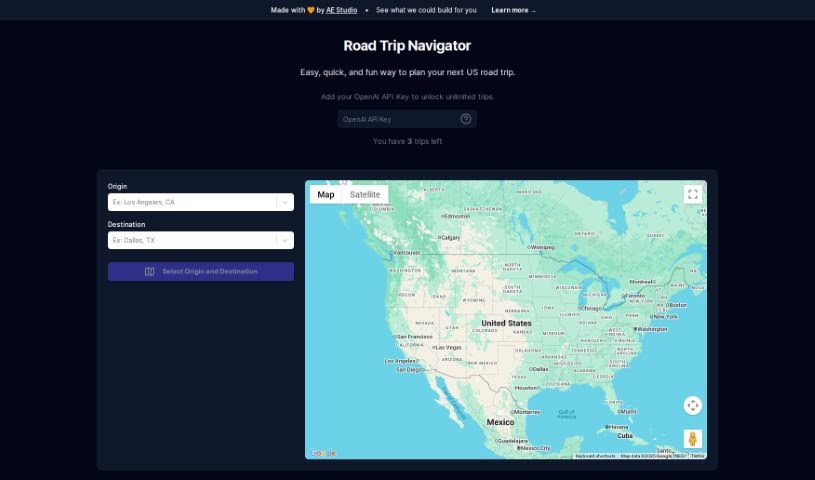
Screenshot of Road Trip Navigator

Road Trip Navigator

Discover what Road Trip Navigator is all about and learn how to make the most of it for your US road trips in 2025. We'll cover its features, compare it to other trip planners, and show you exactly how to use it.

Screenshot

What is Road Trip Navigator?

Road Trip Navigator is a really handy tool that makes planning your US road trips a breeze. You just tell it where you’re starting and where you want to end up, and it figures out the best route for you. It shows you the way with detailed maps, including both regular views and satellite imagery, so you always know what to expect. Plus, it helps you find great places to stop along the way, gives you an idea of how long you’ll be driving and how far it is, and even suggests fun things to do in the cities you’ll pass through. It’s free to use, but if you want to plan as many trips as you like without limits, you can add an OpenAI API key. You can also tweak settings with your own personal API key. AE Studio, the company behind Road Trip Navigator, does offer an enterprise plan, but the main focus here is really on making your trip planning smooth and straightforward.

Who created Road Trip Navigator?

Road Trip Navigator was developed by AE Studio and first came out on July 24, 2023. The whole idea behind it is to make planning US road trips super easy. You just pop in your starting point and your destination, and the tool handles the rest – calculating your route, showing you maps with different views, and even providing navigation labels. AE Studio, the team that built this helpful tool, also offers an enterprise plan for businesses. But for individual travelers, the tool itself is free to use and does a great job of helping you plan your journey. It’s great for finding places to stop, figuring out driving times and distances, and getting ideas for activities in the cities you’ll be visiting.

What is Road Trip Navigator used for?

Here’s a quick rundown of what you can do with Road Trip Navigator:

  • Plan your US road trips: Just enter where you’re starting and where you’re headed.
  • Get your route mapped out: It calculates the best path and shows you detailed maps, including terrain and satellite views.
  • Navigate with ease: You’ll find helpful labels right on the map to guide you.
  • Find great stopover spots: Discover convenient places to take a break on your journey.
  • Know your travel times: It estimates how long you’ll be driving and the total distance.
  • Discover local activities: Get ideas for things to see and do in the cities along your route.
  • Customize your trips: Make it your own by adding your personal API key.
  • Enjoy unlimited planning: Unlock endless trip planning by using your OpenAI API key.
  • Have a stress-free experience: It’s designed to make planning your US road trips simple and enjoyable.
  • Explore business options: AE Studio offers an enterprise plan if you need more advanced services.

How to use Road Trip Navigator?

Road Trip Navigator is designed to be really easy to use, making planning your US road trips a breeze. First off, you just need to enter your starting point and your final destination. Once you do that, the tool takes over, calculating the best route and showing it to you on maps that offer both terrain and satellite views. Navigating is also straightforward, thanks to helpful labels directly on the map. While the tool itself is free to use, you can unlock unlimited trip planning by adding an OpenAI API key. Road Trip Navigator really helps out with all the key aspects of trip planning: finding good stopover points, estimating how long your drives will take and the total distance, and even suggesting activities in each city you’ll pass through. You can also customize your plans further by adding your own API key. AE Studio, the developer, provides an enterprise plan as well. All in all, Road Trip Navigator makes the whole process of planning US road trips much simpler with its convenient features and user-friendly design.

Related AI Tools

Discover more tools in similar categories that might interest you

Stay Updated with AI Tools

Get weekly updates on the latest AI tools, trends, and insights delivered to your inbox

Join 25,000+ AI enthusiasts. No spam, unsubscribe anytime.