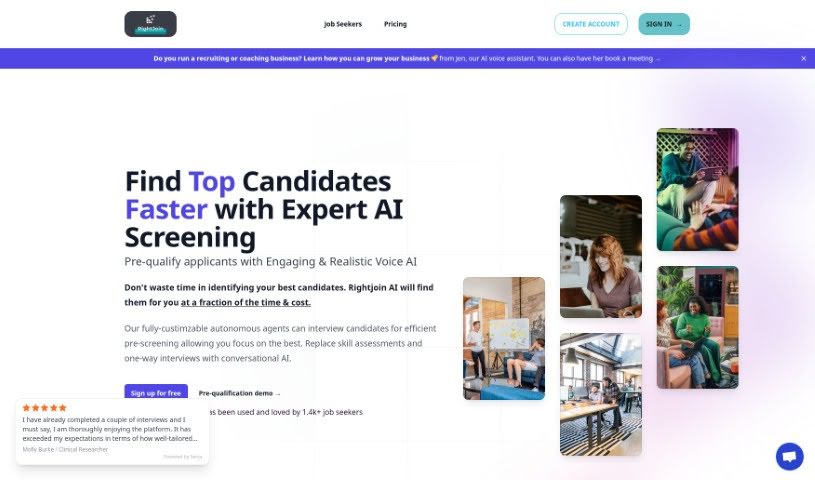
Screenshot of Rightjoin

Rightjoin

Discover what Rightjoin is and how to use it effectively in 2025. We'll explore its features and compare it to other recruitment tools.

Screenshot

What is Rightjoin?

RightJoin is a platform built to help job seekers get better at interviews by offering AI-powered mock interviews. It is a practice ground where you can try out different interview styles – like initial screening calls, technical questions, behavioral questions, and even case studies. What’s really neat is that these practice sessions are customized to match your own resume and the specific job you’re applying for. The AI acts like a real interviewer, putting you in realistic scenarios so you can sharpen your communication skills and get immediate feedback on how you’re doing. You can set up your profile, jump into these tailored mock interviews, and then get detailed assessments to help you keep improving. Ultimately, RightJoin wants to make sure professionals feel ready for the job market, boost their confidence, and really improve their odds of acing those real interviews.

Who created Rightjoin?

Sangy created RightJoin. You can find their contact email at [email protected] on the platform’s website. They’ve developed a really unique service for job seekers looking to boost their interview skills. It uses AI to run mock interviews that are specifically designed around your resume and the jobs you’re interested in. With options for different interview types, instant feedback, and ways to track your progress over time, RightJoin is all about helping professionals feel more prepared and confident when facing the job market.

What is Rightjoin used for?

Rightjoin can be used for a few key things:

  • Hiring and Screening: It can automatically check if candidates meet eligibility, experience, and skill requirements, which really speeds up the hiring process.
  • Finding the Best Fit: It helps identify the most suitable candidates much faster than sifting through applications manually.
  • Interview Preparation: It’s a fantastic tool for job seekers to practice their interview skills using AI-driven mock interviews.
  • Customized Practice: You can tailor these practice interviews to perfectly match your resume and the specific job descriptions you’re targeting.
  • Diverse Interview Formats: Practice a wide range of interview styles, including pre-screenings, technical rounds, behavioral questions, and case studies.
  • Instant Feedback: Get immediate feedback right after each mock interview, along with detailed reports to see where you can improve.
  • AI Customization: You have the flexibility to adjust the AI’s difficulty level and even its tone to suit your personal needs.
  • Progress Tracking: Keep an eye on your improvement over time. You can even invite a mentor to review your sessions and discuss ways to get even better.
  • Topic-Specific Practice: Want to focus on certain areas? You can select specific interview formats like Pre-Screen, Technical, Behavioral, and Case Study, or even input any topic or job posting you like.
  • Real Interview Simulation: The goal is to provide simulations that feel like real interviews, helping to build your confidence and significantly increase your chances of success when it counts.

Who is Rightjoin for?

Rightjoin is a great resource for:

  • Agencies that hire contractors.
  • Coaches looking to help their clients.
  • Recruitment teams aiming to streamline their process.
  • Bootcamps wanting to prepare their graduates.

How to use Rightjoin?

Ready to boost your interview skills with RightJoin? It’s pretty straightforward:

  1. Sign Up: First, create your account on the RightJoin platform. It’s quick and easy.
  2. Set Up Your Profile: Next, fill out your candidate profile. Make sure to add details like your resume and any job postings you’re interested in. This helps personalize your practice.
  3. Choose Your Mock Interview: Decide what kind of interview you want to practice. You can pick from pre-screens, technical interviews, behavioral questions, or case studies.
  4. Customize the AI: You can actually tailor the AI’s difficulty and tone. This way, the practice session feels just right for you.
  5. Practice, Practice, Practice: Dive into unlimited mock interviews. They’re all designed based on your resume and the jobs you’ve applied for.
  6. Get Your Feedback: After each session, you’ll get instant feedback. This includes scores and detailed reports so you know exactly what to work on.
  7. Keep Improving: Track your progress over time. You can even invite a mentor to chat about your feedback and figure out how to improve even more.
  8. Subscription Options: RightJoin offers different subscription plans, starting at just $9.99 a month. Plus, they have a refund policy if you decide it’s not for you within a certain period.
  9. Special Features to Note:
    • You get personalized practice sessions.
    • There are various interview formats available.
    • The feedback mechanism is immediate.
    • You can track your progress continuously.
  10. Quick FAQs:
    • Yes, RightJoin is perfect for professionals getting ready for real interviews.
    • Your interviews are customized based on your resume and job postings.
    • Practicing specific topics is definitely an option.

By following these simple steps, you’ll be well on your way to using RightJoin to really sharpen your interview skills and significantly improve your chances of landing that job!

Related AI Tools

Discover more tools in similar categories that might interest you

Adaface AI Resume Parser

Human Resource Recruitment
Learn More

Stay Updated with AI Tools

Get weekly updates on the latest AI tools, trends, and insights delivered to your inbox

Join 25,000+ AI enthusiasts. No spam, unsubscribe anytime.