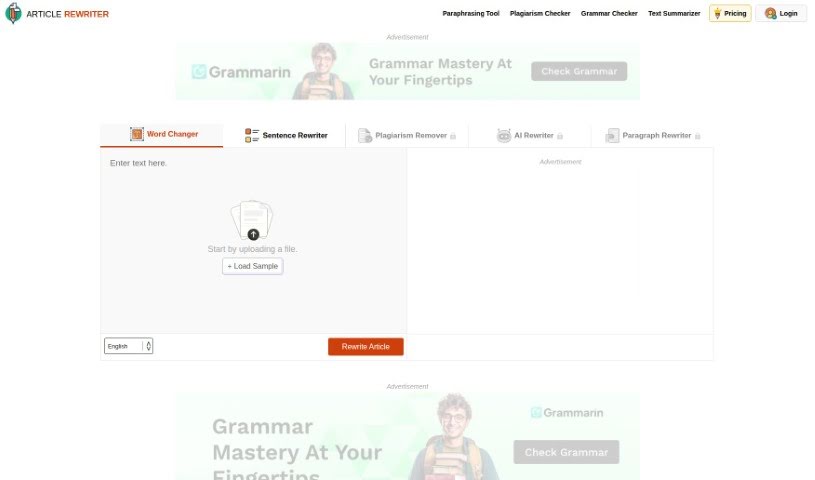
What is Rewrite Article?
Rewrite Article is a handy tool designed to help writers and students produce top-notch content while also boosting their writing skills. It uses AI models to deliver smart, high-quality solutions for all sorts of writing challenges. You get five different rewriting modes, a grammar checker, ways to improve readability, and even advanced synonym suggestions. You can use it right on their website, or grab the app for your Android, iOS, Windows, or Linux device.
The Article Rewriter Tool comes with five distinct modes:
- Word Changer mode: This one focuses on individual words, swapping them out for synonyms to freshen up your text.
- Sentence Rewriter mode: It rewrites your sentences, changing their structure but keeping the original meaning intact.
- Plagiarism Remover mode: This mode works to make your content unique and original, helping you avoid plagiarism.
- AI Rewriter mode: Using advanced AI, this mode makes significant changes to your text while ensuring the core meaning stays the same.
- Paragraph Rewriter mode: It intelligently alters paragraphs, making smart changes while making sure the original intent is still clear.
Who created Rewrite Article?
Articlerewriter was born from a desire to help writers and students create excellent content and improve their craft. Launched on January 22, 2023, it uses modern AI models and technologies. The founding team aimed to make Article Rewriter a standout name among AI rewriters.
What is Rewrite Article used for?
This tool is incredibly versatile. It offers:
- Support for multiple languages.
- A strong focus on data privacy and security.
- Convenient online hosting on a webpage.
- Easy social logins for quick access.
- Targeted rewriting modes for specific needs.
- The ability to convert passive voice to active voice.
- Support for handling large word counts.
- A dedicated mode for word-level changes.
- A specific mode for paragraph-level adjustments.
- Options to upload files in various formats.
- An efficient plagiarism removal feature.
- Help in preventing copyright infringement.
- Fast processing speeds.
- Significant educational value for students.
- Text transformation for students’ educational materials.
- Ways to avoid plagiarism by creating unique content.
- Improved content quality for writers and bloggers.
- Enhanced SEO strategies through unique and readable content.
- Optimization of blog content to maintain search engine rankings.
- Rewriting sentences for content refresh.
- Creation of original, quality website content for SEO experts.
- Better readability and attractiveness of text.
- Restructuring sentences while preserving the original meaning.
- Enhancement of vocabulary and grammar in content.
Who is Rewrite Article for?
This tool is a great resource for:
- Students
- Researchers
- Writers
- Bloggers
- SEO experts
How to use Rewrite Article?
Using the Article Rewriter tool is straightforward. Just follow these simple steps:
- Upload Your Article: You can either copy and paste your text directly into the tool or upload a file from your device.
- Choose Your Mode: Select the rewriting mode that best suits your needs. You have options like Word Changer, Sentence Rewriter, Plagiarism Remover, AI Rewriter, and Paragraph Rewriter.
- Start the Rewrite: Click the “Rewrite Article” button to kick off the rewriting process.
The tool is packed with features like AI rewriting, grammar error correction, and time-saving capabilities. It guarantees grammatically perfect results, helps you save valuable time, and supports up to 10 different languages. You can work across five distinct AI modes without needing to register, making it a fantastic asset for students, bloggers, and SEO experts looking to rewrite content efficiently.