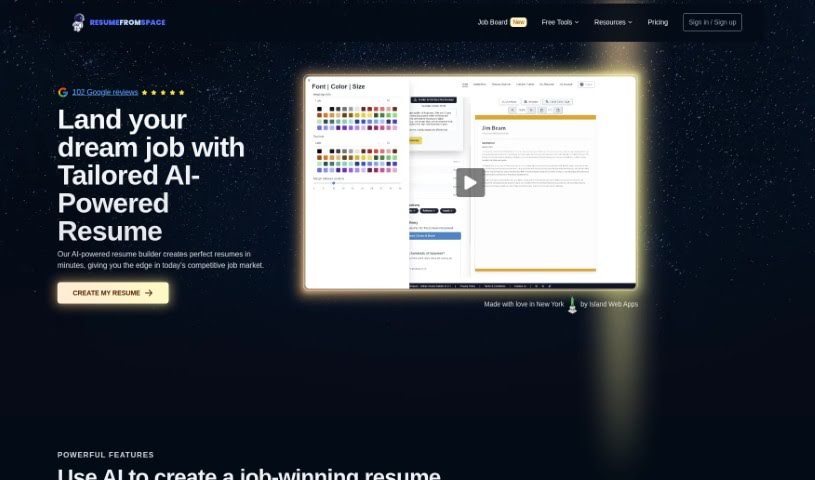
Screenshot of ResumeFromSpace

ResumeFromSpace

Discover what ResumeFromSpace is and how to use it in 2025. We'll explore its features, compare it to other resume builders, and show you how to create, manage, and share your professional resumes with ease.

Screenshot

What is ResumeFromSpace?

ResumeFromSpace is a handy online tool that uses artificial intelligence to help you create, save, and manage all your resumes in one convenient spot. It is your personal AI assistant for resume writing. This AI feature really speeds things up by automatically drafting a professional-looking resume for you. Plus, it makes sure your resume is formatted correctly so it’s compatible with the Applicant Tracking System (ATS) software that many companies use to screen applications. You’ll need an account to use ResumeFromSpace, which also gives you online storage for all your resumes. You can manage several different versions of your resume, pick from various designs to match your style, and even use tools like a resume scanner to see how well it stacks up, or an interview trainer to get ready for your next big chance. It’s designed to make your job hunt smoother.

Who created ResumeFromSpace?

Ken Dumaine is the person behind ResumeFromSpace. He launched it on July 17, 2023. The company’s main goal is to offer AI-powered tools for creating resumes and cover letters. They’re all about making career changes simpler and giving users more options to customize their resumes.

What is ResumeFromSpace used for?

Here’s a look at what you can do with ResumeFromSpace:

  • Create a New Resume: Start fresh with a new resume.
  • Resume Scanner: Get feedback on your resume’s effectiveness.
  • Interview Trainer: Practice your interview skills.
  • Online Resume Management: Keep all your resumes organized in one place.
  • Download Options: Save your resume as a PDF or DOCX file.
  • Shareable Links: Generate links to your resume PDFs to easily share them.
  • ATS Compatibility: Ensures your resume is formatted correctly for Applicant Tracking Systems.
  • Professional Drafting: Get help drafting a polished, professional resume.
  • Privacy Focused: Your information is kept private.
  • Easy Support: Contact support if you need help.
  • Manage Multiple Resumes: Keep track of different versions of your resume.
  • Resume Download Feature: Easily download your created resumes.
  • Shareable PDF Links: Create and share links to your resume PDFs.
  • Time-Saving AI: The AI helps you create resumes much faster.
  • User-Friendly Process: It’s designed to be easy to use for drafting resumes.
  • Automated Drafting: The AI handles much of the work in creating a well-organized resume.
  • Seamless Integration: Designed to fit smoothly into how organizations manage job applications.
  • Effortless Downloads: Downloading your resume files is simple.
  • Easy Sharing: Generating and sharing a link to your resume PDF is straightforward.
  • User-Friendly Platform: A simple interface for creating your resume.
  • Facilitate Updates: Make changes to your resume easily.

Note: Resume versioning isn’t currently supported.

Who is ResumeFromSpace for?

ResumeFromSpace is a great tool for a variety of people, including:

  • Web Developers: Build your professional online presence.
  • Education Professionals: Showcase your experience and qualifications.
  • Job Seekers: Find and apply for jobs more effectively.
  • Human Resources Professionals: Understand what makes a good resume.
  • Career Changers: Transition to a new field with a tailored resume.
  • Individuals Needing Resume Layouts: Get professional designs for your resume.
  • People Seeking Resume Scanners: Improve your resume with targeted feedback.
  • Job Applicants: Make sure your application stands out.
  • Students: Create your first professional resume.
  • Adults Re-entering the Workforce: Update your skills and experience for today’s job market.
  • People Looking to Showcase Skills: Highlight your abilities effectively.
  • Individuals Needing Resume Creation: Get help creating a resume from scratch.

Essentially, if you’re looking to save time, improve your resume’s impact, and manage your job application materials efficiently, ResumeFromSpace can help.

How to use ResumeFromSpace?

Using ResumeFromSpace is pretty straightforward. Just follow these simple steps:

  1. Start a New Resume: Head over to the website and click the “Start new resume” button. This kicks off the process of creating your resume.
  2. Let the AI Help Draft: Take advantage of the AI feature. It’ll automate much of the drafting for you, saving you time and making sure your resume is ATS-friendly, which is key for getting past initial employer screenings.
  3. Make It Your Own: Customize your resume to reflect your personal style. You can choose different fonts, colors, and layouts that best represent you.
  4. Manage Your Resumes: Once you’ve logged into your account, you can create, edit, save, and manage multiple resume files. The online storage feature keeps everything organized.
  5. Download and Share: You can easily download your resume files for offline use. Plus, you can generate a shareable link to your resume PDF, making it super simple to send to potential employers.
  6. Keep It Updated: Need to make changes? The user-friendly interface and AI capabilities make updating your resume a breeze.
  7. Privacy and Support: Rest assured, the platform is committed to keeping your information private. If you ever need assistance or have questions, just use the ‘Contact Us’ feature to reach out to support.

Just remember, you’ll need an account to access all of ResumeFromSpace’s features. The tool is really designed to make creating and managing your resume as easy as possible, thanks to its AI, user-friendly design, and focus on privacy.

Related AI Tools

Discover more tools in similar categories that might interest you

Adaface AI Resume Parser

Human Resource Recruitment
Learn More

Stay Updated with AI Tools

Get weekly updates on the latest AI tools, trends, and insights delivered to your inbox

Join 25,000+ AI enthusiasts. No spam, unsubscribe anytime.